A design team specifies Inter at weight 620 and width 87.5 for its report headings, the report generator embeds the font file, and the PDF opens with headings in plain Regular. Hunt through the file for 620 and you will not find it anywhere. That comes as no surprise: a PDF font dictionary (ISO 32000-1 §9.6 and §9.8) describes a fixed glyph program with fixed widths, and there is no entry in which axis coordinates could live, so a reader handed a variable font draws the outlines stored in the file, which are the default instance. To get weight 620 onto paper, the coordinates have to be baked into the outlines before the font ever reaches the PDF
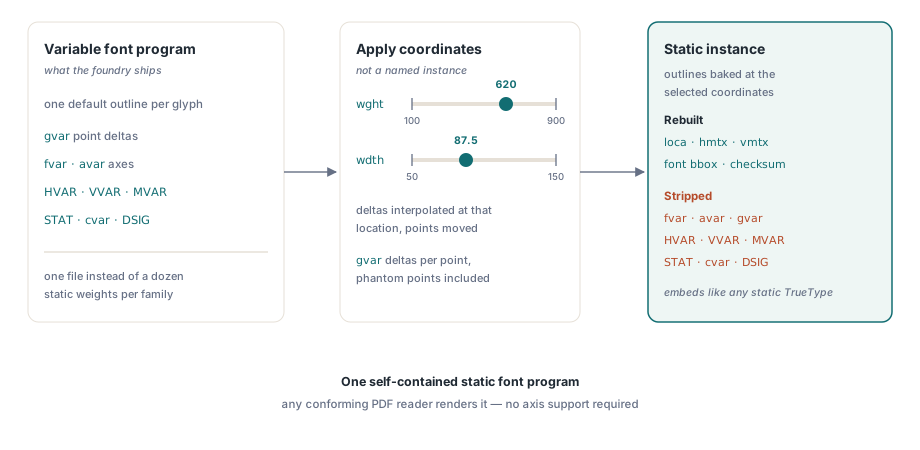
Baking is more than writing a number into a header. It means producing a new, self-contained static font whose outlines, advances, bounding boxes and layout tables all agree with the chosen position in the design space, and then embedding that font in place of the original
What a static instance has to rebuild
HotPDF builds that static instance during font registration, and for a TrueType-flavoured variable font the work touches almost every table in the file. An OpenType variable font stores one default outline per glyph plus deltas in the gvar table, each delta set tied to a region of the design space. For each glyph the library works out how strongly every region applies at your coordinates, accumulates the weighted deltas in floating point across all tuples, and rounds each point once at the end. Rounding per tuple instead would let errors pile up on glyphs that sit in many overlapping regions
Then everything derived from the moved points is regenerated. The glyf table is rewritten and loca is emitted in the long offset format; hmtx (and vmtx when present) gets one full entry per glyph; the global bounding box in head and the summary fields in hhea and vhea — maximum advance, minimum side bearings, maximum extent — are recalculated from the final metrics; and the sfnt checksums are rebuilt. Font-wide values follow too: cvar deltas go into the cvt table, MVAR adjusts ascender, descender and similar metrics, and the variation data in GDEF, GPOS and the GSUB feature variations is resolved at the chosen location
Even the descriptive metadata moves. The OS/2 usWeightClass takes the wght value, so weight 620 is recorded as 620; usWidthClass is mapped from the wdth percentage, and 87.5 lands exactly on class 4, semi-condensed; a slnt axis writes its angle into post.italicAngle. Finally the variation tables come out: fvar, avar, gvar, HVAR, VVAR, MVAR, STAT and cvar, plus DSIG, whose signature covered bytes that no longer exist. A font that kept fvar once its outlines had been moved would invite any variation-aware consumer to apply the same deltas a second time
CFF2-flavoured variable fonts take a separate route. Their charstrings carry blend operators that a static font program cannot express, so HotPDF converts a CFF2 font into a static instance every time it is registered, even when all axes sit at their defaults. That conversion, and its embedding as CID-keyed CFF, is covered in CFF2 variable font embedding
Phantom points and the double-counting trap
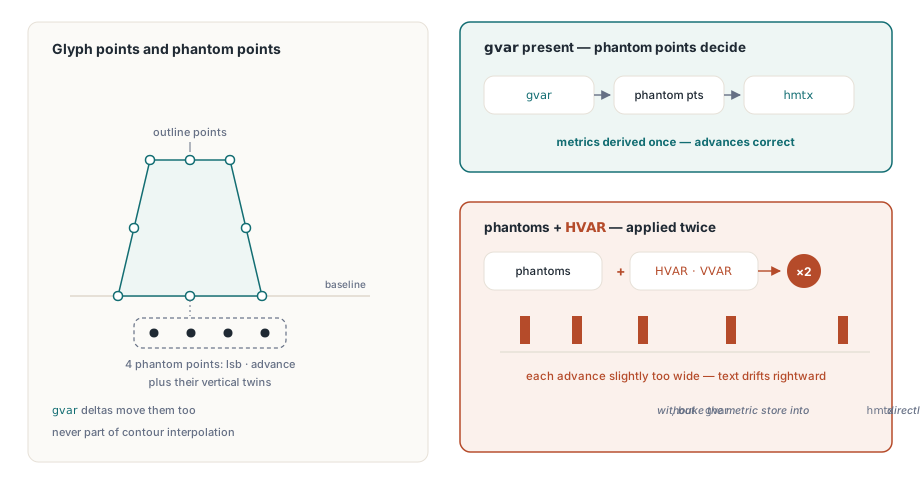
The subtlest rule concerns metrics, and the OpenType specification makes it easy to get wrong. In gvar, the point count for a glyph is its outline points (or its components, for a composite glyph) plus four phantom points that encode the left side bearing, the advance width and their vertical counterparts. Those phantom points take deltas just like any other point
A font that has gvar very often ships HVAR as well, because HVAR lets a renderer find advances without decoding outlines. Apply both and every advance moves twice; justified text then drifts rightwards a little more with each glyph. When gvar is present, HotPDF derives the horizontal and vertical metrics from the interpolated phantom points and ignores HVAR and VVAR. Only a font without gvar gets its metric variation store baked straight into hmtx and vmtx. That precedence is the safer one: gvar is the only table that moves outlines and metrics in a single operation, so its answers can never disagree with the glyph they describe
Two further rules keep the geometry honest. Points not listed in a sparse delta set are inferred per contour with IUP (interpolate untouched points), and phantom points never take part in that interpolation. For composite glyphs, deltas move the component offsets only when the component is positioned by XY values; point-matched components take their position from the attachment points instead. Child bounds are then recomputed recursively, with nesting capped at 64 levels, so a malformed component graph that refers back to itself ends in a rejected font rather than endless recursion
Reading the design space with InspectVariableFont
InspectVariableFont is the first call to make, because it tells you which axes exist and what range each one accepts. It returns False for a missing file or a font without fvar; for a .ttc collection it reads the first member. Each THPDFVariableFontAxis record carries the four-byte Tag, MinimumValue, DefaultValue, MaximumValue, Flags and a NameID. Each named instance carries a SubfamilyNameID, Flags, a PostScriptNameID and one Coordinates entry per axis, in axis order
// ClampToAxis is a helper you add yourself; HotPDF does no clamping on your behalf
function ClampToAxis(const Axis: THPDFVariableFontAxis; Value: Single): Single;
begin
  Result := Value;
  if Result < Axis.MinimumValue then Result := Axis.MinimumValue;
  if Result > Axis.MaximumValue then Result := Axis.MaximumValue;
end;

procedure ListDesignSpace(Pdf: THotPDF; const FontPath: string);
var
  Axes: THPDFVariableFontAxisArray;
  Instances: THPDFVariableFontNamedInstanceArray;
  I, J: Integer;
  Coords: string;
begin
  if not Pdf.InspectVariableFont(FontPath, Axes, Instances) then
  begin
    Writeln('static font: register it without axis selections');
    Exit;
  end;
  for I := 0 to High(Axes) do
    Writeln(Format('%s  min=%.1f default=%.1f max=%.1f',
      [string(Axes[I].Tag), Axes[I].MinimumValue,
       Axes[I].DefaultValue, Axes[I].MaximumValue]));
  for I := 0 to High(Instances) do
  begin
    Coords := '';
    for J := 0 to High(Instances[I].Coordinates) do
      Coords := Coords + Format('%s=%g ',
        [string(Axes[J].Tag), Instances[I].Coordinates[J]]);
    Writeln(Format('named instance %d: %s', [I, Coords]));
  end;
end;
The range matters because HotPDF refuses out-of-range values. A selection of weight 1000 on a font whose wght axis stops at 900 makes registration raise an exception naming the axis, the requested value and the permitted range. Clamping quietly would produce a PDF that disagrees with the on-screen preview, so the check belongs in your UI, where the slider limits can come straight from MinimumValue and MaximumValue
Why must axis selections precede RegisterUnicodeTTF?
Axis selections are read once, when RegisterUnicodeTTF loads the font file, so they have to be set beforehand. SetVariableFontAxis takes a four-byte tag of printable ASCII and a finite value; anything else raises immediately, and setting the same tag again replaces the earlier value. GetVariableFontAxisSelections returns whatever is pending, and ClearVariableFontAxes empties the list. After registration, GetRegisteredVariableFontAxes reports the full coordinate set that was frozen into the most recently registered face, with unselected axes filled in at their defaults
var
  Pdf: THotPDF;
  Frozen: THPDFVariableFontAxisValueArray;
  I: Integer;
begin
  Pdf := THotPDF.Create(nil);
  try
    Pdf.FileName := 'quarterly.pdf';
    Pdf.BeginDoc;

    Pdf.SetVariableFontAxis('wght', 620);   // semibold, not a named instance
    Pdf.SetVariableFontAxis('wdth', 87.5);  // semi-condensed
    Pdf.RegisterUnicodeTTF('C:\Fonts\Inter.ttf');
    Pdf.ClearVariableFontAxes;              // nothing left pending for the next font

    Frozen := Pdf.GetRegisteredVariableFontAxes;
    for I := 0 to High(Frozen) do
      Writeln(Format('%s = %g', [string(Frozen[I].Tag), Frozen[I].Value]));

    Pdf.CurrentPage.SetFont('Inter', [], 14, DEFAULT_CHARSET);
    Pdf.CurrentPage.UnicodeTextOut(60, 70, 0, 'Quarterly results');

    Pdf.EndDoc;
  finally
    Pdf.Free;
  end;
end;
The ClearVariableFontAxes call straight after registration is the line people leave out. Selections stay pending until cleared, so if the next RegisterUnicodeTTF call loads a static font, it raises because axis selections were supplied for a non-variable font; if it loads a different variable family with no wdth axis, it raises because that axis is not present. Both failures surface a long way from the code that set the axes. Clear after every registration and the selection stays tied to the one font it was meant for
When every resolved value equals its axis default, a TrueType variable font is registered as it stands, because its stored outlines already are the default instance. The rebuild described above runs only for non-default coordinates or for CFF2 outlines
Supplying your own instancer through OnVariableFontInstance
OnVariableFontInstance fires during registration whenever at least one axis sits away from its default, and it receives the original font bytes together with the resolved coordinates. A handler can leave Handled as False and let the built-in instancer carry on, or set it to True and return its own static font in InstanceFontBytes. HotPDF checks a returned font before using it: fewer than 12 bytes, or a font that still contains fvar, raises an exception instead of being embedded
procedure TReportBuilder.VariableFontInstance(Sender: TObject;
  const SourceFontBytes: TBytes;
  const AxisValues: THPDFVariableFontAxisValueArray;
  out InstanceFontBytes: TBytes; out Handled: Boolean);
var
  I: Integer;
  Coords: string;
begin
  InstanceFontBytes := nil;
  Handled := False;   // keep the built-in instancer
  Coords := '';
  for I := 0 to High(AxisValues) do
    Coords := Coords + Format('%s=%g ',
      [string(AxisValues[I].Tag), AxisValues[I].Value]);
  // FLog is your own logger; record what this PDF will contain
  FLog.Add(Format('instancing %d-byte font at %s',
    [Length(SourceFontBytes), Coords]));
end;

// wiring: Pdf.OnVariableFontInstance := VariableFontInstance;
Most applications should use the handler purely for logging, as above. Replacing the instancer makes sense when a font pipeline outside the application already produces approved static instances and the PDF has to match them byte for byte; otherwise the built-in path keeps metrics, layout tables and metadata consistent with one another, and that consistency is the whole point of instancing
How instancing interacts with subsetting and shaping
Instancing runs before subsetting, so the subsetter sees an ordinary static font: it works out the glyph closure, keeps the glyphs the document uses and drops the rest, as described in font subset closure and shaped glyphs. The identity HotPDF uses for caching is derived from the instance bytes, so two coordinate sets of the same family can never share a cache entry
Shaping reads the instanced layout tables. GSUB and GPOS survive instancing with their variation data already resolved, so ligatures and the alternates described in OpenType GSUB stylistic alternates keep working, and a font that uses feature variations to swap a glyph above a certain weight gets the swap that matches 620. Positioning is where layout code goes wrong. A semi-condensed instance has narrower advances than the default, and GetWideTextWidth measures with the advances of the face actually registered. Measure after RegisterUnicodeTTF and the line breaks you compute are the ones that get printed
Variable font instancing sits in the same pipeline as embedding, subsetting and shaping, and the full typography feature set for Delphi and C++Builder is set out on the HotPDF Delphi PDF component page