A page rendered from an embedded Arial subset shows "Cafe" where the PDF says "Café", and the opening curly double quote turns up as a single quote followed by a blank space. Every unaccented letter on the page is pixel-perfect. Both broken characters are glyphs assembled from other glyphs, and the piece that goes missing is always the one placed with an offset: the acute over the e, the second stroke of the quote
That pattern sends people down the wrong road. The first theory is nearly always a damaged font or a sloppy PDF producer, yet a damaged font tends to break whole glyphs, and it breaks them in every viewer. When the same file looks right elsewhere and only the composed characters lose a part, the font program is fine and the code assembling the parts is placing them wrongly. The mechanisms that assemble a glyph from parts are TrueType composite glyphs and the seac form of the CFF endchar operator
Why does only the accent disappear from a PDF glyph?
Only the accent disappears because it is the only component that moves. TrueType and CFF fonts both save space by reusing outlines, so é is stored as "the e glyph plus the acute glyph shifted up and to the right" rather than a fresh shape. The base letter sits at offset (0, 0) in practically every font, which means any mistake in how offsets are applied leaves it untouched. The accent carries the non-zero translation, so the accent is what lands in the wrong place
Paired punctuation follows the same logic. In Arial the left double quote is two copies of the single-quote shape, the second one shifted to the right. Get the offset wrong and you see one mark plus a gap of exactly the right width, because the advance width comes from the font's metrics rather than the outline
TrueType composite glyphs and the matrix order trap
The HotPDF Delphi component draws a TrueType composite glyph by applying each component's transform in glyph units first and the glyph-to-device matrix second. In the OpenType glyf table a composite glyph has a negative contour count, followed by component records. Each record holds a flags word, the component glyph index, two arguments stored as bytes or words (ARG_1_AND_2_ARE_WORDS, 0x0001), and an optional transform: one F2Dot14 value for WE_HAVE_A_SCALE (0x0008), two for WE_HAVE_AN_X_AND_Y_SCALE (0x0040), or a full 2x2 matrix for WE_HAVE_A_TWO_BY_TWO (0x0080). With ARGS_ARE_XY_VALUES (0x0002) set, the arguments are a dx/dy offset in font units. MORE_COMPONENTS (0x0020) says another record follows
For each component you build a component matrix CM from the transform and the offset, then combine it with M, the matrix that maps font units to device pixels. The order of that combination is the whole trap. Under the column-vector convention, the product of A and B applies B first and A second, so the correct product is M times CM. Write it the other way round and M runs first; the offset gets added afterwards, already in device space and never scaled
// Self-contained sketch of a 2D affine product with the column-vector
// convention: Mul(A, B) maps a point through B first, then through A
type
  TAffine = record
    a, b, c, d, e, f: Double;
  end;

function Mul(const A, B: TAffine): TAffine;
begin
  Result.a := A.a * B.a + A.c * B.b;
  Result.b := A.b * B.a + A.d * B.b;
  Result.c := A.a * B.c + A.c * B.d;
  Result.d := A.b * B.c + A.d * B.d;
  Result.e := A.a * B.e + A.c * B.f + A.e;
  Result.f := A.b * B.e + A.d * B.f + A.f;
end;

// M  : font units -> device pixels (tiny scale, y flipped)
// CM : component transform; e/f hold dx/dy in font units
Sub := Mul(M, CM);    // offset shrinks together with the outline
// Sub := Mul(CM, M); // dx/dy arrive as raw device pixels
The arithmetic shows how far out the reversed product is. Arial uses a 2048-unit em. Text set at 12 pt on a 96 DPI raster has a 16-pixel em, so M scales by 16/2048, about 0.0078 pixels per font unit. For a component that declares dx = 400, the correct order moves the accent a little over 3 pixels. The reversed order moves it 400 pixels, which at normal zoom puts it well outside the glyph and usually off the visible line
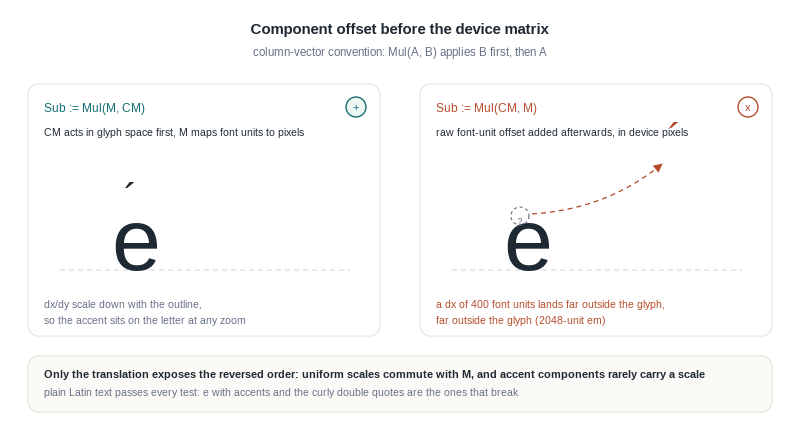
The linear part almost never gives the game away. Accent components rarely carry a scale, and a uniform scale commutes with M anyway. Only the translation differs between the two products, which is why a test page of plain English text renders perfectly with the wrong order. The first page with "Ångström" on it does not
Nesting, cycles and point matching
Composite glyphs may reference other composites, so the outline walk is recursive and has to defend itself against malformed fonts. HotPDF stops descending after 5 levels of nesting, caps the components a single top-level glyph may expand to at 1024 across all levels, and skips any component that names its own glyph index. Deep chains are not merely a theoretical worry; our own test fixtures include composite glyphs nested four levels deep. The rarely used point-matching mode, where the two arguments are point numbers to align rather than an offset, is drawn with a zero offset. A corrupted font can lose a component this way. What it cannot do is hang the render
What a four-operand CFF endchar means
A CFF Type 2 endchar with four operands is the deprecated seac form: the operands are adx ady bchar achar, and the glyph is a base letter plus an accent. Adobe Technical Note #5177 describes it in the appendix on Type 1 compatibility. The name comes from the Type 1 seac operator (standard encoding accented character), and CFF fonts converted from Type 1 still use it for accented Latin letters, which is why it turns up in output from older typesetting systems and some print workflows
Three details catch implementers out. bchar and achar are not glyph IDs; they are codes in Adobe StandardEncoding, so each code maps to a glyph name, and the name goes through the font's charset to find the GID. Type 2 also drops the asb operand that Type 1 seac takes (asb adx ady bchar achar), so the accent's origin goes straight to (adx, ady) relative to the base glyph's origin. And CID-keyed CFF fonts may not use seac at all, because they have no glyph-name charset through which to resolve StandardEncoding codes
The width operand is where interpreters most often go wrong. The first stack-clearing operator of a Type 2 charstring may carry an optional advance width in front of its normal operands, and endchar is one of those operators. So a glyph whose only operator is endchar can arrive with five operands: the width, then the four seac values. The rule is to count operands against the operator's fixed count, which is four for seac, and treat one extra as the width only if no earlier operator has consumed it. An interpreter that reads every endchar as "maybe a width, then stop" produces an empty outline for seac glyphs: no base, no accent, just a correctly sized gap
// Reader-side sketch of the endchar decision, written for illustration;
// it is not part of the HotPDF API
type
  TEndcharKind = (ekPlain, ekSeac, ekSeacAfterWidth);

function ClassifyEndchar(OperandCount: Integer;
  WidthPending, IsCIDFont: Boolean): TEndcharKind;
begin
  Result := ekPlain;
  if IsCIDFont or (OperandCount < 4) then
    Exit;                            // seac is not allowed in CID-keyed CFF
  if WidthPending and (OperandCount = 5) then
    Result := ekSeacAfterWidth       // operand 0 is the advance width
  else if OperandCount = 4 then
    Result := ekSeac;                // adx ady bchar achar
  // any other count is not a valid seac; end the glyph as a plain endchar
end;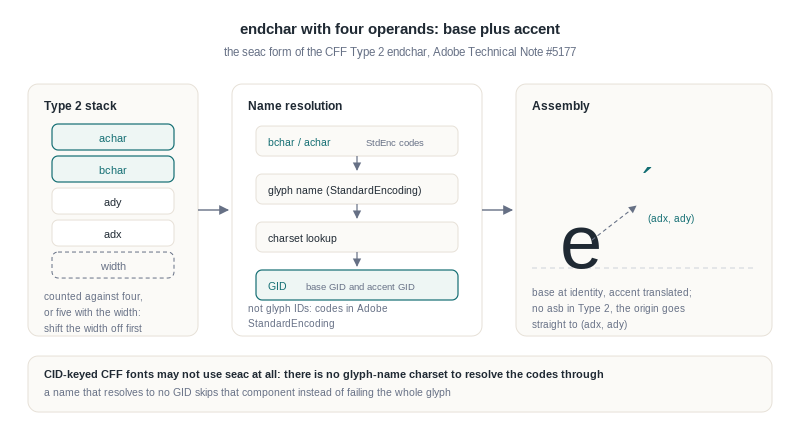
In HotPDF both component glyphs run through the same charstring interpreter. The base is drawn with the current glyph matrix, the accent with that matrix composed with a translation to (adx, ady), and the matrix is restored afterwards so the next glyph on the line starts clean. If either name has no GID in the font, that component is skipped and the other one is still drawn. That choice is deliberate: a subset trimmed a little too eagerly should cost one accent, and a missing base letter is far more visible than a missing diacritic
Rendering accented text through both output paths
HotPDF offers two public ways to turn a loaded page into pixels or paths, and both use the same embedded-glyph outline code: THotPDF.RenderLoadedPageToBitmap for raster output, and THotPDF.SaveLoadedPageAsSVG with EmbedFonts set to True for vector output, which writes the page to a file; the sibling BuildLoadedPageSVG returns the same SVG document as a string when you want to inspect it in memory. The SVG route writes each embedded glyph as an outline, so a composite or seac glyph shows up in the file as path data you can inspect. The broader pipeline is covered in how HotPDF renders embedded TrueType, CFF and Type 3 glyphs, and raster options in rendering PDF pages to bitmaps in Delphi
uses
  Vcl.Graphics, HPDFDoc;

procedure RenderAccentProbe(const FileName: string);
var
  Pdf: THotPDF;
  Bmp: TBitmap;
begin
  Pdf := THotPDF.Create(nil);
  try
    if Pdf.LoadFromFile(FileName) <= 0 then
      Exit;

    // Raster path: 144 DPI makes a misplaced accent easy to spot
    Bmp := Pdf.RenderLoadedPageToBitmap(0, 144);
    if Bmp <> nil then
    try
      Bmp.SaveToFile('accent-probe.bmp');
    finally
      Bmp.Free;
    end;

    // Vector path: EmbedFonts = True writes embedded glyphs as outlines,
    // so composite and seac assembly is visible in the path data
    Pdf.SaveLoadedPageAsSVG(0, 'accent-probe.svg', True);
  finally
    Pdf.Free;
  end;
end;
The test files are what expose this class of bug, because assembly mistakes leave plain ASCII text untouched. You want one PDF with an embedded TrueType subset that contains é, Å and curly double quotes, and one with an embedded CFF (FontFile3, Type1C) font converted from Type 1, since that is where seac still lives. Text in fonts the producer did not embed proves nothing here: those glyphs come from installed Windows fonts, and the embedded font program described in ISO 32000-1 §9.9 never gets involved
Why can composite glyphs break during font subsetting?
Composite glyphs break during subsetting when the subsetter walks component records with a fixed stride and ignores the transform bytes that a scale flag adds. Subsetting is the write-side twin of the rendering trap. When HotPDF embeds a subset of an installed TrueType font, it has to keep every glyph a composite references, follow composites nested inside composites, and update the component glyph indexes wherever the subset renumbers glyphs
A walker that looks only at the argument-size flag and the more-components flag advances 6 or 8 bytes per record. After a component with WE_HAVE_A_SCALE, the next "glyph index" it reads is really transform data. The real component can drop out of the subset, and the renumbering step can write a new glyph ID straight into the transform. In a viewer that shows up as a wrong accent, a distorted accent or none at all, and only for fonts that scale their components. HotPDF computes every record's length from its own flags word: 4 bytes of flags and index, 2 or 4 bytes of arguments, then 0, 2, 4 or 8 bytes of transform
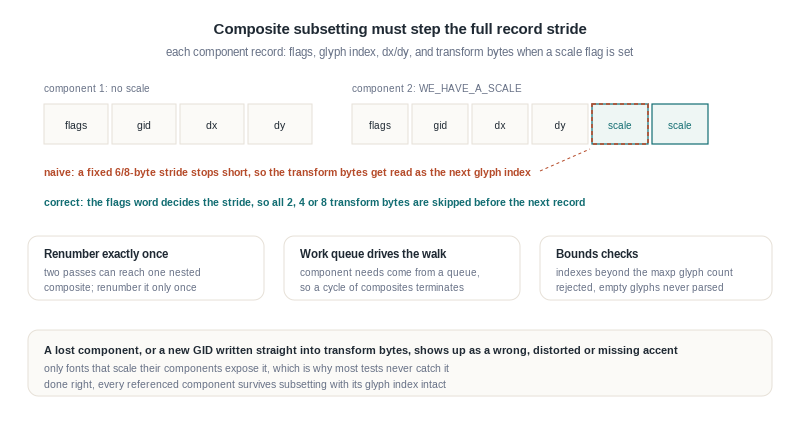
The stride is not the only thing that can bite. Renumbering a glyph index is not idempotent, and a nested composite can be reached twice: once in the pass over every kept composite and again by descending into its parent. HotPDF rewrites each composite's references exactly once and collects the components a composite needs from a work queue, so composites that reference each other in a cycle still terminate. Component indexes at or beyond the font's maxp glyph count are ignored, and records shorter than a glyph header are never treated as composites
var
  Pdf: THotPDF;
begin
  Pdf := THotPDF.Create(nil);
  try
    Pdf.FileName := 'accents-subset.pdf';
    Pdf.FontEmbedding := True;          // embed the font program
    Pdf.EnableFontSubsetting := True;   // keep only the glyphs in use
    Pdf.BeginDoc;
    Pdf.CurrentPage.SetFont('Arial', [], 14);
    // é, Å, ü and the curly quotes are composite glyphs in Arial
    Pdf.CurrentPage.UnicodeTextOut(50, 720, 0,
      'Café, Ångström, München, “quoted”');
    Pdf.EndDoc;
  finally
    Pdf.Free;
  end;
end;
EnableFontSubsetting is off by default, so full-font embedding is what you get unless you ask for it. Run the resulting file through the probe above and open it in a second, unrelated viewer. The accents should sit in the same place in both, because every component behind a scale or 2x2 transform made it into the subset with its glyph index intact
Point-matching composites, CID-keyed seac and trimmed subsets
HotPDF handles offset-based component placement, which is what nearly every shipping font uses, and treats the rarer forms conservatively. TrueType point-matching composites are drawn with a zero offset. Seac inside a CID-keyed CFF font is ignored, as the specification requires. A seac whose base or accent code has no glyph in a trimmed subset draws whichever component it can find. None of these cases stops the page from rendering
If you produce PDFs for archiving or PDF/A, the safer choice is to embed fonts whose composites use offsets and whose CFF charstrings avoid seac altogether. Every consumer, from a print RIP to a phone's built-in viewer, then has only the common case to get right. Point-matching composites and seac exist for compatibility with older font tooling, and a file that has to render identically in twenty years' time gains nothing from depending on them
Everything above is code you need never write: composite glyph rendering, CFF seac handling and composite-aware TrueType subsetting ship with the HotPDF Delphi PDF Component, a native VCL library for Delphi and C++Builder that creates, edits, renders and exports PDF documents with no external DLLs