In HotPDF Component, THotPDF.Resolution defines the drawing unit: every X and Y coordinate, every margin, the size passed to SetFont, and the results of TextWidth and GetWideTextWidth are measured in 1/Resolution inch. THPDFPage.Width and Height do not follow it and stay in points, so layout bounds must come from the read-only UserWidth and UserHeight. The usual reason to touch Resolution is a port: a report engine that already thinks in 1/96 or 1/144 inch is easier to move over when the PDF side speaks the same unit than when every call site gets a conversion factor. That works well, as long as you know which numbers moved to the new unit and which ones stayed behind
What does THotPDF.Resolution actually change?
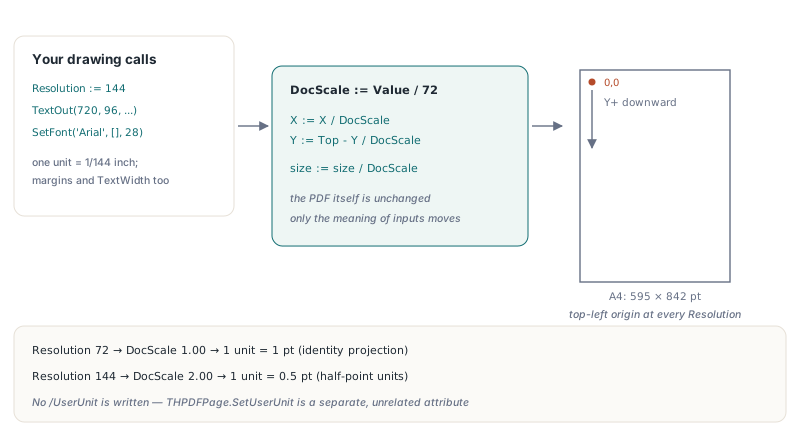
THotPDF.Resolution changes only how HotPDF reads the numbers you pass in; the PDF it writes is the same. The setter is two lines: SetResolution stores the value and sets DocScale := Value / 72. From then on, XProjection and YProjection divide every coordinate by DocScale on the way into the content stream, and SetFont divides the size the same way before it records it. PDF user space defaults to 1/72 inch (ISO 32000-1 §8.3.2.3), so at the default Resolution of 72 the projection is the identity and at 144 one drawing unit is half a point. No /UserUnit entry is written. That page attribute, added in PDF 1.6, is a separate thing that HotPDF exposes as THPDFPage.SetUserUnit. One detail that catches people coming from the TextOut tutorials: page coordinates run from the top-left corner with Y growing downward, because YProjection computes the MediaBox top minus the scaled Y, and that stays true at every Resolution
var
  Pdf: THotPDF;
  Page: THPDFPage;
  Margin: Single;
  Title: WideString;
begin
  Pdf := THotPDF.Create(nil);
  try
    Pdf.FileName := 'invoice.pdf';
    Pdf.Resolution := 144;               // 1 drawing unit = 1/144 inch
    Pdf.BeginDoc;
    Page := Pdf.CurrentPage;             // A4: Width = 595, UserWidth = 1190
    Margin := 144;                       // one inch in drawing units
    Page.SetFont('Arial', [fsBold], 28); // 28/144 inch, a 14 pt font
    Title := 'INVOICE 2026-0417';
    // Right-align against the page edge measured in the same unit
    Page.TextOut(Page.UserWidth - Margin - Page.GetWideTextWidth(Title),
      Margin, 0, Title);
    Page.SetLineWidth(2);                // 1 pt rule
    Page.MoveTo(Margin, Margin + 48);
    Page.LineTo(Page.UserWidth - Margin, Margin + 48);
    Page.Stroke;
    Pdf.EndDoc;
  finally
    Pdf.Free;
  end;
end;
Why does Page.Width disagree with my coordinates at Resolution 144?
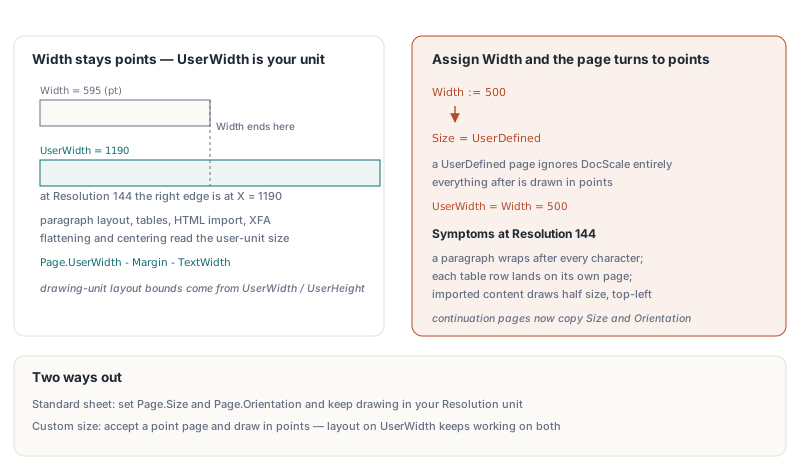
THPDFPage.Width and Height report the page in points no matter what the document Resolution is, while your coordinates are in 1/Resolution inch, so at 144 the page looks half as wide as it really is. An A4 page reads Width = 595 and Height = 842 at Resolution 72 and still reads 595 and 842 at 144, where the right edge is actually at X = 1190. UserWidth and UserHeight, added in v2.766.0, return Width * DocScale, which is the page size in the unit you draw with. Before they existed, the library mixed the two internally, and the symptoms at Resolution 144 were dramatic: paragraphs wrapped after every character, THPDFTable.Render pushed each row onto a new page, and both the HTML importer and the XFA flattener drew their content at half size, the flattened form crowded into the top-left corner. Paragraph layout, table rendering, HTML import, EMF centring, the WMF page clip, and layout diagnostics now all read the user-unit size. Your own layout code should too: anything that compares against a drawing coordinate (a right margin, a page-break test, a centring calculation) belongs on UserWidth and UserHeight, never on Width and Height
Trap one: assigning Width or Height switches the page to points
Setting Page.Width or Page.Height silently changes the page to UserDefined, and a UserDefined page ignores DocScale entirely, so everything you draw on it afterwards is in points, not in 1/Resolution inch. The setter is old and takes points by design, which is why its meaning was left alone. The projection for a UserDefined page is plain X + MinX, and SetFont stores the size unchanged. At Resolution 144 the result is a page whose content suddenly comes out twice as large as the page before it. The library made exactly this mistake itself: paragraph continuation pages used to copy the previous page's size through Width, and every overflow page switched to points. Those pages now copy Size, Orientation, and the page Resolution instead, and only fall back to Width and Height when the original page was already UserDefined
Two ways out, depending on what you need. If a standard sheet will do, set Page.Size and Page.Orientation and keep drawing in your Resolution unit. If you really need a custom page size, accept that it is a point page and draw in points; UserWidth equals Width there, so layout code that always reads UserWidth keeps working on both kinds of page. The unit test pins this down: at Resolution 144 an A4 page reports a UserWidth of 1190, but after Width := 500 and Height := 400 it reports 500 and 400. Loaded pages behave the same way, because a page rebuilt from an existing PDF knows only its MediaBox in points and draws in points. Pages that this document created keep their own units when you switch away and come back through CurrentPageNumber, which has been the case since v2.766.26
Trap two: why do font sizes come out half size?
A font size that started as points comes out half size at Resolution 144 because SetFont treats its size argument as drawing units and converts it to points before storing it. Internally, SetFont stores ASize / DocScale * DPI in the current font object, so the stored value is always points. The library tripped on this twice: the font fallback in WideTextOutBoxEx and the paragraph continuation page both handed that stored point value back to SetFont, which scaled it a second time and halved the text. Your code cannot read the stored size, but the same bug turns up whenever a point value from somewhere else reaches SetFont: a TFont.Size from a VCL form, a size in a report definition, a CSS pt length. Convert it first, and include the page's own Resolution and the UserDefined case in the factor, as metafile playback does when it replays the page Canvas (see how HotPDF imports EMF and WMF vector graphics for that path):
// Drawing units per point on the current page. Mirrors the projection
// HotPDF uses: 1 on a page sized through Width/Height, otherwise
// (document Resolution / 72) * (page Resolution / 72)
function UnitsPerPoint(Pdf: THotPDF): Single;
begin
  if Pdf.CurrentPage.Size = UserDefined then
    Result := 1
  else
    Result := (Pdf.Resolution / 72) * (Pdf.CurrentPage.Resolution / 72);
end;

procedure SetFontFromVcl(Pdf: THotPDF; Font: TFont);
begin
  // TFont.Size is in points; SetFont expects drawing units
  Pdf.CurrentPage.SetFont(AnsiString(Font.Name), Font.Style,
    Font.Size * UnitsPerPoint(Pdf));
end;
The library applies the same rule to its own point constants. The 12 point font that every new page starts with is now multiplied by the internal units-per-point factor, so it is 12 points at any Resolution. DrawChart, whose margins, label sizes and line widths are all hard-coded points, now runs with the scale temporarily set to 1. What stays in drawing units, on purpose, are public parameter defaults such as the DrawQRCode module size and the default table font size: they are part of the API contract, so at Resolution 144 they mean half of what they mean at 72. If you size reports from a template, the guide to report output with fonts and images in HotPDF covers where those values usually come from
How do you verify that a layout is Resolution-independent?
The most reliable check is a byte comparison: render the same page at Resolution 72 and again at 144 with every coordinate and size doubled, and the uncompressed content streams must be identical. Both runs land on the same point values after projection, so any difference is a value that skipped the conversion. This is how the HotPDF test suite checks paragraphs, tables, HTML import, XFA flattening, arcs, metafiles and images. The same technique works for your own report code with almost no harness:
procedure RenderPage(const FileName: string; Res: Integer; K: Single);
var
  Pdf: THotPDF;
begin
  Pdf := THotPDF.Create(nil);
  try
    Pdf.AutoLaunch := False;
    Pdf.Compression := cmNone;       // readable content streams
    Pdf.FileName := FileName;
    Pdf.Resolution := Res;
    Pdf.BeginDoc;
    Pdf.CurrentPage.SetFont('Arial', [], 10 * K);
    Pdf.CurrentPage.TextOut(36 * K, 36 * K, 0, 'Line 1');
    Pdf.CurrentPage.Rectangle(36 * K, 60 * K, 200 * K, 40 * K);
    Pdf.CurrentPage.Stroke;
    Pdf.EndDoc;
  finally
    Pdf.Free;
  end;
end;

// RenderPage('r72.pdf', 72, 1) and RenderPage('r144.pdf', 144, 2)
// must produce byte-identical page content streams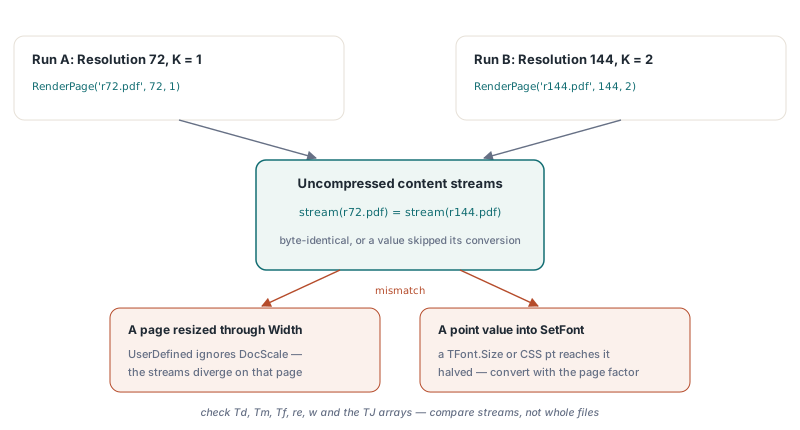
Check the operators that carry numbers: Td, Tm, Tf, re, w and the TJ arrays. File-level bytes will still differ in the creation date and the /ID, so compare the streams, not whole files. A mismatch nearly always points at one of the two traps above: a page that was resized through Width, or a point value passed straight into SetFont. If you are new to the drawing calls themselves, start with the HotPDF TextOut walkthrough for size, style and rotation, then come back and switch the Resolution once your layout reads UserWidth. Full API details and trial downloads are on the HotPDF Delphi PDF component page