HotPDF exposes three image downsampling kernels through the ImageDownsampleKernel property and a separate Floyd-Steinberg pass through RenderOutputDither. The first controls how photographs look after you shrink them to hit a size budget, the second controls how they look after a page is reduced to black and white. Neither is on by default, and both are opt-in for the same reason: they cost real time
The pressure that leads people here is familiar. A 60 MB scanned contract has to go out through an email gateway that rejects anything over 10 MB, or a batch of statements has to land on a fax-style monochrome device that renders every grey pixel as either paper or toner. Both problems are resampling problems, and both have a fast answer that looks bad and a slow answer that looks right
What the three kernels actually differ in
THPDFResampleKernel has three values, and they sit at genuinely different points on the speed and quality curve. rkHalftone delegates to the historical GDI StretchBlt path with the HALFTONE mode, which despite the name is bilinear-class filtering: fast, adequate for line art and screenshots, and prone to the crunchy edges you recognise instantly on downscaled photographs. rkBicubic runs a separable Catmull-Rom kernel, and rkLanczos3 runs a separable windowed sinc with a three-lobe support
Both separable kernels run as two passes, horizontal then vertical, with 6 to 12 taps per destination pixel in pure Pascal. That is roughly an order of magnitude slower than the GDI path, which is exactly why rkHalftone stays the default. On a nightly batch of thousands of pages the difference is a scheduling decision, not a preference. On a single document a user is waiting for, Lanczos3 is nearly free and visibly better
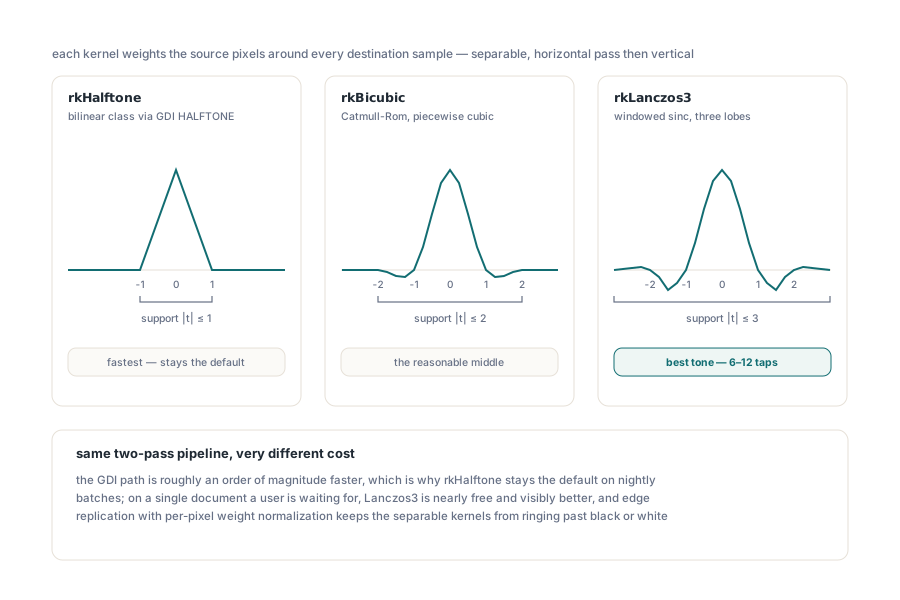
Two implementation properties are worth knowing because they determine what the output can and cannot do. Borders clamp by edge replication rather than wrapping or fading, and the weights are normalised per destination pixel. Together those two mean the result never rings below black or above white, so the classic Lanczos overshoot halo around a hard edge does not appear as clipped artefacts in the encoded image
var
  Pdf: THotPDF;
  Info: THPDFLoadedResourceOptimizationInfo;
  Changed: Integer;
begin
  Pdf := THotPDF.Create(nil);
  try
    Pdf.LoadFromFile('scanned-contract.pdf');
    Pdf.ImageDownsampleKernel := rkLanczos3;   // set before the call
    Changed := Pdf.DownsampleLoadedImages(150, 82, 4096, Info);
    if Changed > 0 then
    begin
      Writeln('resampled images: ', Info.DownsampledImageCount);
      Writeln('kept calibrated : ', Info.PreservedCalibratedImageCount);
      Pdf.SaveToFile('scanned-contract-150dpi.pdf');
    end;
  finally
    Pdf.Free;
  end;
end;
The MinimumSavingsBytes argument, 4096 above, is the guard that keeps the operation honest. Re-encoding an image that was already efficiently compressed can produce a larger stream than the original, and a downsampler that blindly replaces every image will occasionally grow the file it was asked to shrink. The threshold says: only commit the replacement when it saves at least this many bytes. PreservedCalibratedImageCount reports the other conservative decision, images left untouched because they carry a calibrated colour space that resampling would compromise
Why is a wrong polynomial coefficient so hard to spot?
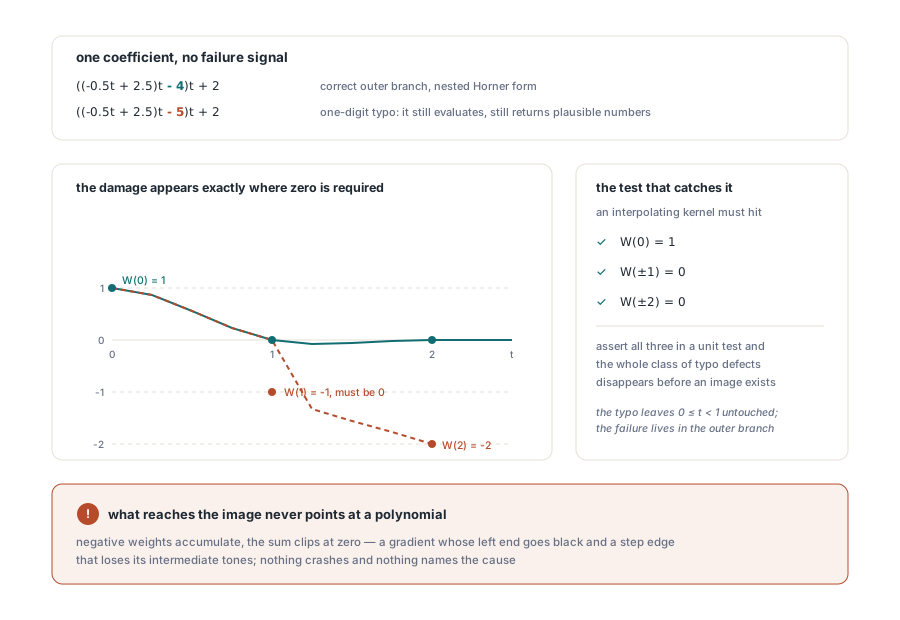
Because a broken interpolation kernel does not crash or throw, it just produces an image that looks subtly wrong in a way nobody can attribute. The Catmull-Rom kernel is piecewise cubic, and its outer branch in nested Horner form is ((-0.5t + 2.5)t - 4)t + 2. Write that middle coefficient as -5 instead of -4 and the function still evaluates, still returns numbers in a plausible range, and still produces an image
The damage shows up as W(1) evaluating to -1 where it must be 0. Negative weights accumulate, the sum clips at zero, and the visible symptom is a gradient whose left end goes black and a step edge that loses its intermediate tones. Nothing in the failure points at a polynomial. The check that catches it in seconds is arithmetic rather than visual: an interpolating kernel must satisfy W(0) = 1 and W(±1) = W(±2) = 0, and any kernel that misses those three points has a coefficient error, full stop. Assert on those three values in a unit test and the whole class of typo defects disappears
Floyd-Steinberg dithering, and where it belongs in the pipeline
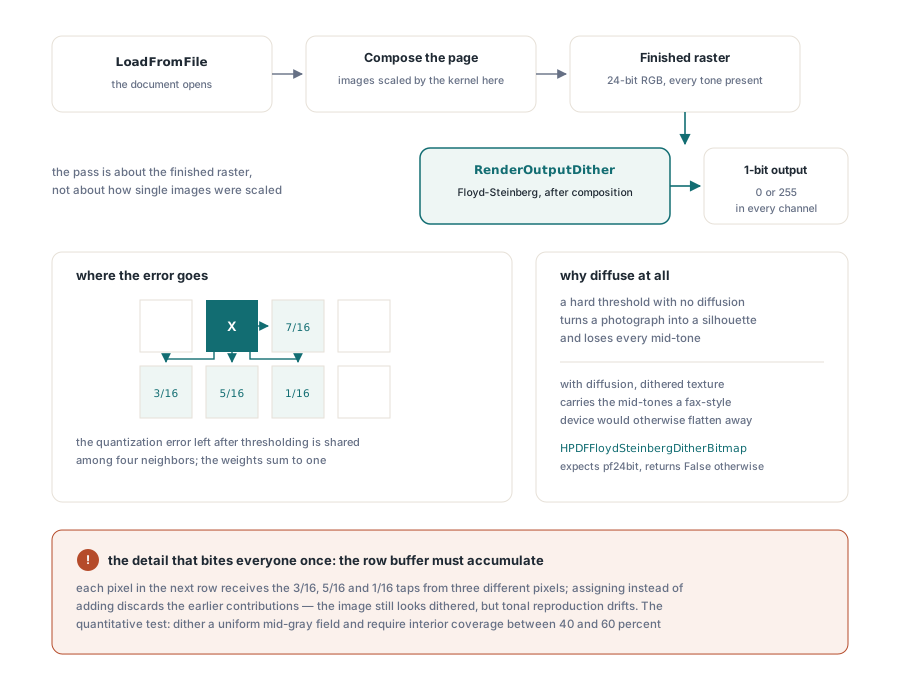
The dither pass is a different problem from resampling and lives at a different point in the pipeline. RenderOutputDither applies Floyd-Steinberg error diffusion after page composition, which is the only placement that makes sense for a monochrome print preview or a fax-style export: the operation is about reducing a finished raster to one bit per pixel, not about how individual images were scaled on the way in
The algorithm itself is short. Luminance is thresholded at 50 percent, and the quantization error is diffused to four neighbours with the classic 7/16, 3/16, 5/16 and 1/16 weights, going right, below-left, below and below-right. The output pixel is 0 or 255 in every channel. What the naive alternative gives you instead, a hard threshold with no diffusion, turns a photograph into a silhouette and loses every mid-tone that carried the content
// Render-time dithering for a monochrome preview device
Pdf.RenderOutputDither := True;

// Or apply the same pass to a bitmap you already own. The bitmap must
// be pf24bit; the function returns False rather than guessing
if not HPDFFloydSteinbergDitherBitmap(Preview) then
  raise Exception.Create('dither expects a 24-bit bitmap');

// Direct kernel access when you resample outside the document pipeline
Small := HPDFResizeBitmapKernel(Large, 640, 480, rkLanczos3);
try
  Small.SaveToFile('thumb.bmp');
finally
  Small.Free;
end;
There is one implementation detail in error diffusion that bites everyone once. The row-to-row error buffer has to accumulate. Each pixel in the next row receives contributions from three different pixels in the current row, the 3/16, 5/16 and 1/16 taps, and if the code assigns instead of adding, each write discards the previous contribution and only the last tap survives. The image still looks dithered, which is what makes it hard to notice, but the texture is wrong and the tonal reproduction drifts. The test that catches it is quantitative: dither a uniform mid-grey field and require the interior coverage to land between 40 and 60 percent
Which combination should a size-reduction pipeline use?
Match the kernel to what the images actually are, and treat dithering as a device concern rather than a compression concern. For photographic scans that must survive a size budget, rkLanczos3 at 150 or 200 DPI keeps the detail people notice whilst cutting the pixel count by a factor of four or more. For screenshots, diagrams and line art, rkHalftone is genuinely fine and much faster, because those images have few tonal gradients to preserve. For a mixed batch where you cannot inspect each image, rkBicubic is the reasonable middle: better than bilinear, roughly half the tap count of Lanczos3
Downsampling is one lever among several, and it is not always the biggest one. Bilevel scans usually respond far better to the encoder covered in native JBIG2 bilevel compression in Delphi, where the win comes from symbol dictionaries rather than pixel counts. Before you decide, it helps to know what is actually in the file, which is what extracting images and their decode filters is for: an inventory of image objects and their existing compression tells you whether resampling has anything to gain
If you are building the preview surface that shows the result, the same rendering path documented in rendering a PDF page to a bitmap is where RenderOutputDither takes effect, so the dithered preview and the dithered output come from one code path rather than two implementations that drift apart
The broad principle behind both features is that quality settings should be explicit and reversible. HotPDF keeps the historical behaviour as the default so an existing application upgrades without a surprise change in output or timing, and puts the better-looking, slower paths one property assignment away. Both are part of the HotPDF Delphi PDF component, alongside the resource optimisation and rendering machinery they build on