HotPDF draws colour emoji into a PDF through THotPDF.DrawRegisteredColorGlyph, which reads the colour data of a font registered with RegisterUnicodeTTF and emits it as native PDF graphics: COLR v0 layers as filled glyph outlines, COLR v1 paint graphs as clips, shadings and blend modes, SVG glyphs as Form XObjects, and CBDT or sbix bitmaps as images. Anything it cannot map natively goes to the OnColorGlyphRasterize event instead of silently turning into a black shape
That last clause is the whole reason this code exists. Embed an emoji font the ordinary way and the viewer gets the outline from glyf or CFF, filled with whatever the current fill colour happens to be. The smiling face arrives as a black blob, the flag as a rectangle, and nothing in the pipeline complains
Why does a colour emoji print as a black silhouette in PDF?
A PDF font program has no notion of colour glyphs. ISO 32000-1 treats a glyph as a shape painted with the current colour, and the colour tables that OpenType added later, namely COLR/CPAL, SVG , CBDT/CBLC and sbix, are not part of the PDF imaging model, so no viewer is obliged to read them from an embedded font. The colour has to be translated into page content at generation time, while the producer still has the font bytes and knows which glyph it wants. That translation differs per format, and emoji fonts in the wild use all of them: layered vectors, gradient paint graphs, embedded SVG documents and PNG strikes. HotPDF reports the result as THPDFOpenTypeColorFormat, with the values otcfNone, otcfCOLRv0, otcfCOLRv1, otcfCBDT, otcfSVG and otcfSBIX, and probes the font in a fixed priority: COLR first, then SVG, then CBDT, then sbix. Vector data wins over bitmaps whenever a font carries both, which is what you want in a document that may be zoomed or printed
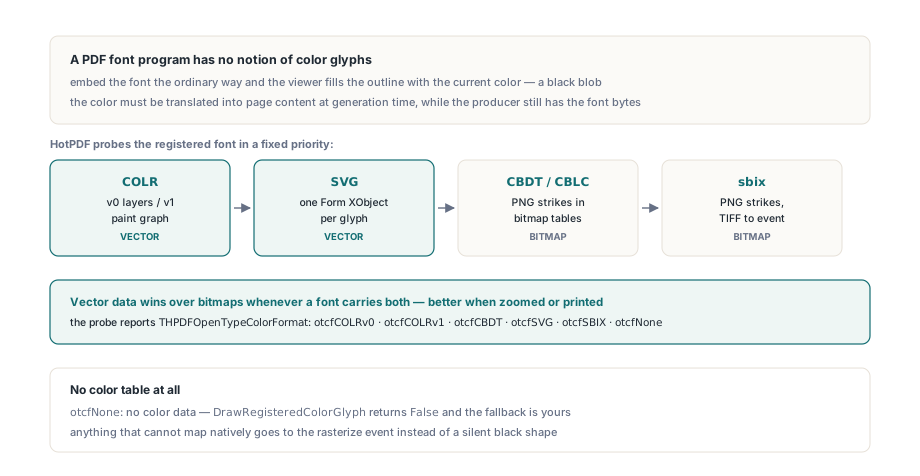
One call, five formats: resolving and drawing a colour glyph
THotPDF.GetRegisteredColorGlyphInfo answers which path a code point will take, and DrawRegisteredColorGlyph takes it. Both look the code point up in the character map of the font most recently passed to RegisterUnicodeTTF, so the colour font has to be the registered Unicode font at the time of the call. The draw function returns False when the glyph has no colour data or no path could render it, and leaves the fallback to you
const
  FormatNames: array[THPDFOpenTypeColorFormat] of string =
    ('none', 'COLR v0', 'COLR v1', 'CBDT', 'SVG', 'sbix');
var
  Pdf: THotPDF;
  Info: THPDFOpenTypeColorGlyphInfo;
begin
  Pdf := THotPDF.Create(nil);
  try
    Pdf.AutoLaunch := False;
    Pdf.FileName := 'emoji.pdf';
    Pdf.BeginDoc;
    Pdf.RegisterUnicodeTTF('C:\Windows\Fonts\seguiemj.ttf');

    // U+1F600, CPAL palette 0, bitmap strike closest to 300 ppem
    if Pdf.GetRegisteredColorGlyphInfo($1F600, 0, 300, Info) then
      Writeln(Format('GID %d via %s',
        [Info.GlyphID, FormatNames[Info.Format]]));

    if not Pdf.DrawRegisteredColorGlyph(Pdf.CurrentPage, $1F600,
      72, 144, 'Segoe UI Emoji', 36, 0, 300) then
    begin
      // No colour data: fall back to the monochrome outline
      Pdf.CurrentPage.SetFont('Segoe UI Emoji', [], 36, DEFAULT_CHARSET);
      Pdf.CurrentPage.TextOut(72, 144, 0, WideString(#$D83D#$DE00));
    end;
    Pdf.EndDoc;
  finally
    Pdf.Free;
  end;
end;
Two parameters deserve attention. PaletteIndex selects a CPAL palette, so a font that ships a dark-background palette can be switched without touching the glyph. TargetPixelsPerEm only matters for bitmap fonts; left at zero it defaults to Round(FontSize * 96 / 72), a screen resolution, which is why the example asks for 300 for print output. The honest limit sits in the signature: the call takes one code point and maps it through cmap alone. ZWJ sequences, skin-tone modifiers and regional-indicator flags are GSUB ligatures, so composing them is a shaping problem of the kind covered in the OpenType GSUB alternates article, not something this entry point does for you
COLR v0: stacked glyph layers with palette colours
COLR v0 is the simple case and HotPDF renders it directly: each base glyph lists layer glyphs with a CPAL colour entry, and each layer becomes one ordinary text-showing operation with its own fill colour, stacked in table order. A layer with alpha below 255 gets a graphics state parameter dictionary with matching /ca and /CA (ISO 32000-1 §8.4.5), and every layer glyph is marked as used so the subsetter keeps its outline even though no code point maps to it directly. One detail surprises people: the palette entry index 0xFFFF means "use the text foreground colour" in the OpenType specification, and HotPDF resolves it to black rather than to the current page fill colour. For emoji fonts this rarely matters; for icon fonts that rely on the foreground entry to tint a glyph, check the output before assuming it will follow your text colour
How does HotPDF turn a COLR v1 paint graph into PDF operators?
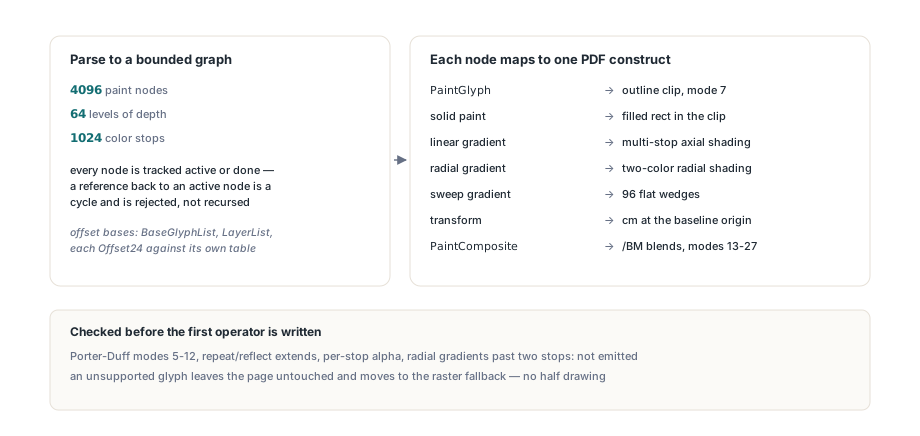
By parsing the paint tables into a flat, bounded graph first and only then mapping each node to a PDF construct. A COLR v1 glyph is not a list of layers but a directed acyclic graph of paint records, where nodes can be shared through PaintColrLayers and PaintColrGlyph. The parser caps it at 4096 paint nodes, 64 levels of depth and 1024 colour stops, and tracks every node as active or done so that a reference back to an active node, a cycle a malicious font can build out of layer reuse, is rejected instead of recursed into. The offset bases are where a first implementation goes wrong. BaseGlyphPaintRecord offsets are relative to the start of BaseGlyphList, LayerList paint offsets are relative to LayerList, and every Offset24 inside a paint table is relative to that paint table itself. Resolve all three against the same base and perfectly legal glyphs fail the bounds check, which looks exactly like a corrupt font. Once the graph is built, the mapping is direct:
PaintGlyphsets the glyph outline as a clip with text rendering mode 7 (ISO 32000-1 §9.3.6), then paints its child inside it- Solid paints fill a clipped rectangle; linear gradients become multi-stop axial shadings and radial gradients become two-colour radial shadings (§8.7.4.5)
- Sweep gradients have no PDF equivalent, so HotPDF approximates them with 96 flat-coloured wedges, each sampled from the colour line
- Transforms are emitted as
cm, conjugated around the glyph baseline origin, with translations scaled byFontSize / UnitsPerEm PaintCompositemodes 13 to 27 map to the separable and non-separable PDF blend modes such as/Multiply,/Screenand/Luminosity(§11.3.5), set through an ExtGState/BMentry
The boundary is explicit. Porter-Duff modes 5 to 12 (src_in, xor, plus and the rest) have no PDF blend-mode counterpart, repeat and reflect extend modes on linear and radial gradients are not emitted, and gradients whose stops carry different alpha values are not faked with a single opacity. Radial gradients with more than two stops keep only their first and last colours. HotPDF checks the whole graph against this supported subset before writing a single operator, so an unsupported glyph leaves the page untouched and moves on to the raster fallback instead of leaving half a drawing behind
SVG glyphs and bitmap strikes
SVG glyphs go through the same bounded builder that HotPDF uses for imported SVG files, and the result is registered as a Form XObject (§8.10), exactly as described in the SVG to Form XObject article. The document in the SVG table may be gzip-compressed; decompression runs in 8 KB chunks and stops as soon as the expanded size would pass 32 MB, instead of inflating first and checking afterward, and the compressed input itself is capped at 8 MB. The profile is restrictive on purpose: scripts, embedded images, external URLs, data: URIs and non-local references fail closed. The form is scaled so its longer side equals the font size and anchored on the baseline, which maps the y-down SVG coordinate system onto the y-up PDF one. Be aware that the builder receives the whole SVG document for the glyph, with no selection of the glyphNNN element, so fonts that pack many glyphs into one shared document are worth testing before you rely on them
Bitmap fonts are a question of strike choice and placement. For CBDT, HotPDF picks the CBLC size whose vertical ppem is closest to TargetPixelsPerEm, accepts image formats 17, 18 and 19, and reads format 19 metrics from the CBLC index subtable because that format stores none of its own. For sbix, strike offsets are relative to the table and glyph offsets to the strike, and a dupe record reuses another glyph's graphic while keeping its own origin offsets; letting the recursion overwrite the outer origin shifts the image. PNG and JPEG payloads are decoded internally, scaled by FontSize / PixelsPerEmY rather than stretched to the font size, and written with a soft mask (§11.6.5.3) whenever any pixel is not fully opaque. sbix TIFF payloads are not decoded and go to the event
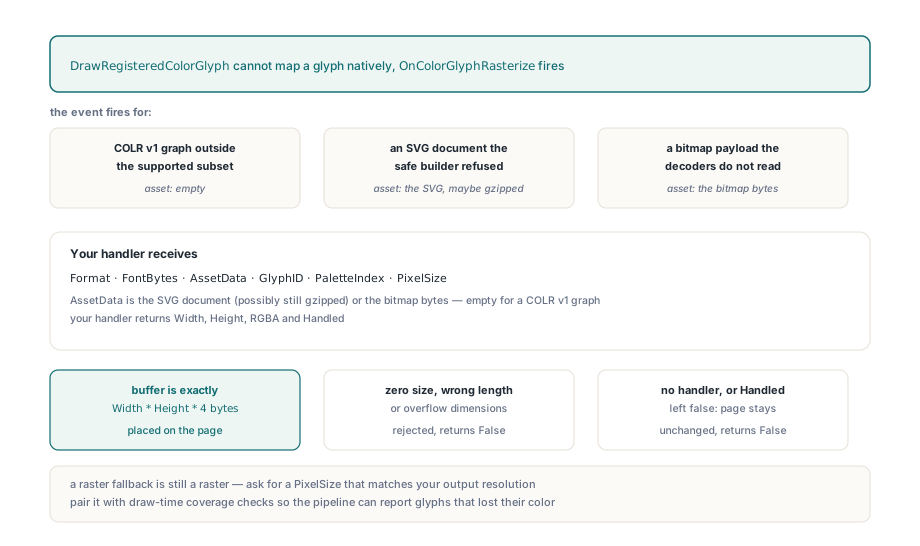
What happens when a glyph cannot be drawn natively?
HotPDF raises OnColorGlyphRasterize and places whatever RGBA bitmap your handler returns; if nothing is assigned, or the handler leaves Handled false, DrawRegisteredColorGlyph returns False and the page stays unchanged. The event fires for a COLR v1 graph outside the supported subset, an SVG document the safe builder refused, and a bitmap payload the internal decoders do not read. The handler gets the format, the raw font bytes, the extracted asset (the SVG document, possibly still gzipped, or the bitmap bytes; empty for COLR v1), the glyph ID, the palette and the target pixel size
type
  TEmojiFallback = class
  public
    procedure Rasterize(Sender: TObject;
      Format: THPDFOpenTypeColorFormat; const FontBytes: TBytes;
      const AssetData: TBytes; GlyphID: Word;
      PaletteIndex, PixelSize: Integer;
      out Width, Height: Integer; out RGBA: TBytes;
      out Handled: Boolean);
  end;

procedure TEmojiFallback.Rasterize(Sender: TObject;
  Format: THPDFOpenTypeColorFormat; const FontBytes: TBytes;
  const AssetData: TBytes; GlyphID: Word;
  PaletteIndex, PixelSize: Integer;
  out Width, Height: Integer; out RGBA: TBytes;
  out Handled: Boolean);
begin
  Width := 0;
  Height := 0;
  RGBA := nil;
  // RenderWithOwnEngine is your rasteriser, not a HotPDF API.
  // It must return exactly Width * Height * 4 bytes of RGBA.
  Handled := RenderWithOwnEngine(Format, FontBytes, AssetData,
    GlyphID, PaletteIndex, PixelSize, Width, Height, RGBA);
end;

// Wiring
Pdf.OnColorGlyphRasterize := Fallback.Rasterize;
HotPDF validates the handler output before touching the page: zero sizes, a buffer whose length is not exactly Width * Height * 4, or dimensions large enough to overflow are rejected and the call returns False. A raster fallback is still a raster, so an emoji rendered this way loses its vector sharpness; ask for a PixelSize that matches your output resolution. Pair the colour path with draw-time coverage checks from the missing glyph tracking article and a pipeline that handles arbitrary user text can report both missing glyphs and glyphs that lost their colour
The colour glyph renderer, the OpenType shaping stack and the safe SVG builder all ship in the HotPDF Delphi PDF component, available for Delphi and C++Builder