Ask a pipeline to route ten thousand spreadsheets by author, company, or last-modified date, and the worst thing it can do is fully open each workbook. The answers sit in the file's document properties, what the Office world calls Document Summary Information: the metadata layer Windows Search indexes, SharePoint files by, and Excel shows in its Properties dialogue. That layer is kilobytes at most, and it lives in a well-documented place in both Excel formats. The trick is reaching it from Delphi without paying for the million cells you do not need
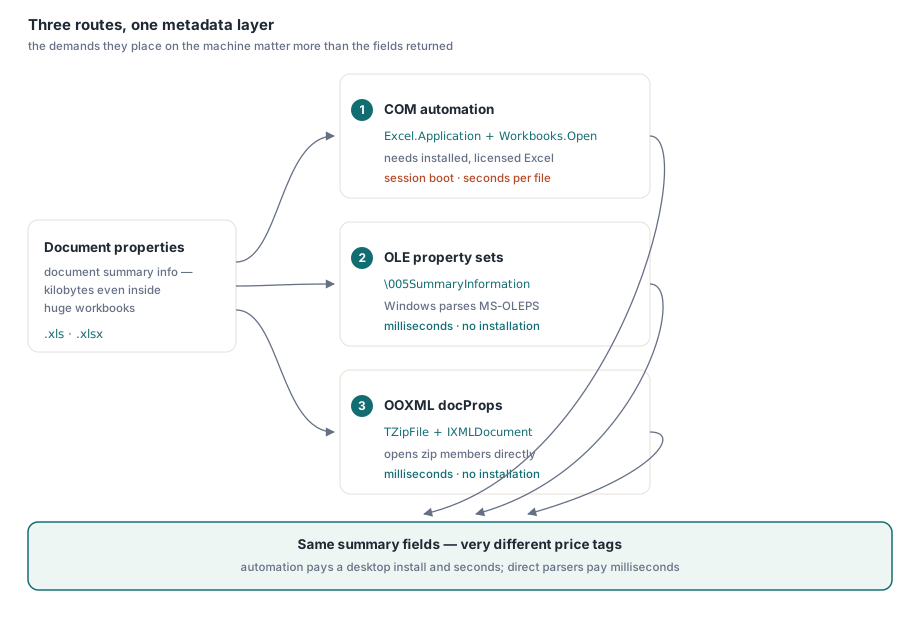
There are three real routes, and they differ less in what they return than in what they demand from the machine that runs them. COM automation drives Excel itself and reads everything, at desktop prices. The .xls format keeps its properties in OLE property-set streams that Windows will parse for you. The .xlsx format keeps them in two small XML parts inside a zip that the Delphi RTL can open on its own. Working code for each follows, with the costs stated plainly
Route 1: COM automation reads everything, at desktop prices
Automation is the only route with total coverage through one object model: the standard summary set, the extended set with Company and Manager, and user-defined custom properties, all reachable through BuiltinDocumentProperties and CustomDocumentProperties. Everything arrives as an OleVariant, and the API has one habit worth knowing before it bites: a built-in property that was never assigned does not come back empty, it raises an EOleException the moment you touch Value. The helper below treats that as "not set" rather than as a failure
uses
  System.SysUtils, System.Variants, System.Win.ComObj;

procedure ReadPropertiesViaCom(const FileName: string);
var
  Excel, Book, Builtin, Custom: OleVariant;
  I: Integer;

  function BuiltinProp(const Name: string): string;
  begin
    try
      Result := VarToStr(Builtin.Item(Name).Value);
    except
      on EOleError do
        Result := '';   // property exists but was never assigned
    end;
  end;

begin
  Excel := CreateOleObject('Excel.Application');
  try
    Excel.DisplayAlerts := False;
    Book := Excel.Workbooks.Open(FileName, 0, True);   // read-only
    try
      Builtin := Book.BuiltinDocumentProperties;
      Writeln('Author : ', BuiltinProp('Author'));
      Writeln('Title  : ', BuiltinProp('Title'));
      Writeln('Subject: ', BuiltinProp('Subject'));
      Writeln('Company: ', BuiltinProp('Company'));
      Writeln('Manager: ', BuiltinProp('Manager'));

      Custom := Book.CustomDocumentProperties;
      for I := 1 to Custom.Count do
        Writeln(VarToStr(Custom.Item(I).Name), ' = ',
          VarToStr(Custom.Item(I).Value));
    finally
      Book.Close(False);
    end;
  finally
    Excel.Quit;   // reach this on every path, or EXCEL.EXE stays behind
    Excel := Unassigned;
  end;
end;
Now the bill. Excel must be installed on every machine this code runs on, which rules out most servers by itself, and Microsoft's support policy is explicit that Office is neither designed nor licensed for unattended server-side automation. CreateOleObject launches a full EXCEL.EXE and Workbooks.Open parses the entire workbook, so expect roughly two to four seconds per file before the first property comes back. And the try..finally around Quit is not decoration: an exception that escapes between CreateOleObject and Quit leaves an orphaned EXCEL.EXE holding a lock on the file, invisible until the next run fails against it. Reusing one Excel instance across a batch amortizes the startup cost but concentrates the risk, because one stray dialog on the hidden desktop stalls every file queued behind it
Route 2: .xls stores properties in OLE property-set streams
A BIFF8 workbook is an OLE compound file, a miniature file system of storages and streams. The cell data lives in the Workbook stream; the metadata lives beside it in two property-set streams whose names begin with control character #5: \005SummaryInformation for the classic fields and \005DocumentSummaryInformation for the extended and custom ones. Inside each sits a binary property set in the MS-OLEPS layout, with sections keyed by a format identifier (FMTID) and properties keyed by an integer property ID. The summary section is FMTID {F29F85E0-4FF9-1068-AB91-08002B27B3D9}, where PIDSI_TITLE is $02 and PIDSI_AUTHOR is $04; Company ($0F) and Manager ($0E) live in the document-summary section, and custom properties in a second section behind a name dictionary
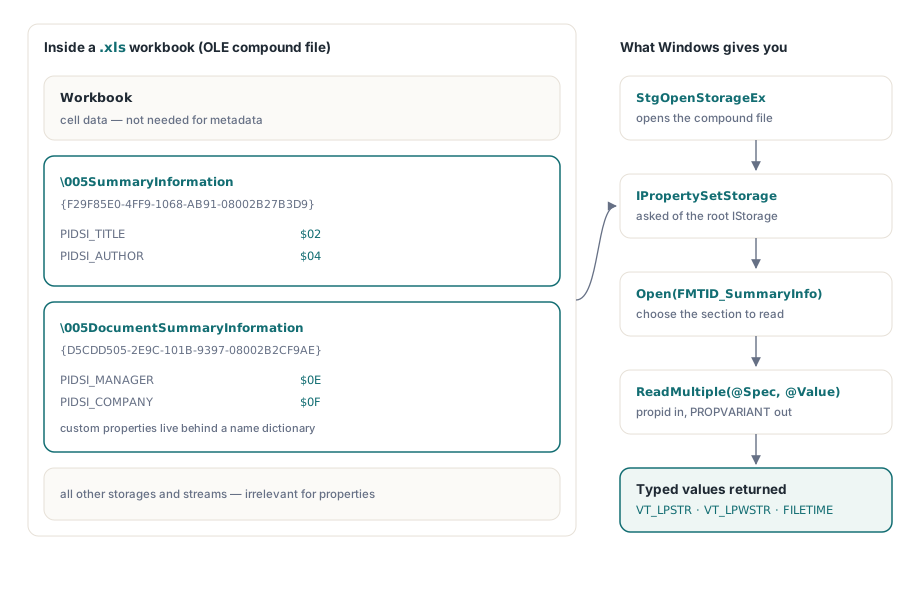
The good news is that on Windows you never parse those bytes yourself. Structured storage exposes the streams through IPropertySetStorage, and the following compiles as shown against the stock RTL units
uses
  System.SysUtils, Winapi.Windows, Winapi.ActiveX, System.Win.ComObj;

const
  FMTID_SummaryInfo: TGUID = '{F29F85E0-4FF9-1068-AB91-08002B27B3D9}';
  PIDSI_TITLE    = $02;
  PIDSI_AUTHOR   = $04;
  STGFMT_STORAGE = 0;

function ReadXlsSummaryString(const FileName: string; PropId: TPropID): string;
var
  Unk: IUnknown;
  Stg: IStorage;
  PropSetStg: IPropertySetStorage;
  PropStg: IPropertyStorage;
  Spec: TPropSpec;
  Value: TPropVariant;
begin
  Result := '';
  OleCheck(StgOpenStorageEx(PWideChar(FileName),
    STGM_READ or STGM_SHARE_DENY_WRITE, STGFMT_STORAGE, 0, nil, nil,
    @IID_IStorage, Unk));
  Stg := Unk as IStorage;
  PropSetStg := Stg as IPropertySetStorage;
  OleCheck(PropSetStg.Open(FMTID_SummaryInfo,
    STGM_READ or STGM_SHARE_EXCLUSIVE, PropStg));
  Spec.ulKind := PRSPEC_PROPID;
  Spec.propid := PropId;
  if PropStg.ReadMultiple(1, @Spec, @Value) = S_OK then  // S_FALSE: not present
  try
    case Value.vt of
      VT_LPSTR:  Result := string(AnsiString(Value.pszVal));
      VT_LPWSTR: Result := Value.pwszVal;
    end;
  finally
    PropVariantClear(Value);
  end;
end;

// usage: Writeln('Author: ', ReadXlsSummaryString('ledger.xls', PIDSI_AUTHOR));
An honest word about what the snippet hides. Strings can arrive as VT_LPWSTR or as VT_LPSTR, and in the ANSI case the bytes are encoded in the property set's own code page, itself stored as property 1 of the section, so the cast above is only exact when that code page matches the system's. Timestamps come back as VT_FILETIME in UTC. Custom properties mean opening the user-defined section, FMTID {D5CDD505-2E9C-101B-9397-08002B2CF9AE}, and walking its name dictionary. IPropertyStorage absorbs all of that on Windows; writing your own MS-OLEPS parser for an environment without structured storage is a genuine project, not an afternoon
Route 3: .xlsx keeps docProps as XML inside the zip
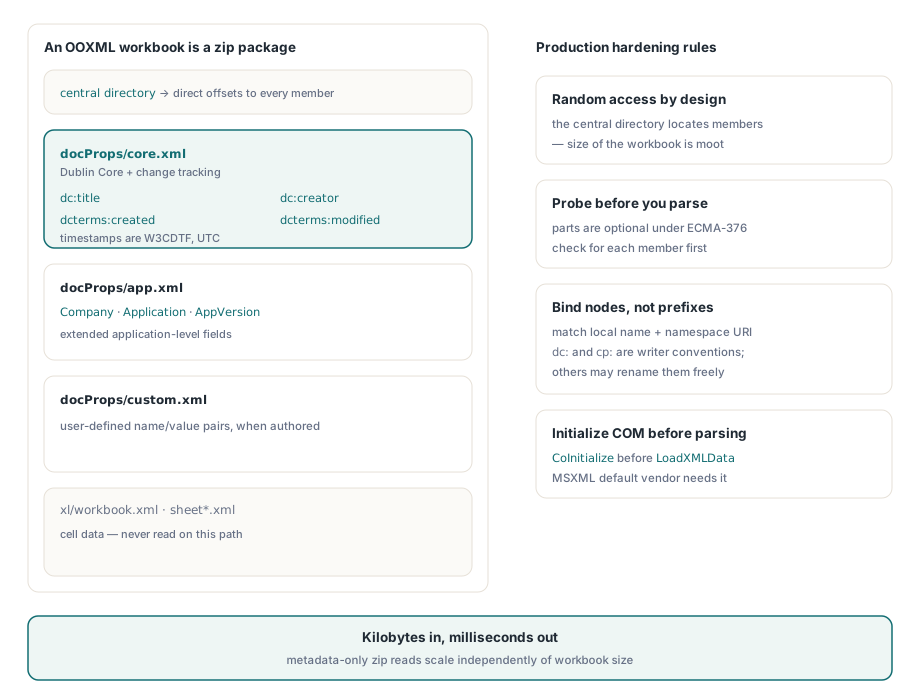
This is the route most pipelines actually need, since new files have been .xlsx for nearly two decades. An OOXML workbook is a zip package, and its properties are split across small parts by purpose: docProps/core.xml holds the Dublin Core fields, dc:title, dc:creator, cp:lastModifiedBy, plus dcterms:created and dcterms:modified as W3CDTF timestamps in UTC, while docProps/app.xml holds application-level fields such as Company and AppVersion, and docProps/custom.xml holds custom properties. Because the zip's central directory locates each part directly, reading them costs a few kilobytes no matter how large the workbook is. TZipFile and IXMLDocument, both in the shipped RTL, do the whole job
uses
  System.SysUtils, System.Classes, System.Zip, Xml.XMLDoc, Xml.XMLIntf;

const
  NsDC    = 'http://purl.org/dc/elements/1.1/';
  NsTerms = 'http://purl.org/dc/terms/';
  NsCore  = 'http://schemas.openxmlformats.org/package/2006/metadata/core-properties';
  NsApp   = 'http://schemas.openxmlformats.org/officeDocument/2006/extended-properties';

function PartToXml(Zip: TZipFile; const PartName: string): IXMLDocument;
var
  Bytes: TBytes;
begin
  Zip.Read(PartName, Bytes);
  Result := LoadXMLData(TEncoding.UTF8.GetString(Bytes));
end;

function Field(const Doc: IXMLDocument; const LocalName, Ns: string): string;
var
  Node: IXMLNode;
begin
  Node := Doc.DocumentElement.ChildNodes.FindNode(LocalName, Ns);
  if Node <> nil then
    Result := Node.Text
  else
    Result := '';
end;

procedure ReadXlsxProperties(const FileName: string);
var
  Zip: TZipFile;
  Doc: IXMLDocument;
begin
  Zip := TZipFile.Create;
  try
    Zip.Open(FileName, zmRead);
    if Zip.IndexOf('docProps/core.xml') >= 0 then
    begin
      Doc := PartToXml(Zip, 'docProps/core.xml');
      Writeln('Title   : ', Field(Doc, 'title', NsDC));
      Writeln('Creator : ', Field(Doc, 'creator', NsDC));
      Writeln('Modifier: ', Field(Doc, 'lastModifiedBy', NsCore));
      Writeln('Modified: ', Field(Doc, 'modified', NsTerms));  // W3CDTF, UTC
    end;
    if Zip.IndexOf('docProps/app.xml') >= 0 then
    begin
      Doc := PartToXml(Zip, 'docProps/app.xml');
      Writeln('Company : ', Field(Doc, 'Company', NsApp));
      Writeln('App     : ', Field(Doc, 'Application', NsApp), ' ',
        Field(Doc, 'AppVersion', NsApp));
    end;
  finally
    Zip.Free;
  end;
end;
Two details keep this robust in production. First, the parts are optional: a minimal package with no docProps at all is perfectly valid under ECMA-376, which is why the code probes with IndexOf instead of assuming. Second, match elements by local name and namespace URI, as FindNode does above, never by literal prefix; dc: and cp: are conventions of Excel's writer, and files produced by other generators are free to pick different prefixes. One environmental note: the default IXMLDocument vendor is MSXML, so a console application or worker thread must call CoInitialize before LoadXMLData, or the first parse dies with a COM error
The cost sheet, and when a library beats both parsers
Measured on an ordinary developer machine, the COM route lands at roughly two to four seconds per file when the automation session is created per file, nearly all of it EXCEL.EXE startup plus a full workbook parse, and it requires an installed, licensed Excel wherever it runs. The two direct routes read only the metadata containers, finish in single-digit milliseconds per file, and need nothing installed beyond what a Delphi executable already links in. Across a ten-thousand-file share, that is the difference between most of a working day and under a minute, with no Office deployment question attached
The catch with the direct routes is that there are two of them. A pipeline that accepts both formats maintains two parsers with two disjoint failure modes, code pages and PROPVARIANT types on one side, namespaces and optional parts on the other, and neither reads the other's format. That maintenance load is the case for a native library: HotXLS, losLab's Object Pascal spreadsheet library for Delphi and C++Builder on Windows, exposes the same fields as plain workbook properties, Title, Author, Company, Created, and the rest, populated by Open for .xls and .xlsx alike, with no Excel installation and none of the container plumbing above. It reads properties as part of a full workbook open rather than a metadata-only probe, so it fits pipelines that go on to touch the cell data anyway; the full property surface on both facades, including the write side, is covered in our article on setting Excel document properties with HotXLS
Note: Full Excel parsing and metadata extraction tools are available in the HotXLS Delphi VCL Component