TDateTimePicker gained a Format property somewhere between Delphi 5 and Delphi 6. The exact version boundary is rarely documented in a way you can trust, and when you hit it, the compiler simply tells you that the identifier does not exist. The line that compiles and works on every newer Delphi you have fails silently or outright on the old one, depending on how the project is structured
The underlying control is the Windows DATETIMEPICK_CLASS common control from comctl32.dll, and it has always accepted a format string through the DTM_SETFORMAT message. Delphi's VCL wraps that message in the Format property on newer versions. On Delphi 5, you send the message yourself via the DateTime_SetFormat macro wrapper declared in CommCtrl
The conditional compilation pattern
The standard approach is a compiler-conditional block keyed on a version symbol. Delphi 5 defines VER130; you can test against it directly or define your own D5 symbol in the project options to make the branch label more readable across the codebase. Either way, the Delphi 5 branch calls DateTime_SetFormat with the control handle; every other branch assigns the property:
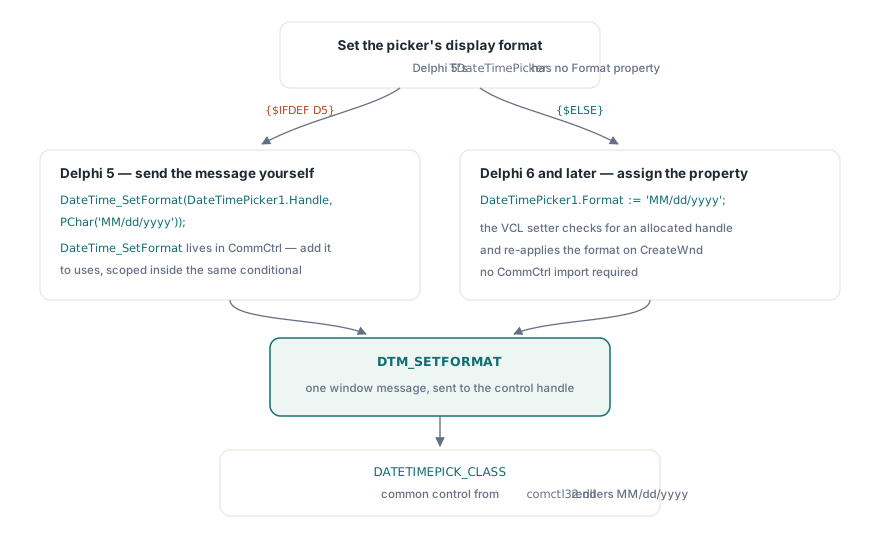
{$IFDEF D5}
  DateTime_SetFormat(DateTimePicker1.Handle, PChar('MM/dd/yyyy'));
{$ELSE}
  DateTimePicker1.Format := 'MM/dd/yyyy';
{$ENDIF}
Add CommCtrl to the uses clause for the unit that contains the Delphi 5 branch. There is no need to add it unconditionally; if you prefer to keep the dependency scoped, wrap the uses entry in the same conditional:
uses
  ...,
{$IFDEF D5}
  CommCtrl,
{$ENDIF}
  ...;
Format string syntax
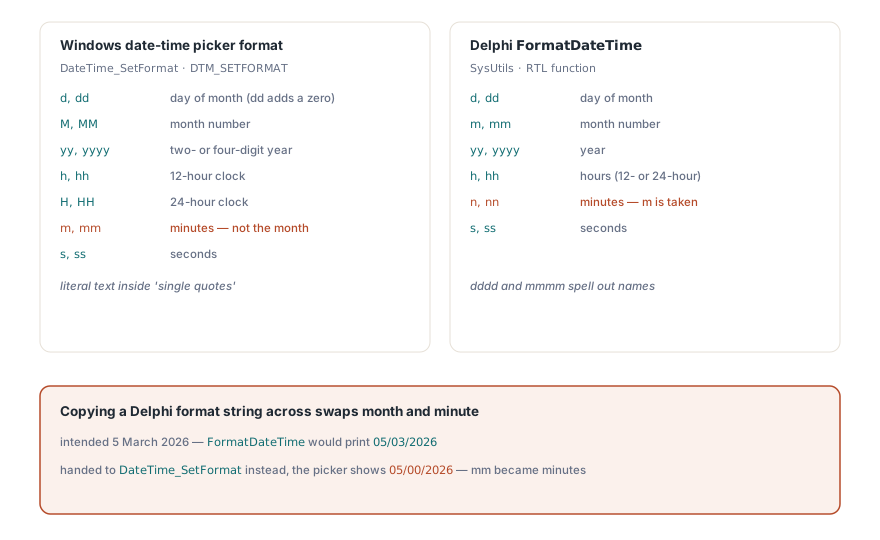
The format string passed to DateTime_SetFormat follows the Windows date-time picker format, not Delphi's FormatDateTime tokens. The two look similar but are not interchangeable. Windows uses d for day-of-month (no leading zero), dd for zero-padded day, M for month number, MM for zero-padded month, yy for two-digit year, and yyyy for four-digit year. Time fields use h/hh for 12-hour hours, H/HH for 24-hour, m/mm for minutes, s/ss for seconds. Literal text goes inside single quotes inside the format string, so 'dd/MM/yyyy' is already correct, but 'dd '<literal>' MM' would require embedded single-quote pairs
Delphi's FormatDateTime, by contrast, uses d/dd/ddd/dddd for day forms with different semantics, and m for month (not M). If you copy a format string from a FormatDateTime call and hand it directly to DateTime_SetFormat, month and minute fields will probably be swapped in the output. Write the control's format string from scratch against the Windows documentation rather than converting from a Delphi format
Regional settings and the global ShortDateFormat
Changing Delphi's global ShortDateFormat variable does not affect a TDateTimePicker that is already created. The picker reads regional settings from Windows at creation time and thereafter renders according to the messages it receives, not the Delphi RTL globals. That means setting ShortDateFormat in FormCreate will not change what the control displays. You need DateTime_SetFormat (or the Format property on newer Delphi) to override the control's own format string after the handle exists
For applications deployed internationally, test the format string on a machine with a non-US regional setting. Windows can override a blank or nil format string with the locale default, but an explicit non-nil string supersedes the regional setting entirely. That is usually what you want, but it means a US-centric pattern like 'MM/dd/yyyy' will appear as-is for users who expect dd/MM/yyyy by convention. If the date picker is user-facing rather than a pure data-entry field, consider letting the control default (pass nil to DateTime_SetFormat) so it follows the user's locale automatically
Handle recreation
The format setting belongs to the window handle, not to any VCL object field. If the control's handle is destroyed and recreated, which VCL can do when you reparent a control or change certain style properties at runtime, the format reverts to the Windows default. The safe place to apply DateTime_SetFormat is in a handler that runs after handle creation: override CreateWnd in a descendant class and call it there, or apply it in the OnEnter or OnShow event only after confirming the handle is live. Setting it once in FormCreate is often sufficient for simple forms, but it is not reliable if the form does dynamic style switching or control reparenting
The same constraint applies to the VCL Format property on newer Delphi versions; internally it calls the same Windows message and faces the same handle lifecycle. The difference is that the VCL property setter checks whether the handle is allocated before calling through, and re-applies the format automatically on CreateWnd. The raw DateTime_SetFormat call has no such protection, so the Delphi 5 branch needs to be more deliberate about when it runs
Removing the workaround
When a project drops Delphi 5 support, the conditional block becomes dead weight. Remove the {$IFDEF D5} branch and the scoped CommCtrl import, leaving only the direct Format property assignment. Keep the removal in a single commit so it is easy to identify if something unexpectedly breaks on a compiler you did not test. The format string itself stays the same; only the delivery mechanism changes