Alcinoe is an open-source component library for Delphi and C++Builder, maintained on GitHub by Zeus64. It covers ground that the VCL and FireMonkey RTL leave to third parties: a GPU-accelerated video player, a WebRTC wrapper, native iOS and Android edit controls, a dual-mode JSON/BSON parser, a MongoDB client with connection pooling, an ImageMagick wrapper, and a collection of FireMonkey controls that sidestep the stock rendering pipeline entirely. The library built its reputation on Rio (10.3.3) and Sydney (10.4.2), and has since tracked each Embarcadero release. At the time of writing, it is fully compatible with Delphi 11.1 Alexandria and Delphi Athens 12.3
Getting Alcinoe into a project
Installation splits on one question: do you need design-time support for Alcinoe’s visual controls? If not, skip the BPL entirely. Add {alcinoe_rootdir}\source to the project’s library search path and you are done. Every non-visual component, including the parsers, database clients, and string utilities, compiles from source without registering anything
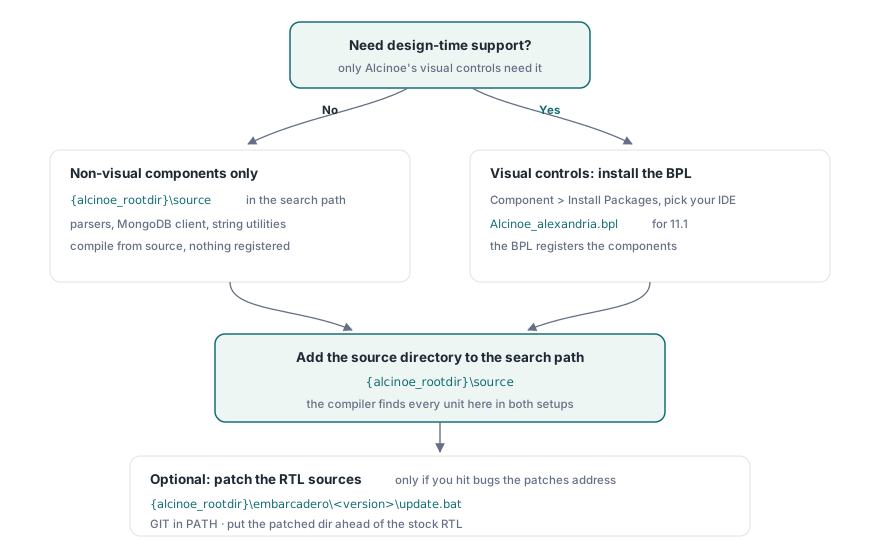
When you do need design-time support, the path is slightly longer. Open Component > Install Packages in the Delphi IDE, browse to the BPL that matches your version (for example {alcinoe_rootdir}\lib\bpl\alcinoe\Win32\alexandria\Alcinoe_alexandria.bpl), install it, and then still add {alcinoe_rootdir}\source to the search path. The BPL registers the components; the source directory is what the compiler finds when it compiles your project
Alcinoe ships optional patches to the Embarcadero RTL sources. If you want them, navigate to {alcinoe_rootdir}\embarcadero\, pick the subdirectory for your version, and run update.bat. The script expects GIT in the PATH and assumes a default Embarcadero install location. It fetches the original RTL source and applies the patches. Once done, add that patched source directory to your project search path so the compiler picks it up ahead of the read-only copy in the Embarcadero installation tree. None of this is required for getting started; it matters only if you hit bugs the patches address
Android and the D8 desugaring proxy
Several Alcinoe components (WebRTC, ExoPlayer-backed video) depend on Java libraries that use Java 8 language features. The Android toolchain that ships with older Delphi versions uses dx.bat for DEX conversion, which cannot handle those bytecodes on API levels below 26. The fix is desugaring, which D8 handles automatically when invoked directly. Alcinoe provides a proxy script at {alcinoe_rootdir}\tools\D8Proxy\dx.bat that forwards calls from the Delphi build system to D8, making desugaring transparent. Replace the original dx.bat in your Android SDK build-tools directory (typically C:\SDKs\android\build-tools\30.0.3\) with this proxy. Embarcadero tracked the underlying issue at RSP-24155; later versions of the SDK tools addressed it directly, so check whether your current toolchain still needs the workaround
The FireMonkey rendering problem and Alcinoe’s answer
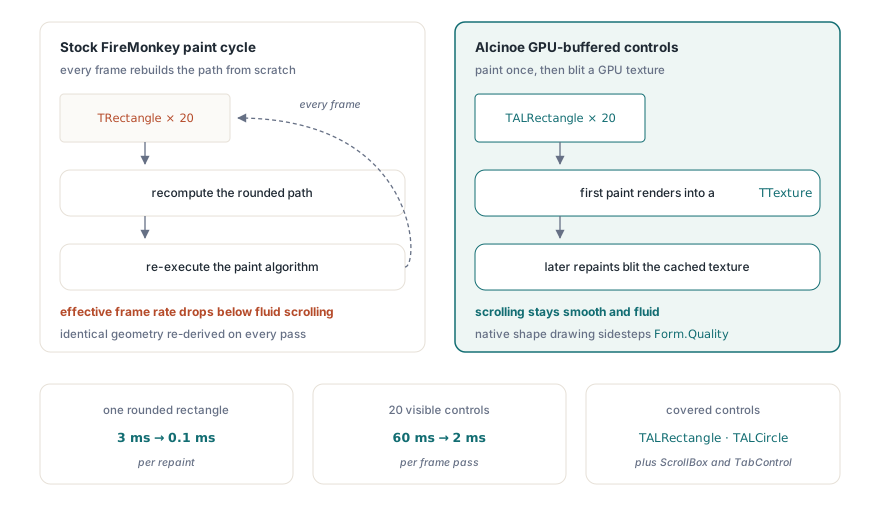
FireMonkey’s default paint cycle becomes a bottleneck in scroll-heavy UIs. A single TRectangle with rounded corners can take around 3 ms to repaint because the stock implementation recalculates the path on every frame. With 20 such controls visible, that adds up to 60 ms per frame pass, which caps the effective frame rate well below the threshold for fluid scrolling
Alcinoe addresses this with a GPU-resident buffer per control. The first paint renders the control to a TTexture stored in GPU memory. Subsequent repaints blit that texture instead of re-executing the paint algorithm. The measured result on the same rounded rectangle drops from around 3 ms to around 0.1 ms. Beyond the buffering, Alcinoe replaces OpenGL path-drawing for basic shapes with native Android and iOS drawing APIs, sidestepping the quality/performance trade-off tied to Form.Quality. The relevant controls are TALRectangle, TALCircle, and a set of improved layout containers including a ScrollBox and TabControl
TALJsonDocument: DOM and SAX in one type
TALJsonDocument is Alcinoe’s JSON and BSON parser. It supports two traversal modes. DOM mode builds an in-memory object tree, giving random access to any node at the cost of memory proportional to document size. SAX mode fires events as the parser reads each token without retaining any tree, which is the right choice when you need to filter a large document and hold only a handful of values. DOM parsers in Delphi (DBXJSON, SuperObject, and the others) are typically three to five times slower than a SAX approach for the same content, because each node allocation carries object-creation overhead on top of the parsing work itself
The type follows the same node-navigation pattern as TALXMLDocument. A minimal DOM read looks like this:
MyJsonDoc.LoadFromJSON(AJsonStr, False {dom mode});
MyJsonDoc.ParseOptions := [poAllowComments];

// read scalar values
ShowMessage(MyJsonDoc.ChildNodes['name'].ChildNodes['first'].Text);
ShowMessage(IntToStr(MyJsonDoc.ChildNodes['_id'].Int32));

// iterate an array
for I := 0 to MyJsonDoc.ChildNodes['contribs'].ChildNodes.Count - 1 do
  Writeln(MyJsonDoc.ChildNodes['contribs'].ChildNodes[I].Text);
For SAX mode, assign an anonymous procedure to OnParseText before calling LoadFromJSON with the second argument set to True. The callback receives the node path, name, value, and a TALJSONNodeSubType that identifies the JSON type (string, integer, float, boolean, and so on). That mode produces no heap allocations for nodes, so it scales to arbitrarily large documents without blowing the memory budget
TALJsonDocument also reads and writes BSON natively; pass True as the BSON flag to LoadFromFile or SaveToFile. A second variant, TALJsonDocumentU, uses UnicodeString (UTF-16) internally instead of AnsiString (UTF-8) for contexts where the surrounding code works in Unicode throughout
MongoDB client and connection pooling
Alcinoe’s MongoDB driver covers the common query operations and handles connection pooling natively. The simple client, TAlMongoDBClient, opens and closes a single connection per operation. The pooled variant, TAlMongoDBConnectionPoolClient, maintains a set of live connections and hands one to each calling thread from the pool, returning it when the call completes. That model keeps multiple threads from blocking each other on connection setup, which matters whenever background workers are querying the same database simultaneously. For tailable cursors on capped collections, TAlMongoDBTailMonitoringThread watches for new documents and fires a callback when they arrive, which is the standard pattern for log streaming or change notification without polling
Other components worth knowing
ALVideoPlayer renders video to a TTexture rather than an overlay window, so other FireMonkey controls can sit above it in Z-order. The Android backend uses ExoPlayer, which adds DASH, HLS, and SmoothStreaming support beyond what Android’s built-in MediaPlayer handles. The iOS backend uses AVPlayer with equivalent HLS support
TALWebRTC wraps the WebRTC stack for peer-to-peer audio and video. It does not require a browser or a plugin, and the connection traverses NAT through the standard ICE/STUN/TURN negotiation that the underlying library handles
TALStringList replaces TStringList’s AnsiCompareText-based sort with a locale-independent ordinal comparison and a quicksort that is up to 10x faster on large lists. The hashed variant, TALHashedStringList, adds an internal hash table for O(1) lookup at the cost of slightly higher overhead on small lists. Note that TALStringList is an 8-bit AnsiString list, not a Unicode one; it fits well in server-side code where UTF-8 is the working encoding and raw throughput matters more than locale-aware comparison
On 64-bit Windows, the FastCode heritage that gave many of Alcinoe’s string routines their speed advantage (mostly hand-written x86 assembly) does not carry over. The Win64 builds fall back to the Pascal implementations, which run noticeably slower on string-intensive workloads. The demo\ALStringBenchMark project lets you measure the gap on your hardware before committing to a 64-bit build where string throughput is a bottleneck
The full source is at github.com/Zeus64/alcinoe