A redaction mark drawn without an /IC colour can come out of the apply step as a transparent gap or a hollow outline, while the reviewer's comment on it stays in the file. PDFlibPas applies Redact annotations with ApplyRedactions: covered content goes first, the overlay comes from /RO or from /IC with black as fallback, and the mark's dictionary is emptied
Marking is reversible, applying is not
ISO 32000-1 §12.5.6.23 splits redaction into content identification and content removal. During identification a Redact annotation is only a proposal that users can still see, move and redefine, which is what makes a review round possible. Removal is left to the application, with firm requirements: everything the annotation identifies goes, the annotation goes, and the covered part of any image has its data destroyed, because a clipping path or image mask over the pixels does not qualify. The keys are listed in Table 192 of ISO 32000-1 (Table 195 in ISO 32000-2), and most of them describe what the page should look like after removal rather than what to remove
| Key | Role in the spec | What ApplyRedactions does with it |
|---|---|---|
QuadPoints | Region to remove as n quadrilaterals; replaces Rect as the region when present | Scrubs the bounding box of each quadrilateral separately; an array whose length is not a multiple of 8 falls back to Rect |
Rect | Region to remove when QuadPoints is absent | Used with reversed corners normalised |
IC | DeviceRGB fill after removal; absent means transparent; ignored when RO exists | Kept when present, added as black when absent |
RO | Form XObject overlay; takes precedence over IC, OverlayText, DA and Q | Installed as the normal appearance and flattened onto the page |
OverlayText, Repeat | Label drawn over the region, optionally tiled | Drawn into the generated overlay, tiled when Repeat is true |
DA, Q | Font, size and colour of the label; justification | Size and colour read from DA, alignment from Q |
Creating marks with AddRedactAnnotation
TPDFlib.AddRedactAnnotation(Left, Top, Width, Height, FillR, FillG, FillB, OverlayText, RepeatOverlay) adds a mark to the selected page and returns the page's new annotation count, which is also the 1-based index of the mark, or 0 when nothing was added. Coordinates follow the current origin and units, so the example switches to the top-left origin, where Top is the upper edge. The call writes /Rect, an /IC from the fill components and a fixed /DA of /F0 10 Tf 1 1 1 rg, 10-point white text; a non-empty OverlayText adds /OverlayText, /Repeat and /Q 1 for a centred label. Redact annotations are a PDF 1.7 feature, so an older header is raised to 1.7. No appearance stream is written yet; the pending mark looks however the reviewer's application draws it. With the label fixed at white, pair OverlayText with a dark fill, since on pale yellow the label disappears. Marks can be created in every PDFlibPas edition
uses
  System.SysUtils, PDFlibrary;

procedure MarkForReview(const SourceFile, ReviewFile: string);
var
  Pdf: TPDFlib;
  Index: Integer;
begin
  Pdf := TPDFlib.Create;
  try
    if Pdf.LoadFromFile(SourceFile, '') <> 1 then
      raise Exception.CreateFmt('Cannot open %s', [SourceFile]);
    Pdf.SetOrigin(1);            // top-left origin: Top is the upper edge
    Pdf.SetMeasurementUnits(0);  // points
    if Pdf.SelectPage(1) <> 1 then
      raise Exception.Create('Page 1 not found');
    // Witness name: black fill, centred white label
    Index := Pdf.AddRedactAnnotation(72, 180, 220, 14, 0, 0, 0, 'REDACTED');
    if Index = 0 then
      raise Exception.Create('Mark was not added');
    // Account block: tile the exemption code across a taller box
    Pdf.AddRedactAnnotation(72, 410, 300, 40, 0, 0, 0, '(b)(6)', 1);
    // Marks only; every byte of the original content is still present
    Pdf.SaveToFile(ReviewFile);
  finally
    Pdf.Free;
  end;
end;
QuadPoints decide the removal area; replies keep their text
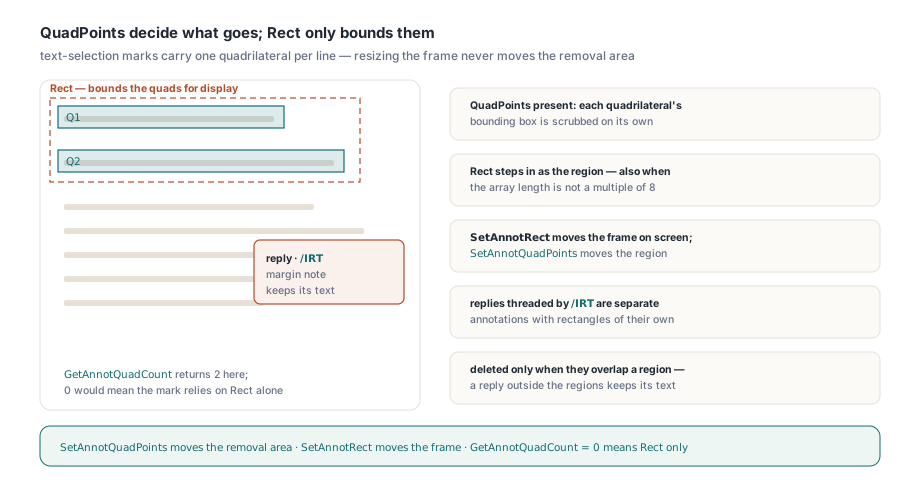
Once a mark carries /QuadPoints, those quadrilaterals decide what ApplyRedactions removes, and Rect only bounds them for display. Marks made with text-selection tools usually have one quadrilateral per selected line, so resizing such a mark with SetAnnotRect moves its frame on screen and leaves the removal area where it was; SetAnnotQuadPoints is the call that moves the region, and GetAnnotQuadCount returns 0 for a mark that relies on Rect alone. The text attached to a mark follows a different rule. Review tools keep the note in /Contents and the author in /T, and a note on a redaction mark tends to describe the very thing being removed ("client SSN, confirm with legal"). ApplyRedactions empties the mark's own dictionary, but replies threaded under it through /IRT are separate annotations, deleted only when their rectangle overlaps a redaction region, so a reply parked in the margin keeps its text. The listing below prints each mark with its quadrilateral count and the replies threaded under it
procedure ListPendingMarks(Pdf: TPDFlib);
var
  P, I, Parent: Integer;
begin
  for P := 1 to Pdf.PageCount do
  begin
    if Pdf.SelectPage(P) <> 1 then
      Continue;
    for I := 1 to Pdf.AnnotationCount do
      if Pdf.GetAnnotType(I) = 'Redact' then
        Writeln(Format('p%d #%d by %s, quads=%d: %s',
          [P, I, Pdf.GetAnnotTitle(I), Pdf.GetAnnotQuadCount(I),
           Pdf.GetAnnotContentsEx(I)]))
      else
      begin
        Parent := Pdf.GetAnnotReplyTo(I);   // 0 when /IRT is absent
        if (Parent > 0) and (Pdf.GetAnnotType(Parent) = 'Redact') then
          Writeln(Format('  reply #%d to #%d: %s',
            [I, Parent, Pdf.GetAnnotContentsEx(I)]));
      end;
  end;
end;
Which overlay appears after ApplyRedactions?
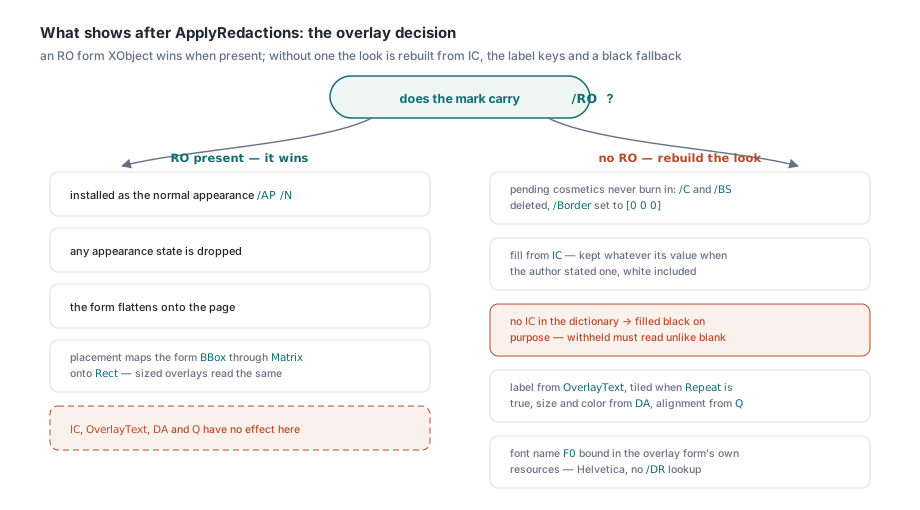
An /RO entry wins whenever it is present, as the precedence rule in Table 192 requires. ApplyRedactions installs that Form XObject as the annotation's normal appearance (/AP /N), drops any appearance state and flattens it, so /IC, /OverlayText, /DA and /Q have no effect on that mark. Placement is the one subtle part. The spec says the overlay's origin lines up with the lower-left corner of Rect, whilst flattening maps the Form's BBox through its Matrix onto Rect, the same BBox and Matrix placement that flattening applies to form field widgets. An overlay whose BBox is [0 0 w h], sized to the rectangle, with an identity Matrix looks the same under both readings, so ask for that shape when your own tools generate /RO marks
Without /RO, ApplyRedactions normalises the dictionary and builds the appearance itself. It deletes /C and /BS and sets /Border to [0 0 0]: those entries describe the pending mark, usually a coloured outline, and burning it into the final page would make a finished redaction look unfinished. With the border gone, the fill covers the whole rectangle. The label is drawn inside the generated Form, with size and colour from /DA, justification from /Q, tiling from /Repeat, and the font name F0 bound in that Form's own resources to standard Helvetica. That binding matters when files travel between tools: ISO 32000-1 §12.7.3.3 defines a DA font name as an entry in the interactive form's default resources (/DR), a document without form fields has none, and another application applying the same mark may substitute a fallback font. PDFlibPas skips that lookup, and with Helvetica the label suits Latin-script text such as REDACTED or an exemption code
A missing /IC becomes a black box
The spec's default for an absent /IC is a transparent interior, and PDFlibPas departs from it on purpose. After removal, a transparent interior shows the paper, a white gap where a name used to be, and that gap looks the same as a layout that never had anything there. A reader cannot tell redacted from blank, and a reviewer cannot confirm the redaction happened without comparing extracted text. A hollow frame, which is what an apply step produces when it flattens the pending appearance of an outline-only mark, fails differently: it reads as a proposal nobody acted on. We weighed following the default literally and chose the black box, because the visible sign that something was withheld is part of what a redacted document tells its reader, and the choice only affects marks whose author never stated a fill. An /IC already in the dictionary is used whatever its value, so a producer that asked for white gets white
What is gone before the overlay is drawn
ApplyRedactions works page by page and completes all removal before it flattens any overlay, so an overlay can never be caught by its own region. For each page it collects one rectangle per quadrilateral, or the Rect of marks without quadrilaterals, and scrubs every content layer against each of them:
- Text is cut glyph by glyph, measured from the page fonts and the full text state, and the rest of a partly covered string stays at its original position
- Vector paths, inline images and shadings that paint inside the region are deleted from the content stream
- Form XObjects are entered recursively; a Form that other pages or placements also draw is redacted through a private copy, so those pages keep the original
- Image XObjects lose only the covered pixels, overwritten with black (full K ink for CMYK); JPEG, JPEG 2000, JBIG2 and CCITT images are decoded and stored back as lossless Flate streams
- In tagged PDF,
/Altand/ActualTextattached to removed marked content are cleared in the page content and in the structure tree - Other annotations whose rectangle meets the region are deleted, and form fields whose widgets sit there lose their values
The pixel step is the spec's image clause in practice. A black rectangle painted over a scanned passport satisfies the eye and still fails §12.5.6.23, because the original samples decode as soon as someone extracts the image. The same engine sits behind RedactRegion, which removes content from a rectangle you pass directly and pairs with SanitizeDocument, without reading any annotations. Once the content is gone, each mark is flattened and its dictionary cleared down to /Type and /Subtype. Flattening removes the annotation from the page's /Annots array, but the dictionary is still an object in the document, and a save that writes it would hand /Contents, /RC, /T and the rest of the review trail to the recipient
Saving without the unredacted revision
An incremental save undoes everything above. Under §7.5.6 (the same number in ISO 32000-1 and ISO 32000-2), an incremental update appends changed objects to the end of the file and leaves the original bytes intact, so the original revision, with its page content, images and annotated marks, stays readable by anyone who cuts the file at the earlier %%EOF; ExtractDocumentRevision in the PDFlibPas Small Business edition does that in one call. After ApplyRedactions, write a new file with SaveToFile, never SaveChanges, which appends. Before saving, GarbageCollectObjects sweeps the object table and drops objects nothing references any more, such as the appearance streams the marks carried before the apply step; a full save skips that sweep unless SetGarbageCollect enables it, or the GarbageCollect field of the TPDFlibSaveOptions record you pass to SaveToFileOptions is set. Metadata is the remaining gap. SanitizeDocument(SANITIZE_METADATA or SANITIZE_XMP_PACKET) blanks Author, Subject, Keywords, Creator and Producer and removes the XMP stream, leaving the Title for you to check. Avoid SANITIZE_ALL here: it includes SANITIZE_ANNOTATIONS and deletes every annotation left in the document, notes you meant to keep among them
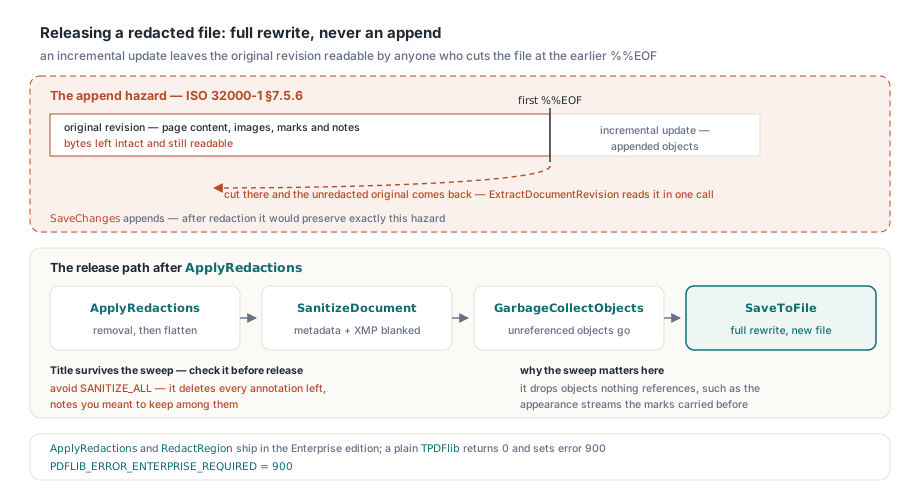
ApplyRedactions, like RedactRegion, is available in the Enterprise edition. On a plain TPDFlib it returns 0 and sets LastErrorCode to PDFLIB_ERROR_ENTERPRISE_REQUIRED (900), so the release step uses TPDFlibEnterprise from the PDFlibEnterprise unit
uses
  System.SysUtils, PDFlibrary, PDFlibEnterprise;

procedure ApplyAndRelease(const ReviewFile, ReleaseFile: string);
var
  Pdf: TPDFlibEnterprise;
  Applied, Orphans: Integer;
begin
  Pdf := TPDFlibEnterprise.Create;
  try
    if Pdf.LoadFromFile(ReviewFile, '') <> 1 then
      raise Exception.CreateFmt('Cannot open %s', [ReviewFile]);
    Applied := Pdf.ApplyRedactions;   // every Redact mark on every page
    if Applied = 0 then
      raise Exception.CreateFmt('No marks applied (error %d)',
        [Pdf.LastErrorCode]);
    // Info and XMP can still name what the pages no longer show
    Pdf.SanitizeDocument(SANITIZE_METADATA or SANITIZE_XMP_PACKET);
    Orphans := Pdf.GarbageCollectObjects;
    // Full rewrite to a new file; never SaveChanges after redaction
    if Pdf.SaveToFile(ReleaseFile) <> 1 then
      raise Exception.Create('Save failed');
    Writeln(Format('%d marks applied, %d unreferenced objects dropped',
      [Applied, Orphans]));
  finally
    Pdf.Free;
  end;
end;
Expected: ApplyRedactions returns the number of Redact marks it flattened across all pages, 2 for the review copy written by MarkForReview, and GarbageCollectObjects returns how many unreferenced objects the sweep dropped
Whichever tool drew a mark, its /RO and /IC entries settle what the recipient sees on the page, while the apply step in PDFlibPas Enterprise for Delphi settles what is gone underneath it