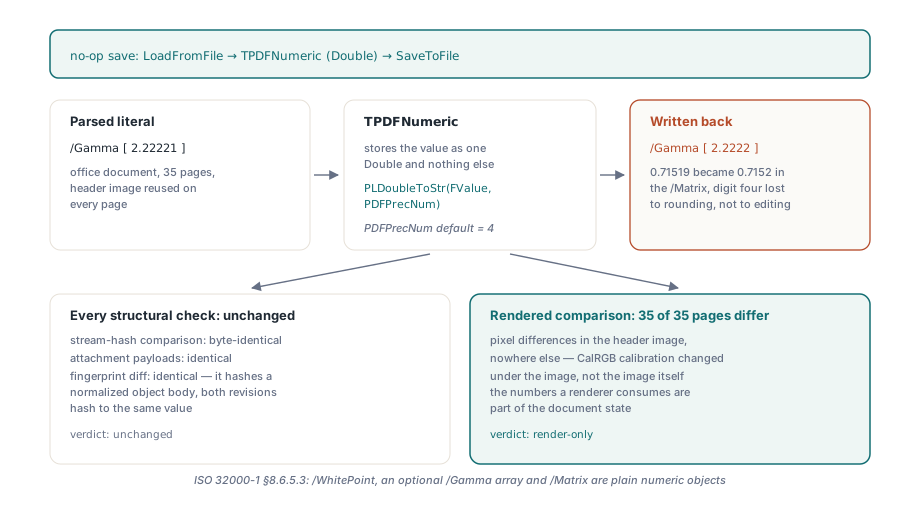
Load a calibrated PDF, change nothing, save it under a new name and diff the colour space dictionary: /Gamma [2.22221 2.22221 2.22221] went in, /Gamma [2.2222 2.2222 2.2222] came out. The writer reformatted a number it never had to touch, and the page now renders in slightly different colours. The cure is to treat every parsed decimal as two things at once, a value for arithmetic and a literal for output, and to keep emitting the literal until somebody actually assigns a new value
Why a no-op save can move CalRGB colours
The pixels move because the renderer is handed slightly different calibration data while the image bytes stay identical. ISO 32000-1 §8.6.5.3 defines a CalRGB colour space by a required /WhitePoint, an optional three-element /Gamma array and an optional nine-element /Matrix, and all of them are plain numeric objects in the colour space dictionary. Push those through a Double and a formatter fixed at four decimal places, and 2.22221 becomes 2.2222 while a matrix entry of 0.71519 becomes 0.7152. A gamma value is an exponent applied to every component of every pixel that goes through that space, so the change shows up wherever the space is used
For a file that declares one CalRGB space for a header image reused on 35 pages, all 35 headers render with shifted colours and nothing else on those pages changes. The checks people reach for first come back clean. A hash of decoded stream bytes compares image data, and the image data really is identical; the damage sits in a dictionary. The revision diff described in the modification level article fingerprints a normalised object body, so the two revisions hash to the same value there too. A rendered page comparison is what catches it. For any pipeline that rewrites PDFs produced by other software, we would put a per-page render comparison ahead of every structural check
What a PDF real number is allowed to look like
ISO 32000-1 §7.3.3 defines a real number as a decimal string: an optional sign, digits, a period, more digits. No radix notation. No exponent form. Annex C, which lists implementation limits, expects roughly five significant decimal digits in the fractional part to be honoured. A default output precision of four therefore already sits a digit below what the specification tells readers to keep, and the file did nothing wrong by using five
Near zero, a naive formatter does worse than lose a digit. The common way to print a Double at N places is to multiply by 10^N, round to an integer and write out the digits, and when that integer is zero the output is 0. Hand it the first operand of 0.00001 0 0 1 0 0 cm at four places and the result is 0 0 0 1 0 0 cm, a singular matrix that makes everything drawn under it vanish. A /Matrix entry of -0.000012345 goes the same way
When PDF Library for Delphi (PDFlibPas) has to format a Double itself, it keeps the requested number of significant digits for a non-zero value smaller than the precision step instead of writing 0. At four places, 0.00001 is written as 0.00001 and 0.0000123 as 0.0000123; only magnitudes below roughly 5E-16 still come out as 0. That keeps newly written numbers sane. A parsed number that never needed reformatting is a different matter, and the library handles it by not reformatting it at all
How PDFlibPas keeps the literal it parsed
TPDFStructure.Decode keeps the source text of every standard real it tokenizes, meaning a token with a decimal point and no exponent marker, right next to the converted Double. TPDFNumeric.Output writes that text back whenever it is present and formats the Double at the structure's PDFPrecNum only when it is not. TPDFNumeric.SetTo discards the text, because an edited number is a new number and should follow the current output precision
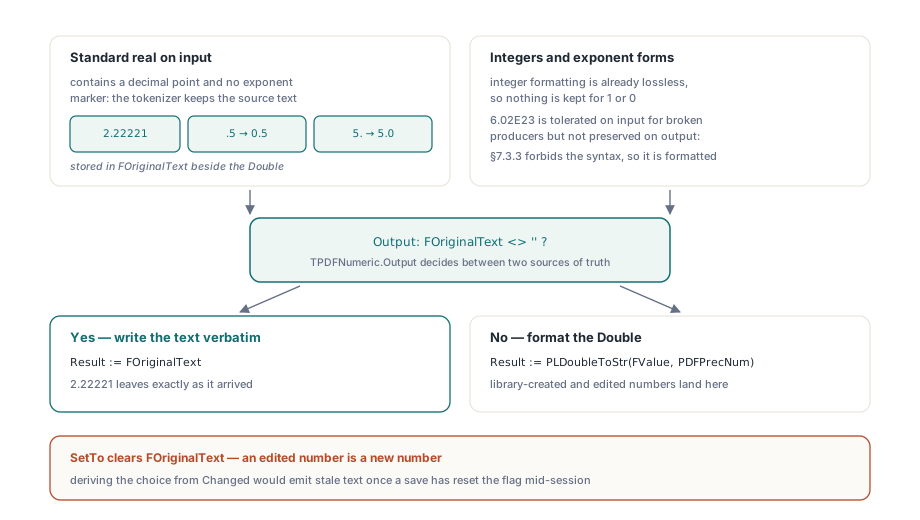
Tying the reset to SetTo was deliberate. The tempting shortcut is to emit the original text unless the object's Changed flag is set, since that flag already exists on every object. The save pipeline clears Changed once an object has been written, though, so a value edited, saved and then edited again in the same session would go back to emitting its stale literal on the second save. Clearing the text inside the assignment itself means the literal and the value can never disagree
A few boundaries are intentional. Integers are not stored as text because integer formatting is already lossless. Exponent forms such as 6.02E23 are accepted on input for the sake of producers that write them anyway, but they are formatted like any library-generated number on output, since copying them back would perpetuate a syntax §7.3.3 rules out. The tokenizer also applies its usual small repair before storing the text: a leading-dot literal like .5 is kept as 0.5, a trailing-dot literal like 5. as 5.0. Every reader treats each pair as the same number, and the repaired spelling is accepted far more widely
The snippet below runs the CalRGB values through the object layer directly, so each rule can be seen without opening a PDF file. The Assert lines are checks we suggest adding in your own tests; they are not calls into the library
uses
  PDFlibStruct;

var
  Structure: TPDFStructure;
  Values: TPDFArray;
  Number: TPDFNumeric;
begin
  Structure := TPDFStructure.Create;
  try
    Structure.PDFPrecNum := 4;
    Values := TPDFArray(Structure.Decode('[2.22221 0.71519 -0.000012345 1 0.12567]'));

    // Your own check: unedited input survives verbatim, including the
    // value a naive four-place formatter would collapse to 0
    Assert(Values.Output = '[ 2.22221 0.71519 -0.000012345 1 0.12567 ]');

    // An edit discards the original text and follows PDFPrecNum
    Number := TPDFNumeric(Values.Item[0]);
    Number.SetTo(0.123456);
    Assert(Number.Output = '0.1235');
    Assert(Structure.NewNumeric(0.123456).Output = '0.1235');

    // Tiny new values keep significant digits instead of becoming 0
    Assert(Structure.NewNumeric(0.0000123).Output = '0.0000123');

    // Lowering the precision afterwards does not reach unedited input
    Structure.PDFPrecNum := 2;
    Assert(TPDFNumeric(Values.Item[1]).Output = '0.71519');
  finally
    Structure.Free;
  end;
end;
One trap when writing assertions like these: Delphi's Round uses banker's rounding, and 0.000012345 * 1e8 evaluates to 1234.4999… in binary rather than 1234.5. We ran straight into that value while checking the near-zero formatting path. Pick test inputs that are not binary midpoints whenever an assertion depends on how the last digit rounds
What does SetPrecision control?
TPDFlib.SetPrecision sets the decimal places of numbers the library writes: graphics drawn through the painter, numbers created from a Double such as through NewNumeric, and parsed values that have since been changed with SetTo. It accepts 2 through 8 and returns 0 for anything outside that range. A parsed decimal that nobody edited keeps its input text whatever the setting is, and changing the setting after LoadFromFile does not reach back into it. Source passed to SetObjectFromString goes through the same tokenizer and is kept the same way
Our recommendation is to leave SetPrecision alone unless the geometry you generate needs finer steps. Raising it to protect input files buys nothing, because untouched input already keeps its own digits, and it makes every number you draw longer. Five places is a sensible choice for sub-point drawing work; eight mostly inflates content streams
uses
  PDFlibrary;

var
  PDF: TPDFlib;
begin
  PDF := TPDFlib.Create;
  try
    if PDF.LoadFromFile('calibrated.pdf', '') <> 1 then
      Exit;

    // Governs numbers written from here on; the parsed /Gamma,
    // /Matrix and /WhitePoint arrays keep their original text
    PDF.SetPrecision(5);

    PDF.SelectPage(1);
    PDF.SetLineWidth(0.123456);       // drawn numbers use five places
    PDF.DrawLine(72, 72, 300, 72);

    PDF.SaveToFile('calibrated-out.pdf');
  finally
    PDF.Free;
  end;
end;
Content streams: edits keep operands, normalisation is opt-in
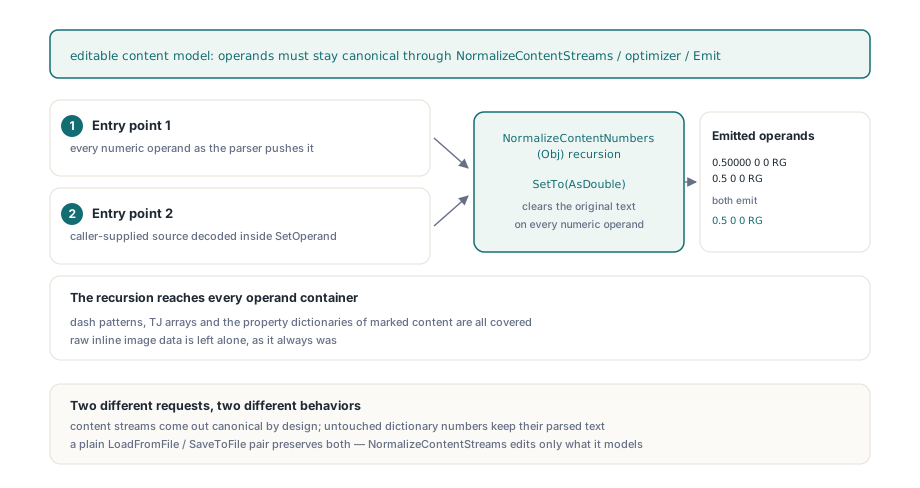
The editable content model keeps operand text by default and canonicalises numbers only when canonical output is the point of the call. TPDFContentProgram.CanonicalNumbers defaults to False, so a layer returned by ParsePageContentLayer, the same model the graphics-state tracker is built on, re-emits every untouched numeric operand exactly as written. Page edits that rewrite a whole layer, including ScalePage, TransformPageElement, DeletePageElement, RedactRegion, ConvertTextToPaths and your own program written back with WritePageContentLayer, change only the operands the edit touched
The other default looks tidier: canonicalise on every parse, so the editing path and NormalizeContentStreams always produce the same spelling. We think it is the wrong default for editing. A ScalePage call on a layer containing 0.123456 w would write back 0.1235 w, and every other operand in the layer would be rewritten too, even though the caller asked only for scaling. Canonical form belongs to operations whose purpose is comparable output
Those operations still get it. NormalizeContentStreams and the save-time content optimizer parse with CanonicalNumbers set to True, because their job is stable output from arbitrary input; if 0.50000 0 0 RG and 0.5 0 0 RG emitted differently, every downstream comparison would drift with the producer's formatting habits. Canonicalising recurses through arrays and dictionaries, so dash patterns, TJ arrays and marked-content property dictionaries are covered, while raw inline image data is left alone. Operands supplied through SetOperand are canonicalised whatever the flag says. A content program carries its own number store fixed at four decimal places, independent of SetPrecision, so an edited operand comes out with four. Only Parse reads the flag, which means it must be set before parsing; for a program that ParsePageContentLayer already parsed, set the flag and call Parse(Emit)
uses
  PDFlibrary, PDFlibContentModel, PDFlibContentOps;

var
  PDF: TPDFlib;
  Prog: TPDFContentProgram;
  I: Integer;
begin
  PDF := TPDFlib.Create;
  try
    if PDF.LoadFromFile('calibrated.pdf', '') <> 1 then
      Exit;
    PDF.SelectPage(1);
    Prog := PDF.ParsePageContentLayer(1);
    if Prog = nil then
      Exit;
    try
      // Change one line width; every other operand keeps its source text
      I := Prog.FindNextOp(0, coLineWidth);
      if I >= 0 then
        Prog.SetOperand(I, 0, '0.123456');   // emitted as 0.1235
      PDF.WritePageContentLayer(1, Prog);

      // Canonical copy for comparison only, not written back:
      // Parse is the only reader of the flag, so re-parse after setting it
      Prog.CanonicalNumbers := True;
      Prog.Parse(Prog.Emit);
      // Prog.Emit now spells 0.50000 and 0.5 the same way
    finally
      Prog.Free;
    end;
    PDF.SaveToFile('calibrated-out.pdf');
  finally
    PDF.Free;
  end;
end;
Put together, the rule for callers is short. A plain LoadFromFile followed by SaveToFile leaves untouched content streams and untouched dictionary numbers as they were. A page edited through the content model keeps the text of every operand the edit did not change. NormalizeContentStreams, the optimizer that runs when content is compressed on save, and any program parsed with CanonicalNumbers set to True produce canonical numbers by design, and the rest of the document is still preserved
What it costs, and where the guarantee stops
Every TPDFNumeric carries one extra AnsiString reference, and every parsed decimal keeps its source text alive for as long as the object lives. On a document with millions of real numbers that is measurable memory, and it belongs in any large-document benchmark you run. The guarantee is also scoped to a number's own document. Copying objects between documents, or rebuilding values through the object API, produces new numbers, and new numbers follow the output precision
Preserved numbers and byte-identical output are separate properties. A load-and-save of an untouched document keeps the calibration numbers the renderer consumes, but byte identity also depends on object numbering, stream compression and the trailer identifier covered in the deterministic PDF ID article. The fingerprint diff keeps hashing the normalised body, which means rounding differences in files written by other tools fall outside what it compares; a render comparison remains the check for those
Numeric handling and the exact SetPrecision semantics are covered in the reference for the losLab PDF Developer Library, along with the content-model calls used above