A surveyor opens a site plan and wants the contours hidden while the utilities stay on. A reviewer wants the redline annotations visible on screen and gone from the printout. A product sheet ships in three languages from one file, and the reader picks which language is shown. All three are the same PDF feature, and the panel that drives them in Acrobat is called Layers. The feature underneath that panel is optional content, and it is what lets a single page carry several independent visual strata that a viewer turns on and off
Optional content is specified in ISO 32000-1 §8.11. The unit of visibility is an optional content group, an OCG, a dictionary of type /OCG that carries a name. Marked content on a page is associated with a group, and the viewer decides whether that group is currently shown. A related construct, the optional content membership dictionary or OCMD, lets visibility depend on a boolean combination of several groups, but the everyday case is a single named group standing for a single layer. The document ties the whole mechanism together through one catalogue entry, /OCProperties, described next
What the catalogue has to carry
An OCG on its own is inert. For a viewer to list a layer and remember its state, the document catalogue needs an /OCProperties dictionary, and §8.11.4 lays out exactly what goes in it. There is a /OCGs array naming every group in the file, and there is a /D entry holding the default configuration. The default configuration is the part a reader applies when the file first opens. It records which groups start on and which start off, which entries are locked against the user toggling them, and, through an /Order array, how the layer names are arranged and nested in the panel
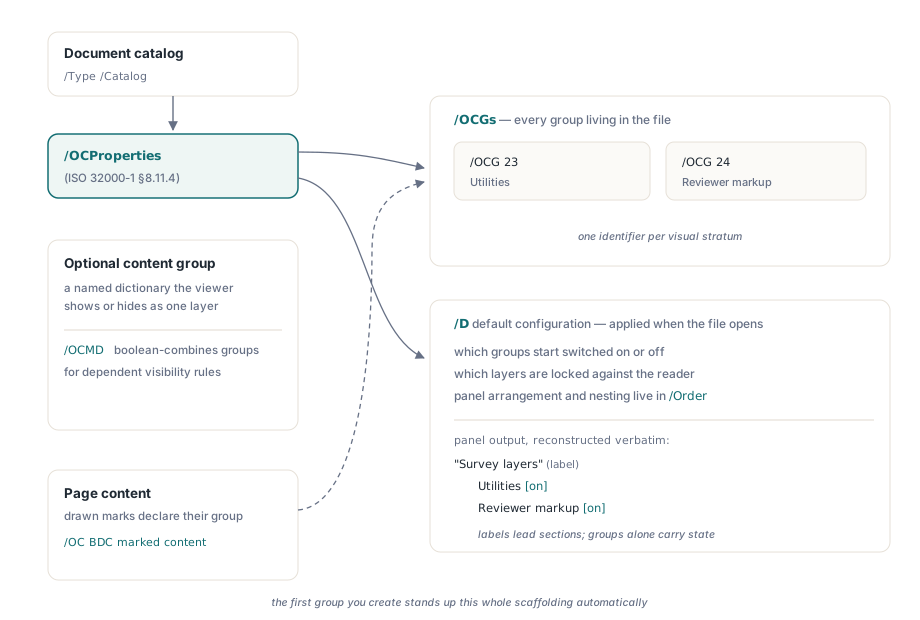
The practical consequence is that creating a layer is never a purely local act. The group has to be drawn into on the page, and it also has to be registered in a catalogue-level structure that did not previously exist. PDF Library for Delphi does both for you. The first call that makes a group adds the /OCProperties entry to the catalogue and seeds the default configuration, so the layer is both painted and listed without separate bookkeeping on your side
Why a compliance mode can withhold the feature
Before any layer code runs, the document's conformance target decides whether optional content is even legal. PDF/A-1, the archival profile defined in ISO 19005-1, forbids the /OCProperties entry outright in §6.1.13. The reasoning fits the format's purpose. An archival file must render identically for every reader far into the future, and content whose visibility a viewer can change is content whose appearance is not fixed, so the profile bans the construct rather than allow an ambiguous archive. PDF/A-2 and PDF/A-3, defined in ISO 19005-2 and ISO 19005-3, take the opposite view in their §6.9 and permit optional content, with rules about default visibility
That difference shows up directly in the API. When the document is in a PDF/A-1 mode, NewOptionalContentGroup refuses to create the group and returns zero, because honouring the request would produce a file that fails its own declared conformance. In PDF/A-2 or PDF/A-3 mode, and in ordinary unconstrained PDF, the same call succeeds and returns a non-zero group ID. A zero result is therefore not a generic failure to inspect later; it is the library telling you the active compliance level has no room for the feature
var
  Pdf: TPDFlib;
  LayerID: Integer;
begin
  Pdf := TPDFlib.Create(nil);
  try
    Pdf.NewDocument;
    Pdf.SetPDFAMode(1);                       // PDF/A-1a: OCProperties forbidden

    LayerID := Pdf.NewOptionalContentGroup('Utilities');
    if LayerID = 0 then
      // refused under PDF/A-1; not a transient error, the mode bans layers
      ShowMessage('Optional content is not available in PDF/A-1 mode.');
  finally
    Pdf.Free;
  end;
end;
Two states per layer, not one
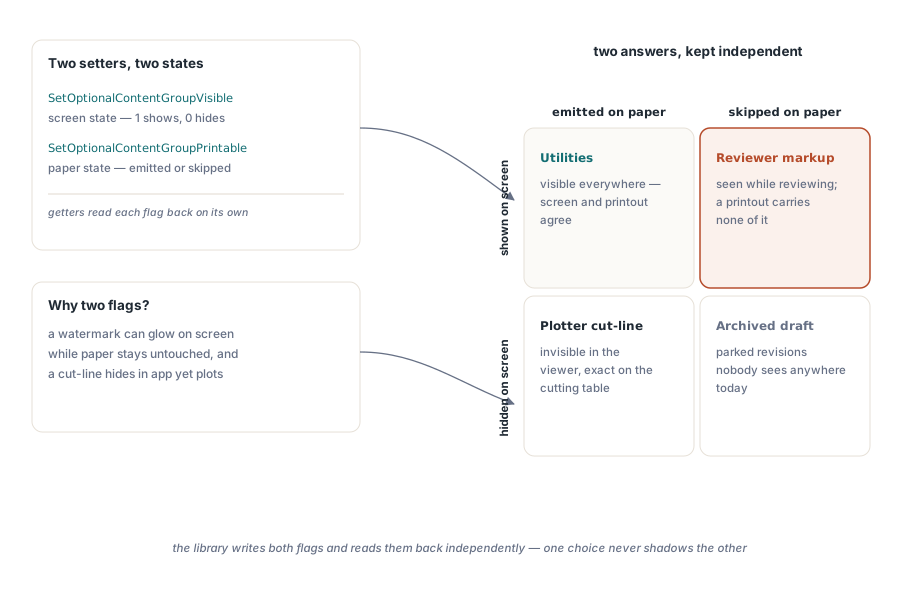
A layer is not simply visible or invisible. The default configuration records its on-screen state and a separate print state, because §8.11.4 distinguishes what a viewer displays from what a print pipeline emits. The two are independent on purpose. A draft watermark can be shown on screen and dropped from paper, and a cut-line layer can be hidden on screen yet sent to a plotter. Collapsing the two would force one to follow the other and lose exactly the control the feature exists to give
PDF Library for Delphi exposes the pair through two setters. SetOptionalContentGroupVisible takes the group ID and a flag, where one means visible and zero means hidden, and governs the default on-screen state. SetOptionalContentGroupPrintable takes the group ID and a flag for whether the layer is emitted when the document prints. The matching getters, GetOptionalContentGroupVisible and GetOptionalContentGroupPrintable, each return one or zero, so you can read back a layer's screen and print disposition separately rather than inferring one from the other
Building two layers on a page
Creating a layer and filling it follows a fixed order. You draw the content for the layer onto the current page, then call SetContentStreamOptional with the group ID, which wraps the page's current content stream so everything drawn so far belongs to that group. Because the call captures whatever is on the stream at that moment, the discipline is to lay down one layer's marks, assign them, and only then start the next layer. The example below puts utilities on the first page and a reviewer redline on a second page, sets each layer's screen and print state, and saves
var
  Pdf: TPDFlib;
  FontID, UtilLayer, RedlineLayer: Integer;
begin
  Pdf := TPDFlib.Create(nil);
  try
    Pdf.NewDocument;                          // unconstrained PDF: layers allowed
    Pdf.SetPageDimensions(595, 842);          // A4 in points
    FontID := Pdf.AddStandardFont(0);         // Helvetica
    Pdf.SelectFont(FontID);

    // Layer 1: utilities, drawn then assigned to its own group
    Pdf.SetTextColor(0.10, 0.30, 0.65);
    Pdf.DrawText(72, 770, 'Utilities: water main, valve chamber');
    UtilLayer := Pdf.NewOptionalContentGroup('Utilities');
    Pdf.SetContentStreamOptional(UtilLayer);
    Pdf.SetOptionalContentGroupVisible(UtilLayer, 1);   // shown on screen
    Pdf.SetOptionalContentGroupPrintable(UtilLayer, 1); // and on paper

    // Layer 2: reviewer redline on a fresh page
    Pdf.InsertPages(2, 1);                     // append one page after page 1
    Pdf.SetTextColor(0.80, 0.10, 0.10);
    Pdf.DrawText(72, 770, 'REVIEW: revise valve spec before issue');
    RedlineLayer := Pdf.NewOptionalContentGroup('Reviewer markup');
    Pdf.SetContentStreamOptional(RedlineLayer);
    Pdf.SetOptionalContentGroupVisible(RedlineLayer, 1);    // visible while reviewing
    Pdf.SetOptionalContentGroupPrintable(RedlineLayer, 0);  // never printed

    Pdf.SaveToFile('SitePlan_Layers.pdf');
  finally
    Pdf.Free;
  end;
end;
The redline layer is the case worth noting. It is shown on screen so a reviewer sees the note, and its printable flag is zero so a printout of the same file carries no review text. That asymmetry is the whole point of keeping the two states apart
Reading the configuration back
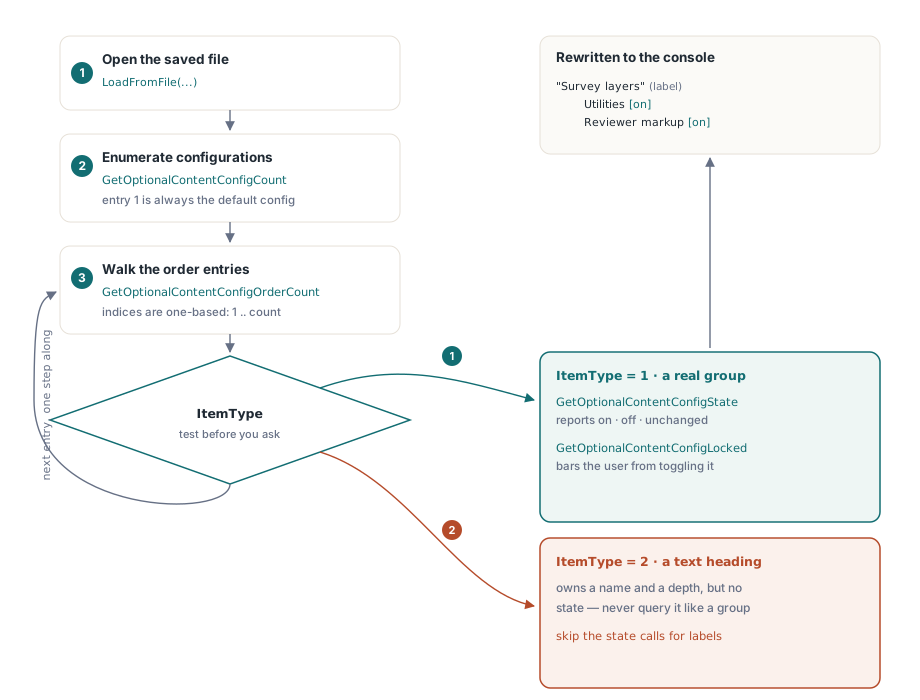
Reading layers is a different walk through the same structure. After a file is loaded, GetOptionalContentConfigCount reports how many configuration dictionaries the document holds; the first default configuration is config ID 1. Within a configuration, GetOptionalContentConfigOrderCount gives the number of entries in the order tree, and you index them from 1. For each entry, GetOptionalContentConfigOrderItemLabel returns its display text and GetOptionalContentConfigOrderItemLevel returns its nesting depth, so a panel outline with sub-layers indented under headings can be reconstructed verbatim
Each entry also has a type. GetOptionalContentConfigOrderItemType distinguishes an actual optional content group from a plain text label that exists only to head a section of the tree. That distinction matters because the per-group state queries only make sense for real groups. For a group entry, GetOptionalContentConfigState reports whether the configuration starts it on, off, or leaves it unchanged, and GetOptionalContentConfigLocked reports whether the user is barred from toggling it. The loop below renders the order tree with each group's state and lock status, indenting by level
var
  Pdf: TPDFlib;
  Cfg, Count, I, ItemType, GroupID, Indent: Integer;
  Line: string;
begin
  Pdf := TPDFlib.Create(nil);
  try
    if Pdf.LoadFromFile('SitePlan_Layers.pdf', '') = 0 then Exit;
    if Pdf.GetOptionalContentConfigCount = 0 then Exit;

    Cfg := 1;                                  // the default configuration
    Count := Pdf.GetOptionalContentConfigOrderCount(Cfg);
    for I := 1 to Count do
    begin
      Indent := Pdf.GetOptionalContentConfigOrderItemLevel(Cfg, I);
      Line := StringOfChar(' ', Indent * 2)
              + Pdf.GetOptionalContentConfigOrderItemLabel(Cfg, I);

      ItemType := Pdf.GetOptionalContentConfigOrderItemType(Cfg, I);
      if ItemType = 1 then                     // 1 = optional content group
      begin
        GroupID := Pdf.GetOptionalContentConfigOrderItemID(Cfg, I);
        case Pdf.GetOptionalContentConfigState(Cfg, GroupID) of
          1: Line := Line + '  [on]';
          2: Line := Line + '  [off]';
          3: Line := Line + '  [unchanged]';
        end;
        if Pdf.GetOptionalContentConfigLocked(Cfg, GroupID) = 1 then
          Line := Line + ' (locked)';
      end;
      // ItemType = 2 is a text label heading; it has no per-group state

      Writeln(Line);
    end;
  finally
    Pdf.Free;
  end;
end;
Two details keep this loop correct. The order index is one-based, from 1 to the count, matching how the library numbers the tree internally. And the per-group calls run only when the item type is a group, because a text label is a heading with a name and a level but no on, off, or locked state to query. Skip that guard and you ask a label for a state it does not have
Where this fits
Layers are a presentation mechanism, so the engine has to honour them on every path that renders a page, and the rendering side is covered in our walkthrough of multi-engine rendering in Delphi. They also intersect with document structure, because a layer's name is author-facing text and a reader benefits from a structured layer outline, which connects to the work in our article on tagged PDF and accessibility structure. Both pair with the optional content APIs described here, which ship as part of the Delphi PDF Library alongside the page, text, font, and conformance facilities discussed elsewhere on this blog