losLab PDF Library for Delphi compresses a scanned page with Mixed Raster Content through TPDFlib.CompressPageAsMRC. The method renders the page, thresholds a full-resolution 1-bit foreground mask, downsamples the rest into a JPEG background, and rebuilds the page as two images: a /DCTDecode background and a /CCITTFaxDecode stencil mask painted in the current fill colour
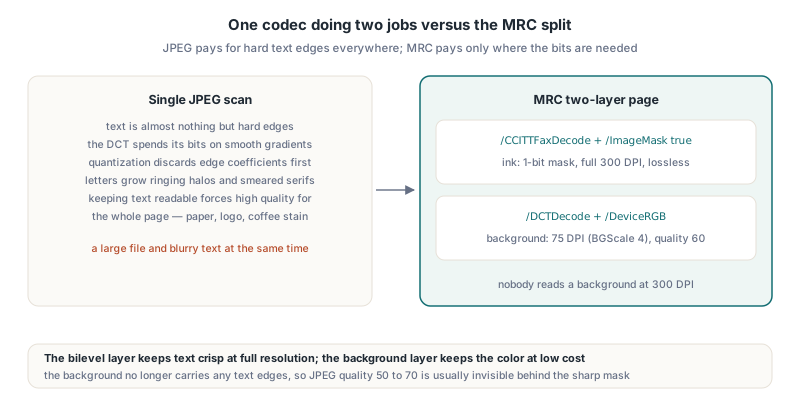
The page this exists for is the one every document archive is full of: a 300 DPI colour scan of an invoice or a contract, stored as one big JPEG. Encode it at a quality that keeps the text readable and the file is large; drop the quality and the letters grow ringing halos and smeared serifs, because the one thing JPEG is worst at is a sharp black edge on white paper. Mixed Raster Content stops asking one codec to do two jobs
Why does a single JPEG make scanned text both blurry and large?
A single JPEG handles scanned text badly because the DCT codec spends its bits on smooth gradients and approximates hard edges with high-frequency coefficients that quantisation throws away first. Text on a scan is almost nothing but hard edges. Keeping those edges clean forces a high quality setting across the whole page, including the paper texture, the logo, and the coffee stain, none of which needed it
The MRC idea splits the page by what each region actually is. Ink becomes a bilevel image, where a fax codec such as CCITT records runs of black and white pixels losslessly and very compactly. Everything else, the paper tone, photos, coloured backgrounds, becomes a continuous-tone image that can be stored at a fraction of the resolution, because nobody reads a background at 300 DPI. The bilevel layer keeps the text crisp at full resolution; the background layer keeps the colour at low cost
How does CompressPageAsMRC split a page into two layers?
TPDFlib.CompressPageAsMRC runs one fixed pipeline per page. It renders the page at the requested DPI to a 24-bit bitmap, classifies every pixel with a Rec. 601 weighted luminance (299/587/114 per mille) against Threshold, and writes the result into a 1-bit mask at the same resolution. In parallel it shrinks the same render by BGScale with a box average, so a BGScale of 4 turns each 4×4 block of pixels into one background pixel
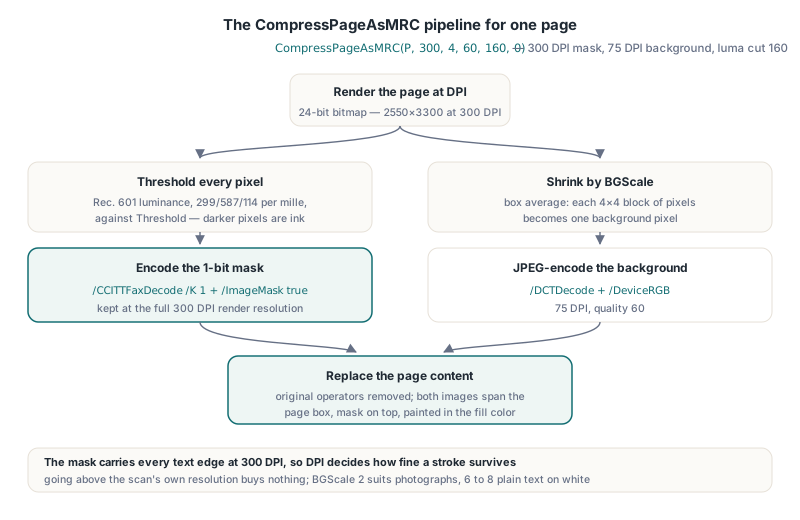
The page content is then replaced. The original operators are removed, the downsampled background is embedded as a /DCTDecode image in /DeviceRGB (ISO 32000-1 §7.4.8), the mask is encoded with the library CCITT encoder as a /CCITTFaxDecode image (§7.4.6) and flagged /ImageMask true, and both are drawn across the full page box with the mask on top. The signature is short:
function CompressPageAsMRC(Page: Integer; DPI: Double;
BGScale, JPEGQuality, Threshold, Options: Integer): Integer;Pageis 1-based and must be withinPageCountDPIis the render resolution of the source raster, 50 to 1200BGScaleis the background downsample factor, 1 to 8JPEGQualityis the background JPEG quality, 1 to 100Thresholdis the luminance cut, 1 to 255; pixels at or above it are paper, darker pixels are inkOptionsis reserved and must be 0
A typical batch over a scanned file looks like this. Call SetFillColor right before each page, for a reason the next section explains
uses
  SysUtils, PDFlibrary;

procedure CompressScannedFile(const SrcFile, DstFile: string);
var
  Lib: TPDFlib;
  P, Replaced: Integer;
begin
  Lib := TPDFlib.Create;
  try
    if Lib.LoadFromFile(SrcFile, '') <> 1 then
      raise Exception.CreateFmt('Cannot open %s', [SrcFile]);
    for P := 1 to Lib.PageCount do
    begin
      Lib.SetFillColor(0, 0, 0);  // ink colour of the stencil layer
      // 300 DPI mask, 75 DPI background, JPEG quality 60, cut at luma 160
      Replaced := Lib.CompressPageAsMRC(P, 300, 4, 60, 160, 0);
      if Replaced = 0 then
        raise Exception.CreateFmt('MRC failed on page %d', [P]);
    end;
    if Lib.SaveToFile(DstFile) <> 1 then
      raise Exception.CreateFmt('Cannot save %s', [DstFile]);
  finally
    Lib.Free;
  end;
end;
Why is the foreground painted in the current fill colour?
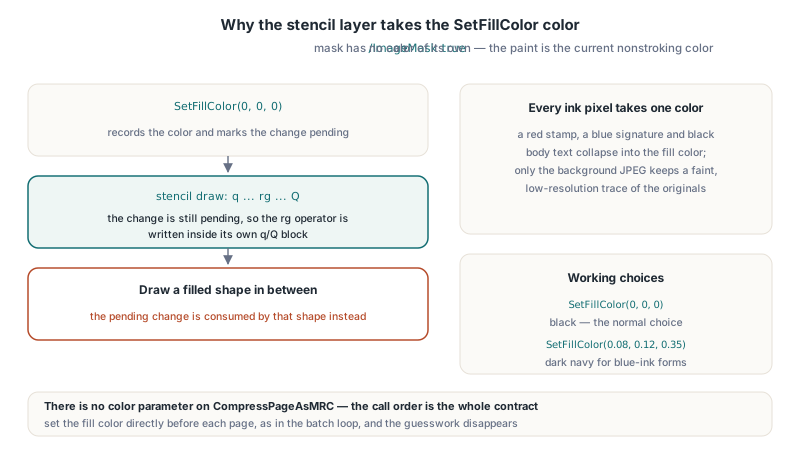
The foreground layer is a stencil mask, and a stencil mask has no colour of its own. ISO 32000-1 §8.9.6.2 defines an image with /ImageMask true as a 1-bit shape: sample values mark where paint goes, and the paint is whatever nonstroking colour is current in the graphics state. That is exactly what makes the layer cheap, and it is also why CompressPageAsMRC takes no colour parameter
TPDFlib.CompressPageAsMRC paints the mask with the colour set by SetFillColor, so the call order matters. The painter emits a fill colour lazily: SetFillColor records the colour and marks it as changed, and the stencil draw writes the rg operator inside its own q/Q block only while that change is still pending. Draw a filled shape in between and the pending change is consumed by that shape instead. Setting the colour directly before each page, as in the batch above, removes the guesswork. Black is the normal choice; a dark navy works for blue-ink forms where you want the output to look less like a photocopy
// Blue ballpoint form: render the ink layer in a dark navy
Lib.SetFillColor(0.08, 0.12, 0.35);
Replaced := Lib.CompressPageAsMRC(PageNo, 300, 4, 55, 170, 0);
Placement follows the library coordinate origin. CompressPageAsMRC reads GetOrigin and draws both images from the top edge of the page box: top coordinate 0 when the origin is top-left (SetOrigin(1)), top coordinate PageHeight with the default bottom-left origin. You do not need to adjust anything, but it explains why the layers land correctly whichever origin your pipeline was already using
One consequence of stencil semantics is worth stating plainly: every pixel classified as ink takes the same colour. A red stamp, a blue signature, and black body text all end up in one fill colour on the foreground layer. Only the background JPEG keeps a faint, low-resolution trace of the original colours underneath
Choosing DPI, BGScale, Threshold, and JPEG quality
The DPI value decides the sharpness of the text, and 300 is the sensible default for office scans. The mask is kept at full render resolution, so DPI sets how fine a stroke survives thresholding. Going higher than the original scan resolution buys nothing, because the renderer would only be upsampling the embedded scan image. Memory is the other limit: a US Letter page at 300 DPI renders to 2550×3300 pixels, 25,245,000 bytes of 24-bit pixel data before the mask and background are derived, and the same page at the 1200 DPI ceiling is 10200×13200 pixels, about 404 MB
BGScale trades background detail for size. At 300 DPI, a factor of 4 gives a 75 DPI background, 638×825 pixels for Letter, which is plenty for paper tone and flat colour areas. Pages with photographs or halftone illustrations that a reader will actually look at deserve 2; plain text on white paper can take 6 or 8, since the background is barely more than a tint
Threshold is the parameter that changes what the page looks like. Raising it classifies more mid-grey pixels as ink, which thickens thin strokes and pencil marks but also pulls in scanner noise and paper shadow as specks. Lowering it gives cleaner paper and thinner, sometimes broken, letters. Values around 128 to 170 are a reasonable starting range for black text on white; the trade-off between the two is the same one discussed in rendering PDF pages to 1-bit monochrome in Delphi, where the same luminance threshold drives RenderPageToMonochromeFileEx. Unlike that method, CompressPageAsMRC has no despeckle pass, so noisy scans are better served by a slightly lower threshold
JPEGQuality matters less than it does for a single-image scan, because the background no longer carries any text edges. Quality 50 to 70 is usually invisible on a 75 DPI background behind a sharp mask
What does the return value tell you, and what does it not?
TPDFlib.CompressPageAsMRC returns the size in bytes of the page content it replaced, and 0 when something failed. It is a success indicator, not a measure of savings. On a typical scanned page the original content stream is a few dozen bytes, just enough operators to place one image, so a small positive number is the normal result even when the page shrinks by megabytes. A page whose original content stream was empty reports 0 even though it was rebuilt
The failure behaviour is not atomic, and that is the part to design around. Argument checks, the render, and the JPEG encoding run before the page is touched, so an out-of-range BGScale, a JPEGQuality of 101, or a render failure leaves the page exactly as it was. Once the original content has been cleared, though, a failure to embed one of the layers or draw it also returns 0, and at that point the page may already be partially rebuilt. Treat any 0 as a reason to discard the in-memory document rather than save it, and never write the result over the source file
To find out what the conversion actually saved, measure the document. Comparing the length of SaveToString before and after is the quickest check; for a per-category answer, the PDF file size audit with AuditDocumentSpace shows whether the weight moved out of images as expected
function MRCSavings(Lib: TPDFlib): Int64;
var
  Before: Int64;
  P: Integer;
begin
  Before := Length(Lib.SaveToString);
  for P := 1 to Lib.PageCount do
  begin
    Lib.SetFillColor(0, 0, 0);
    if Lib.CompressPageAsMRC(P, 300, 4, 60, 160, 0) = 0 then
      raise Exception.CreateFmt('Page %d failed; discard this document', [P]);
  end;
  Result := Before - Length(Lib.SaveToString);
end;
Where this two-layer MRC stops short of ITU-T T.44
CompressPageAsMRC implements a deliberately simplified MRC. The full model in ITU-T T.44 uses three layers per stripe: a background image, a foreground image that carries the ink colours, and a bilevel mask that selects between them pixel by pixel, with room for several mask and foreground pairs on one page. In PDF terms the third layer would be a low-resolution colour foreground image with an explicit mask (§8.9.6.3) instead of a stencil painted in one colour. PDF Library for Delphi skips the foreground colour layer, which is what makes the result so small and also why coloured ink collapses into the fill colour
- The method suits black or single-colour text on scanned paper; colour-coded documents, highlighted text, and coloured stamps lose their ink colour
- The rebuilt page is pure raster: any real text, vector art, or selectable characters on the original page become pixels, so run it on scans, not on born-digital pages, where font subsetting and image downsampling are the right tools
- The mask uses the library CCITT encoder in T.4 two-dimensional mode, written as
/CCITTFaxDecodewith/K 1; the encoder also has a Group 4 mode throughAddImageCCITTFromBitmapStream, butCompressPageAsMRCdoes not expose it, and it does not use JBIG2 - Annotations and form fields are not flattened; they stay as objects above the rebuilt content
- The background is
/DeviceRGB, so the output is not suited to PDF/X-1a workflows, andSetFillColoritself is rejected in PDF/X-1a mode - A scan that already needs OCR should be recognised before MRC, while the original pixels still exist at full colour depth
FAQ
Does CompressPageAsMRC keep the text searchable?
No. CompressPageAsMRC replaces the page content with two images, so any text operators on the original page, including an invisible OCR text layer, are removed with it. Run OCR on the compressed page afterward, or add the text layer back after compression
Can I compress only some pages of a document?
Yes. CompressPageAsMRC works on one 1-based page per call, so you choose the pages and can even vary BGScale and Threshold per page, for example a factor of 2 for a photo insert and 6 for plain text pages
What should the Options parameter be?
Pass 0. Options is reserved for future use in the current release and no bits are defined, so a nonzero value carries no meaning today
CompressPageAsMRC shipped in losLab PDF Library for Delphi v3.561.0 together with the render, JPEG, CCITT, and stencil mask building blocks it is assembled from, all available as public methods if you need a variant of the pipeline. The library, its C++Builder support, and the full API reference are on the PDF Library for Delphi product page