PDFlibPas, the losLab PDF library for Delphi, converts the EMF Poly* records into PDF paths by following each record definition in [MS-EMF]: a 32-bit EMR_POLYBEZIER starts at point 0, polylines stay open and are only stroked, PT_CLOSEFIGURE in EMR_POLYDRAW is a flag, and every point count is checked against the record size. Those rules landed across v3.539.39, v3.539.41 and v3.539.43. Before them, a report chart could come out of ImportEMFFromFile with a filled wedge where a trend line should be, a Bezier curve bent towards the wrong control point, or a closed outline missing its last side. None of these raised an error, and the rules apply to any Delphi EMF to PDF converter or GDI record parser
Why do EMF Poly* records go wrong in PDF conversion?
EMF Poly* records go wrong because each one carries part of its meaning outside its points: whether the figure is open, whether it starts at the current position, which pen and brush apply, and where in the record the points begin. An enhanced metafile is a recording of GDI calls against a device context, so a converter has to replay that device context state as well as the coordinates. PDF has no device context. It has a path, a current point inside that path, and a painting operator that decides between stroke (S), fill (f) and both (B). Every mismatch between the two models becomes a silent rendering difference
The Poly* family also comes in two widths. Each 32-bit record such as EMR_POLYLINE has a 16-bit twin such as EMR_POLYLINE16 that stores points as SmallInt pairs. GDI usually records the compact form when every coordinate fits, so the 32-bit handlers of a converter can stay wrong for years while everyday test drawings never reach them. The fastest audit is to feed the same points through both records and compare the resulting paths. The records covered here are all in the drawing record group of [MS-EMF] (2.3.5 Drawing Record Types)
| Record | Starts at | Closed? | Current position |
|---|---|---|---|
EMR_POLYBEZIER | Point 0 | No | Not used, not updated |
EMR_POLYLINE | Point 0 | No (pen only) | Not used, not updated |
EMR_POLYLINETO | Current position | No (pen only) | Used and updated |
EMR_POLYPOLYLINE | First point of each polyline | No (pen only) | Not used, not updated |
EMR_POLYDRAW | First PT_MOVETO, or current position | Only where PT_CLOSEFIGURE is set | Used and updated |
Where does an EMR_POLYBEZIER curve actually start?
An EMR_POLYBEZIER curve starts at point 0, and only the points from index 1 onward are grouped in threes as control point, control point, end point. A record with 7 points therefore draws two cubic segments: 0 is the start, 1 to 3 form the first segment, 4 to 6 form the second. The 16-bit handler in PDFlibPas already did this. The 32-bit handler started grouping at point 0, so the start point was consumed as the first control point and every later segment shifted by one. The curve still rendered, just the wrong one. Since v3.539.41 both widths open the path with m at point 0 and emit one c per complete triple after it
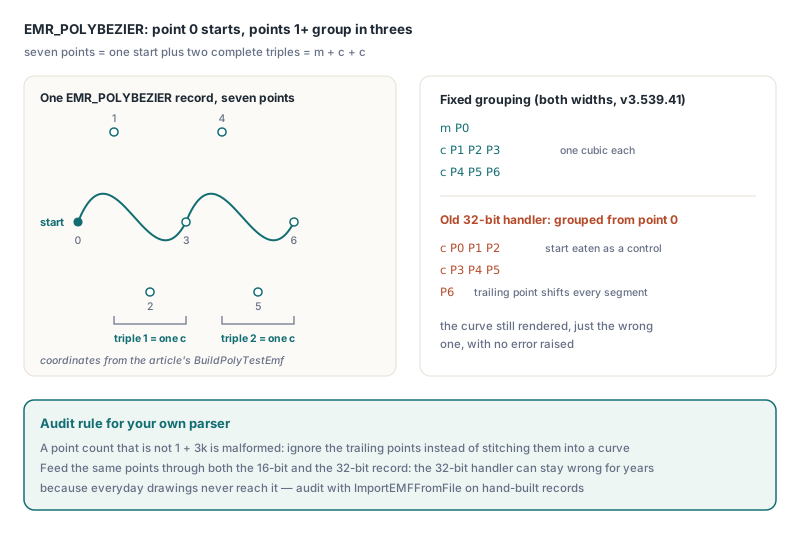
For your own parser: a count that is not 1 plus a multiple of 3 is malformed, and the trailing points should be ignored rather than stitched into a curve
PolyDraw: PT_CLOSEFIGURE is a flag, not a point type
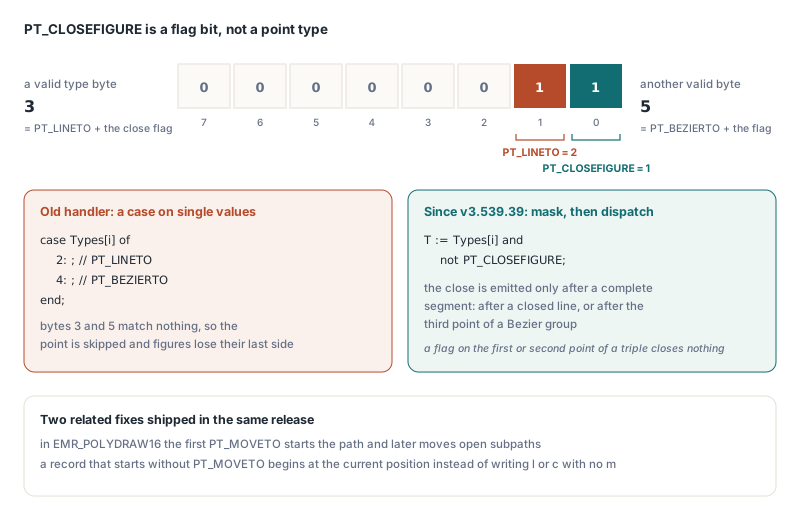
In EMR_POLYDRAW, PT_CLOSEFIGURE (value 1) is a bit that is combined with PT_LINETO (2) or PT_BEZIERTO (4), so a valid type byte can be 3 or 5. The point type is the byte with that bit masked off, and the flag means close the figure after the segment that ends on this point. The old PDFlibPas handler matched the byte against single values in a case statement, so points of type 3 and 5 matched nothing and were skipped entirely. A rectangle drawn with PolyDraw lost its closing side, and a Bezier triple whose last point carried the flag lost that point, which pushed every later triple out of step
Since v3.539.39 the type is read as Types[i] and not PT_CLOSEFIGURE, and the close is emitted only after a full segment: after the line for a closed PT_LINETO, and after the third point of a Bezier group. A malformed file that sets the flag on the first or second point of a triple does not close the figure early. Two related fixes shipped in the same release:
- Every
PT_MOVETOin the 16-bitEMR_POLYDRAW16restarted the whole path, so a record holding three figures kept only the last one; now the first move starts the path and later moves open subpaths - A PolyDraw record that does not begin with
PT_MOVETOstarts at the current position, as the record definition says, instead of writing anlorcoperator with no precedingm
Why must an EMF polyline never be filled in PDF?
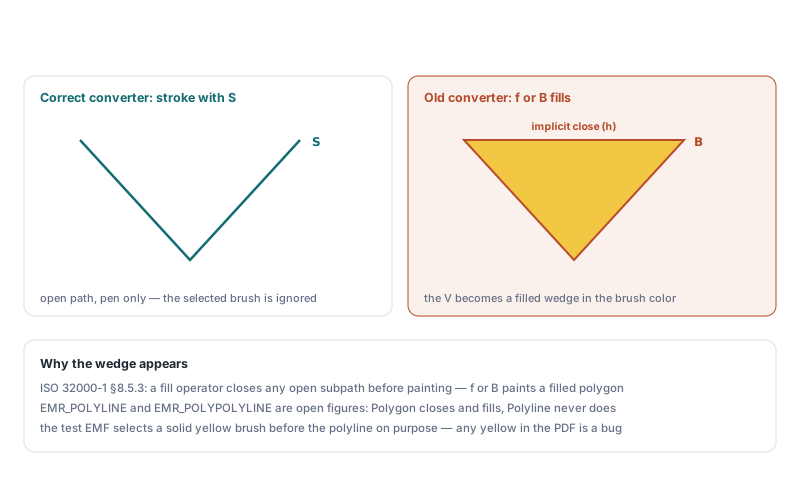
An EMF polyline must never be filled because EMR_POLYLINE and EMR_POLYPOLYLINE are open figures drawn with the pen only, and filling an open path in PDF closes it implicitly. ISO 32000-1 §8.5.3 states that the fill operators close any open subpath before painting it. A converter that emits B or f for a three-point polyline therefore paints a filled triangle in the current brush colour: the filled wedge under a chart trend line. Before v3.539.41, PDFlibPas filled both polyline widths with the brush, and the 32-bit record was also closed explicitly. Today both widths end with stroke only, and the GDI distinction is preserved: Polygon closes and fills, Polyline never does
PolylineTo starts at the current position
EMR_POLYLINETO draws from the current position through every point in the record, stays open, and leaves the current position at the last point. The old handler also contained a special case that turned the pen off when the first two points shared a y coordinate, and nothing ever turned it back on, so every later record in the file lost its outline. Pen state belongs to EMR_SELECTOBJECT and EMR_CREATEPEN; a drawing record handler has no business changing it. That special case was removed in v3.539.41, and the one-point form of the record no longer reads past its own points (fixed in v3.539.39)
PolyPolyline points start after the counts array
The 32-bit EMR_POLYPOLYLINE stores nPolys counts and then cptl points, and the points begin at byte offset 32 + nPolys * 4. The trap is in the RTL: the Windows unit declares TEMRPolyPolyline with aPolyCounts and aptl as one-element arrays, so aptl[0] is the first point only when nPolys is 1. Code that indexes aptl directly reads count values as coordinates for every multi-line record. The old PDFlibPas handler also sized its bounds check on that wrong layout, so valid multi-line records were rejected and single-line ones drew nothing. Since v3.539.41 PDFlibPas locates the point array from the computed offset, the way its PolyPolygon handler always did, and draws each polyline as its own open subpath with one stroke at the end. In v3.539.43 the 16-bit twin got the same treatment; it had been drawing segment by segment, which broke line joins and ignored a selected NULL_PEN
The default pen and brush, and path brackets
Two state rules round out the polyline fixes in v3.539.43:
- A fresh GDI device context already has
BLACK_PENandWHITE_BRUSHselected, so a metafile that draws without anyEMR_SELECTOBJECTstill draws black outlines; the converter used to start with no pen and no fill and wroten(end path, paint nothing) for such records - Inside a
BeginPath/EndPathbracket, aPolylineneither uses nor updates the current position, so it must open a new subpath at its first point instead of connecting to the previous figure, and nothing may be painted until the bracket is stroked or filled
Building an EMF test file with TMetafileCanvas
The quickest way to check a converter against these rules is to record the three risky calls into one enhanced metafile with TMetafileCanvas. The drawing below records the curves with a hollow brush and then selects a solid yellow brush for the polyline on purpose: a correct converter must ignore that brush for the polyline, so any yellow in the output PDF is a bug. PolyDraw has no TCanvas wrapper, so it is called through the Windows API with the canvas handle, using type bytes 3 and 5 to exercise the close flag
uses
  Winapi.Windows, System.Types, Vcl.Graphics;

procedure BuildPolyTestEmf(const FileName: string);
const
  // A closed square (3 = LINETO + CLOSEFIGURE), then a closed Bezier
  // figure whose last control triple ends with 5 = BEZIERTO + CLOSEFIGURE
  DrawPts: array[0..7] of TPoint = (
    (X: 300; Y: 40), (X: 380; Y: 40), (X: 380; Y: 120), (X: 300; Y: 120),
    (X: 420; Y: 120), (X: 440; Y: 40), (X: 520; Y: 40), (X: 540; Y: 120));
  DrawTypes: array[0..7] of Byte = (
    PT_MOVETO, PT_LINETO, PT_LINETO, PT_LINETO or PT_CLOSEFIGURE,
    PT_MOVETO, PT_BEZIERTO, PT_BEZIERTO, PT_BEZIERTO or PT_CLOSEFIGURE);
var
  Mf: TMetafile;
  Canvas: TMetafileCanvas;
begin
  Mf := TMetafile.Create;
  try
    Mf.Enhanced := True;
    Mf.Width := 600;
    Mf.Height := 260;
    Canvas := TMetafileCanvas.Create(Mf, 0);
    try
      Canvas.Pen.Color := clNavy;
      Canvas.Pen.Width := 2;
      Canvas.Brush.Style := bsClear;    // outlines only for the curves
      // Point 0 is the start; 1..3 and 4..6 are two cubic segments
      Canvas.PolyBezier([Point(20, 120), Point(60, 20), Point(100, 220),
        Point(140, 120), Point(180, 20), Point(220, 220), Point(260, 120)]);
      PolyDraw(Canvas.Handle, DrawPts[0], DrawTypes[0], Length(DrawPts));
      // Open V shape with a solid brush selected: stroked, never closed
      // into a yellow triangle
      Canvas.Brush.Style := bsSolid;
      Canvas.Brush.Color := clYellow;
      Canvas.Polyline([Point(20, 240), Point(120, 160), Point(220, 240)]);
    finally
      Canvas.Free;   // ends the recording
    end;
    Mf.SaveToFile(FileName);
  finally
    Mf.Free;
  end;
end;
Because these coordinates fit in a SmallInt, GDI will normally store the 16-bit variants. To reach the 32-bit handlers you need a producer that writes them, or records you build by hand. Hand-built files come with their own trap: VCL TMetafile.LoadFromStream treats the stream as an EMF only when the remaining length is strictly greater than the 108-byte TEnhMetaHeader. A minimal hand-written EMF with a short header, or an empty one that is exactly 108 bytes long, is taken for a WMF and rejected with "Metafile is not valid". Always write the full 108-byte header, including the extension fields, before your test records
Importing the EMF into a PDF with PDFlibPas
PDFlibPas imports an EMF with ImportEMFFromFile or ImportEMFFromStream, which return a non-zero image ID on success and 0 on failure. GeneralOptions = 0 keeps the vector path that this article is about; 1 rasterises the metafile to a bitmap instead. FontOptions = 1 adds the metafile fonts as non-embedded TrueType fonts. The stream variant rewinds the stream to position 0 before loading, so pass a stream that contains only the metafile
uses
  System.SysUtils, PDFlibrary;

procedure EmfToPdf(const EmfFile, PdfFile: WideString);
var
  PDF: TPDFlib;
  ImageID: Integer;
  PageOps: AnsiString;
begin
  PDF := TPDFlib.Create;
  try
    PDF.SetOrigin(1);              // top-left origin for DrawImage
    PDF.SetMeasurementUnits(0);    // points
    // FontOptions 1 = add fonts as non-embedded TrueType
    // GeneralOptions 0 = vector import, 1 = bitmap
    ImageID := PDF.ImportEMFFromFile(EmfFile, 1, 0);
    if ImageID = 0 then
      raise Exception.Create('The metafile could not be imported');
    PDF.SelectImage(ImageID);
    // For an EMF, ImageWidth / ImageHeight are the frame size in points
    PDF.DrawImage(36, 36, PDF.ImageWidth, PDF.ImageHeight);

    // The page only invokes the imported form: q ... cm /Name Do Q
    PageOps := PDF.GetPageContentToString;
    if Pos(AnsiString(' Do'), PageOps) = 0 then
      raise Exception.Create('Expected a form XObject invocation');

    if PDF.SaveToFile(PdfFile) <> 1 then
      raise Exception.Create('The PDF could not be saved');
  finally
    PDF.Free;
  end;
end;
A vector EMF import becomes a form XObject, so GetPageContentToString returns only the save, transform, Do and restore sequence. The m, l, c, h and S operators produced from the Poly* records live in the form XObject stream, which is compressed. To audit them, decompress the saved file in a PDF object inspector and read the form stream: for the test file above you should see the polyline end in S with no h before it, an h at each close flag in the PolyDraw figures, and no f or B on any of these subpaths. DrawImage also scales an imported EMF uniformly by the smaller of Width and Height, so the drawing keeps its aspect ratio even if the box you pass does not match it
For Free Pascal targets, see how the PDFlibPas EMF vector importer builds under Free Pascal; the record semantics are the same wherever the importer compiles
How should an EMF parser treat point counts from the file?
An EMF parser should treat every point count as untrusted input and check it against the record size before copying a single point. EnumEnhMetaFile only guarantees that each record nSize stays inside the file. It does not check that cptl agrees with nSize, so a handler that copies cptl points with Move will read the following records, or past the end of the metafile, when the count is forged or corrupt. Since v3.539.39 PDFlibPas checks fixed header plus count times bytes per point against nSize for PolyDraw, PolyBezier, PolyBezierTo, Polyline, PolylineTo and Polygon in both widths, with one extra byte per point for PolyDraw type bytes. For the PolyPoly records the per-figure counts must also add up to no more than the declared total, and zero-point figures are skipped
The same check is short enough to copy into your own parser. This version validates a 32-bit EMR_POLYPOLYLINE and returns a pointer to its real point array:
uses
  Winapi.Windows;

// Returns nil unless the record really holds the points it declares.
// Points start after the counts array: 32 + nPolys * 4 bytes in, not at
// aptl[0], which the RTL declares as a one-element array
function PolyPolylinePoints(Rec: PEnhMetaRecord): PPoint;
var
  P: PEMRPolyPolyline;
  Count: PDWORD;
  PointsOffset, Total: Int64;
  I: Cardinal;
begin
  Result := nil;
  if (Rec^.iType <> EMR_POLYPOLYLINE) or (Rec^.nSize < 32) then
    Exit;
  P := PEMRPolyPolyline(Rec);
  if P^.nPolys = 0 then
    Exit;
  PointsOffset := 32 + Int64(P^.nPolys) * SizeOf(DWORD);
  if PointsOffset + Int64(P^.cptl) * SizeOf(TPoint) > Rec^.nSize then
    Exit;                         // forged or truncated count
  Total := 0;
  Count := @P^.aPolyCounts[0];    // walk by pointer: [0..0] trips range checks
  for I := 1 to P^.nPolys do
  begin
    Inc(Total, Count^);
    Inc(Count);
  end;
  if Total > P^.cptl then
    Exit;                         // figures claim more points than exist
  Result := PPoint(NativeUInt(Rec) + NativeUInt(PointsOffset));
end;
The points-fit test runs first, so the counts array is known to be inside the record before the loop walks it. The arithmetic is Int64 because nPolys * 4 and cptl * 8 computed in 32 bits can wrap around and pass the comparison
Quick reference: EMF Poly* rules for EMF to PDF conversion
EMR_POLYBEZIER: point 0 is the start point; group from point 1 in threes; fixed for the 32-bit record in v3.539.41EMR_POLYLINE/EMR_POLYPOLYLINE: open figures, stroke withS, neverh,forB, because PDF fill closes open subpathsEMR_POLYLINETO: start at the current position, stay open, update the current position, never touch pen state- 32-bit
EMR_POLYPOLYLINE: points start at byte32 + nPolys * 4, not ataptl[0] EMR_POLYDRAW: maskPT_CLOSEFIGUREoff before dispatching, close after the completed segment, start at the current position when the first point is notPT_MOVETO- Default device context state is
BLACK_PENplusWHITE_BRUSH; v3.539.43 and later honour it - Inside
BeginPath/EndPath, each polyline opens its own subpath and nothing is painted until the bracket is used - Validate every
cptl/cptsagainstnSizein 64-bit arithmetic before copying points - Hand-built test EMFs need the full 108-byte header, or
TMetafile.LoadFromStreamreads them as WMF
If your reports go through a different component, the same record semantics apply; HotPDF EMF and WMF vector import covers how that component turns gradient and hatch brushes into PDF patterns, and vector graphics, shaders and gradients in PDFlibPas covers drawing the same shapes directly with the library API instead of through a metafile
PDFlibPas v3.539.43 or later includes every rule above. Details and trial downloads are on the PDFlibPas Delphi PDF library product page