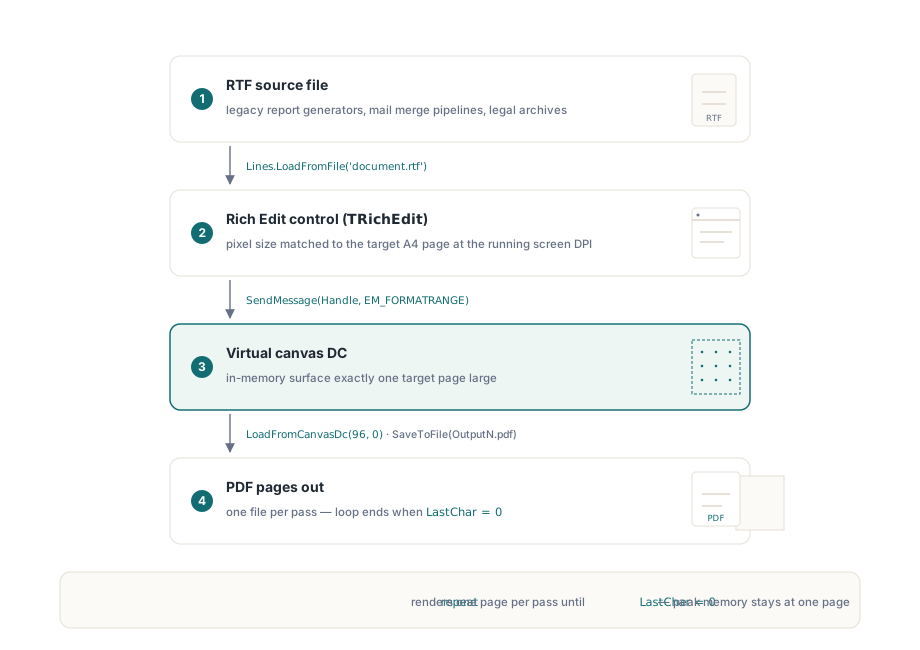
RTF gibt es lange genug, dass es an Orten auftaucht, die niemand eingeplant hat: alte Berichtsgeneratoren, Serienbrief-Pipelines, juristische Dokumentenarchive aus der Zeit vor modernen Textverarbeitungen. Es on-the-fly nach PDF zu konvertieren ist eine wiederkehrende Anforderung, und der Ansatz, der unter Windows tatsächlich funktioniert, ist kein dedizierter RTF-Parser, sondern der Rendering-Pfad, den Windows selbst bereits über TRichEdit und EM_FORMATRANGE bereitstellt. Die DLL-Edition der losLab PDF Library stellt einen virtuellen Gerätekontext bereit, der sich direkt in diese Pipeline einfügt
Der Mechanismus: virtueller DC und EM_FORMATRANGE
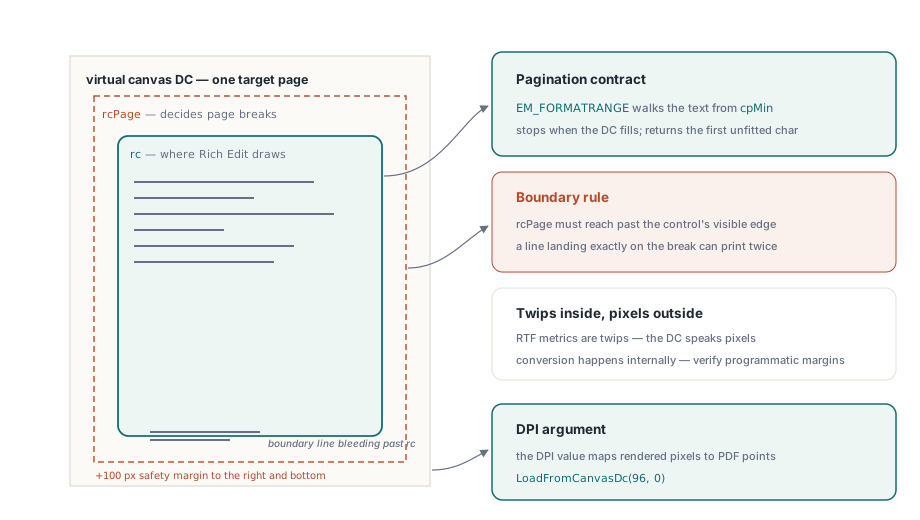
Rich-Edit-Steuerelemente können ihren Inhalt für jeden Gerätekontext paginieren, nicht nur für einen physischen Drucker. Die Nachricht EM_FORMATRANGE weist das Steuerelement an, einen Zeichenbereich in einen gegebenen DC zu setzen, und liefert die Position des letzten Zeichens zurück, das es unterbringen konnte. Ruft man sie wiederholt auf und rückt cpMin jedes Mal vor, erhält man seitenweise Ausgabe. GetCanvasDC der losLab PDF Library liefert einen In-Memory-DC in den von Ihnen angegebenen Seitenmaßen; nach dem Rendern einer Seite hinein erfasst LoadFromCanvasDc das Ergebnis als PDF-Seite. Das ist die ganze Pipeline
Eine Sache muss von Anfang an stimmen: Das TRichEdit-Steuerelement muss auf die Zielseite dimensioniert sein. Ist das Steuerelement kleiner oder größer als die DC-Maße, deckt sich die Paginierung nicht mit dem, was im PDF landet. Für A4-Ausgabe ist der Standardansatz, die Pixelmaße des Steuerelements vor dem Laden der RTF-Datei auf 210 x 297 mm bei 96 DPI zu setzen, mit denselben Skalierungshelfern, mit denen Sie auch den DC dimensionieren
Delphi-Implementierung
Das Folgende verwendet die Import-Unit PDFlibAX_TLB, die die DLL-Edition der Bibliothek umschließt. Das Formular beherbergt ein TRichEdit und eine Schaltfläche; der OnCreate-Handler des Formulars dimensioniert das Steuerelement und lädt das RTF, und der Schaltflächenklick treibt die Konvertierungsschleife an
unit MainUnit;

interface

uses
  Windows, Messages, SysUtils, Classes, Graphics, Controls, Forms,
  Dialogs, StdCtrls, ComCtrls, PDFlibAX_TLB, ActiveX;

type
  TForm1 = class(TForm)
    RichEdit1: TRichEdit;
    Button1: TButton;
    procedure FormCreate(Sender: TObject);
    procedure Button1Click(Sender: TObject);
  private
    function PrintRtfBox(hDc: HDC; rtfBox: TRichEdit;
      FirstChar: Integer): Integer;
  end;

var
  Form1: TForm1;
  PdfDoc: TPDFLibrary;

implementation

{$R *.dfm}

procedure TForm1.FormCreate(Sender: TObject);
begin
  PdfDoc := TPDFLibrary.Create(Self);
  // Steuerelement auf A4 bei Bildschirm-DPI einstellen, damit die Paginierung zum DC passt
  RichEdit1.Width  := Round(ScaleX(210, mmPixel));
  RichEdit1.Height := Round(ScaleY(297, mmPixel));
  RichEdit1.Lines.LoadFromFile(
    ExtractFilePath(Application.ExeName) + 'document.rtf');
end;

procedure TForm1.Button1Click(Sender: TObject);
var
  Dc: HDC;
  PageNumber, LastChar, PdfDocId: Integer;
begin
  PageNumber := 1;
  LastChar   := 0;
  repeat
    // Virtuellen DC in A4-Größe beschaffen
    Dc := PdfDoc.GetCanvasDC(
      Round(ScaleX(210, mmPixel)),
      Round(ScaleY(297, mmPixel)));
    // Die nächste Seite des RTF-Inhalts in den DC rendern
    LastChar := PrintRtfBox(Dc, RichEdit1, LastChar);
    // Den DC-Inhalt als PDF-Dokument erfassen
    PdfDoc.LoadFromCanvasDc(96, 0);
    PdfDocId := PdfDoc.SelectedPdfDocument;
    PdfDoc.SaveToFile(
      ExtractFilePath(Application.ExeName)
      + 'Output' + IntToStr(PageNumber) + '.pdf');
    PdfDoc.RemovePdfDocument(PdfDocId);
    Inc(PageNumber);
  until LastChar = 0;
end;

function TForm1.PrintRtfBox(hDc: HDC; rtfBox: TRichEdit;
  FirstChar: Integer): Integer;
var
  RcDrawTo, RcPage: TRect;
  Fr: TFormatRange;
  NextCharPosition: Integer;
begin
  RcPage.Left   := 0;
  RcPage.Top    := 0;
  RcPage.Right  := rtfBox.Left + rtfBox.Width  + 100;
  RcPage.Bottom := rtfBox.Top  + rtfBox.Height + 100;

  RcDrawTo.Left   := rtfBox.Left;
  RcDrawTo.Top    := rtfBox.Top;
  RcDrawTo.Right  := rtfBox.Left + rtfBox.Width;
  RcDrawTo.Bottom := rtfBox.Top  + rtfBox.Height;

  Fr.hdc         := hDc;
  Fr.hdcTarget   := hDc;
  Fr.rc          := RcDrawTo;
  Fr.rcPage      := RcPage;
  Fr.chrg.cpMin  := FirstChar;
  Fr.chrg.cpMax  := -1;

  NextCharPosition :=
    SendMessage(rtfBox.Handle, EM_FORMATRANGE, 1, LPARAM(@Fr));
  if NextCharPosition < Length(rtfBox.Text) then
    Result := NextCharPosition
  else
    Result := 0;  // signalisiert die letzte Seite
end;

end.
Was die Schleife tut
PrintRtfBox füllt die TFormatRange-Struktur und übergibt sie per SendMessage an das Rich-Edit-Steuerelement. Das Steuerelement rendert Zeichen ab cpMin, hält an, wenn der DC voll ist, und liefert die Position des ersten Zeichens zurück, das nicht mehr hineinpasste. Erreicht oder überschreitet der Rückgabewert die Gesamttextlänge, wurde jedes Zeichen gerendert und die Funktion gibt null zurück, was die repeat...until-Schleife beendet
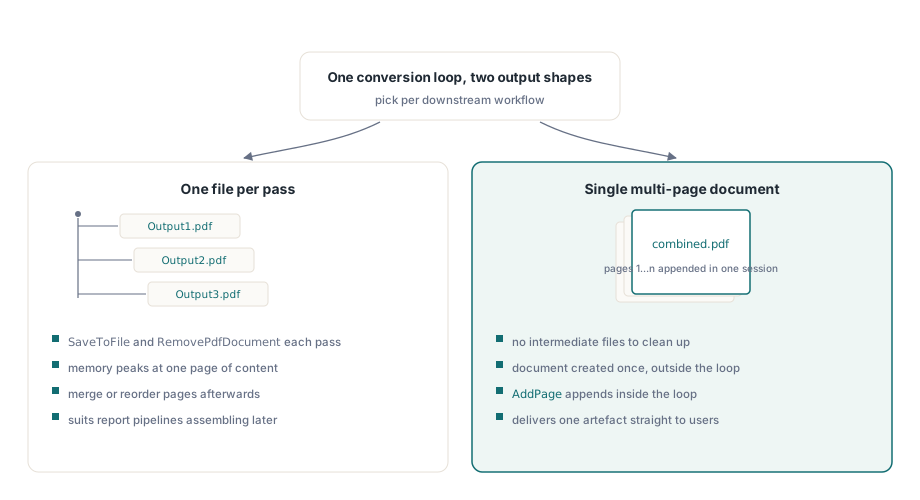
Jede Iteration erzeugt eine PDF-Datei namens Output1.pdf, Output2.pdf und so weiter. Wollen Sie stattdessen ein einzelnes mehrseitiges Dokument, lässt Sie die Page-Append-API der Bibliothek die Seiten nachträglich zusammensetzen, oder Sie strukturieren die Schleife um und rufen AddPage innerhalb einer einzigen Dokumentsitzung auf. Das obige Muster — pro Iteration SaveToFile gefolgt von RemovePdfDocument — begrenzt den Spitzenspeicher auf den Inhalt einer Seite, was bei sehr langen RTF-Dateien zählt
Dimensionierungsdetails, die zu Stolperfallen werden
Das 96-DPI-Argument an LoadFromCanvasDc teilt der Bibliothek mit, bei welcher Bildschirmauflösung der DC gerendert wurde, damit sie die korrekte Punkt-zu-Pixel-Abbildung für die PDF-Seite berechnen kann. Stimmt das nicht, erscheint Text in der Ausgabe in falscher Größe, obwohl das Bild am Bildschirm korrekt aussieht
Die zu RcPage.Right und RcPage.Bottom addierten +100 sind ein kleiner Rand jenseits der sichtbaren Kante des Steuerelements. Rich Edit nutzt das rcPage-Rechteck, um zu entscheiden, wo Seiten getrennt werden; ohne den Rand kann eine Zeile, die exakt auf die Grenze fällt, auf zwei Seiten dupliziert werden. Es ist keine magische Konstante: Der Wert muss groß genug sein, dass die Seitengrenze sauber innerhalb des Layoutbereichs des Steuerelements liegt statt auf dem letzten Pixel
Schließlich muss das Steuerelement bereits an ein sichtbares Formularfenster gebunden sein, wenn FormCreate läuft, damit sein Fensterhandle vor dem ersten SendMessage-Aufruf gültig ist. Ein zur Laufzeit dynamisch erzeugtes TRichEdit braucht einen expliziten HandleNeeded-Aufruf vor Beginn der Renderschleife, falls das Formular noch nicht angezeigt wurde
Umgang mit Schriften und RTF-Funktionen
Weil das Rendern von der Windows-Rich-Edit-Engine erledigt wird, folgt die Schriftersetzung denselben Regeln wie bei Anzeige und Druck. In der RTF-Datei referenzierte Schriften, die auf der Maschine installiert sind, rendern originalgetreu; fehlende Schriften werden stillschweigend ersetzt, was Zeilenlängen und Paginierung verschieben kann. Für Batch-Konvertierung in der Produktion lohnt sich ein expliziter Test: Laden Sie ein Dokument mit jeder Schriftart, die Ihre RTF-Quellen verwenden, und bestätigen Sie, dass die Seitenzahl der Ausgabe dem entspricht, was Sie aus einer manuellen Druckvorschau erwarten
Tabellen, eingebettete Bilder und die meisten Rich-Text-Formatierungsfunktionen funktionieren ohne zusätzliche Behandlung, weil Rich Edit sie nativ rendert. Der eine Bereich, der überraschen kann, ist Text mit benutzerdefinierten Absatzabständen oder Erstzeileneinzügen in Twips: Das interne Koordinatensystem von Rich Edit arbeitet in Twips (1/1440 Zoll), während die in TFormatRange gesetzten DC-Koordinaten Pixel bei der aktuellen DPI sind. Das Steuerelement rechnet intern um, aber wenn Sie das RTF programmatisch konstruieren, sollten Sie prüfen, dass Ihre Randwerte in der richtigen Einheit vorliegen
DPI-Bewusstsein und High-DPI-Displays
Auf einem Display mit 150 % Skalierung (144 DPI) liefert ScaleX(210, mmPixel) eine größere Pixelzahl als bei 100 %. Die PDF Library merkt sich die an GetCanvasDC übergebenen Pixelmaße und nutzt das DPI-Argument in LoadFromCanvasDc, um daraus die physische Seitengröße im PDF zurückzurechnen. Solange der übergebene DPI-Wert der DPI entspricht, mit der Ihre Anwendung läuft, ist die ausgegebene Seitengröße unabhängig von der Displayskalierung korrekt
Ist Ihre Anwendung nicht DPI-bewusst (der alte Standard), skaliert Windows den Bildschirm-DC, und Ihre Pixelberechnungen sind auf High-DPI-Maschinen falsch. Die einfachste Lösung ist, DPI-Bewusstsein im Anwendungsmanifest zu deklarieren; die Anwendung erhält dann echte Gerätepixel, und die an LoadFromCanvasDc übergebene 96 sollte durch die tatsächliche Display-DPI ersetzt werden, ermittelt über GetDeviceCaps(GetDC(0), LOGPIXELSX). Das Codebeispiel oben kodiert 96 fest, weil das für eine 100-%-Skalierungsumgebung passt und das Beispiel kurz hält
Ausgabestruktur: eine Datei pro Seite oder ein kombiniertes Dokument
Die Schleife oben schreibt jede Seite in eine separate PDF-Datei. Ob das gewünscht ist, hängt von der nachgelagerten Verwendung ab. Berichtsgenerierungssysteme brauchen oft Einzelseiten, weil sie das Enddokument später durch Zusammenführen oder Umsortieren von Seiten montieren. Wollen Sie von Anfang an ein einzelnes PDF, lässt Sie die Bibliothek ein Dokument mit mehreren Seiten in einer Sitzung erzeugen: das Dokument einmal außerhalb der Schleife anlegen, in der Schleife die Seitenhinzufüge-Methode statt SaveToFile aufrufen und das vollständige Dokument nach Schleifenende speichern. Das vermeidet die Zwischendateien und ist die richtige Struktur für die meisten Einzeldokument-Konvertierungsszenarien
Für große RTF-Dateien lohnt es sich, der Schleife eine Fortschrittsanzeige hinzuzufügen, denn die Konvertierungsrate ist grob proportional zur Seitenzahl, und ein 200-Seiten-Dokument kann ein paar Sekunden dauern. Die repeat...until-Struktur ist leicht zu erweitern: Verfolgen Sie den Zeichenoffset in einer Fortschrittsbalken-Aktualisierung nach jeder Iteration, mit LastChar geteilt durch die Gesamtzeichenzahl aus RichEdit1.GetTextLen
Die hier gezeigten Methoden GetCanvasDC und LoadFromCanvasDc sind Teil der losLab PDF Library für Delphi und C++Builder