Excel bietet zwei Dinge an, die beide „Passwort“ heißen, und nur eines davon ist Verschlüsselung. Das Öffnungspasswort schließt eine echte Chiffre auf: Ohne es lässt sich die Datei überhaupt nicht lesen. Die Schutzpasswörter für Arbeitsblatt und Arbeitsmappe tun nichts dergleichen. Sie setzen ein Flag, das ein kooperierender Editor zu respektieren bereit ist, und eine Arbeitsmappe, die nichts als dieses Flag trägt, ist ein gewöhnliches lesbares Zip, in dem die Daten im Klartext liegen. Wählen Sie das falsche, und Sie liefern eine Gehaltsabrechnung aus, die in Excel gesperrt aussieht und sich in jedem Texteditor lesen lässt
Der Beweis dauert zehn Sekunden. Benennen Sie eine geschützte .xlsx in .zip um, öffnen Sie sie in einem beliebigen Archivwerkzeug und schauen Sie in xl/worksheets/sheet1.xml. Stehen die Zellwerte dort in reinem UTF-8, ist die Datei nicht verschlüsselt, gleichgültig wie viele Passwortabfragen Excel anzeigt, wenn jemand versucht, eine Zelle zu bearbeiten. Diese Lücke überlebt jahrelang in Teams, die annehmen, Blattschutz sei Vertraulichkeit, und sie kommt gewöhnlich an dem Tag ans Licht, an dem eine Sicherheitsprüfung genau diese Umbenennung durchführt
HotXLS ist eine native Tabellenkalkulationsbibliothek für Delphi und C++Builder, und sie hält die beiden Funktionen auf entgegengesetzten Seiten dieser Linie. Arbeitsblatt- und Arbeitsmappenschutz sind Bearbeitungsbeschränkungen, hinterlegt mit einem bewusst schwachen Legacy-Hash. SaveAsEncrypted erzeugt ein AES-verschlüsseltes Paket, das nichts außer dem Passwort öffnet. Die folgenden Abschnitte behandeln, was dieser Aufruf schreibt, die Asymmetrie, um die Sie herum planen müssen (HotXLS schreibt verschlüsselte Dateien, kann sie aber nicht zurücklesen), und wie sich der ältere XLS-Pfad unterscheidet
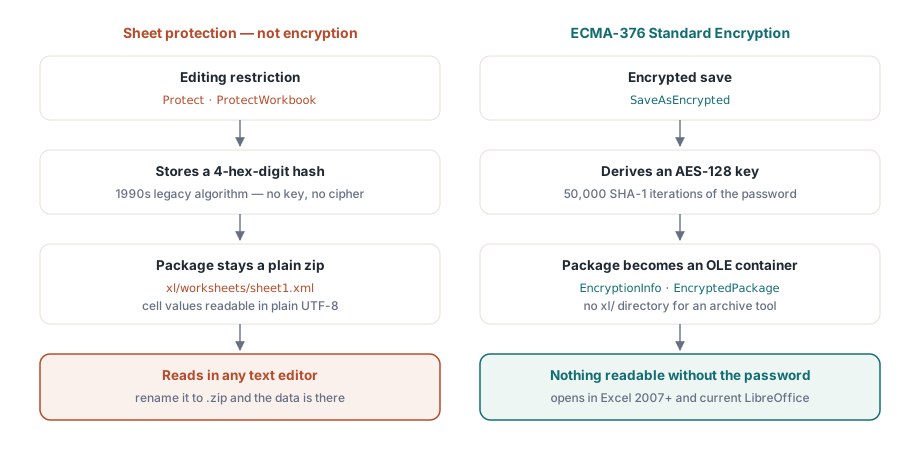
Warum Blattschutz keine Verschlüsselung ist
Die Protect-Methoden auf Blättern und ProtectWorkbook auf der Arbeitsmappe speichern einen 4-stelligen Hex-Hash des Passworts. Das ist der Legacy-Algorithmus, den OOXML und BIFF beide vom Excel der 1990er geerbt haben, und die Formatdokumentation behauptet nie, dass er mehr leistet, als versehentliche Bearbeitungen zu stoppen. Das Paket bleibt ein gewöhnliches lesbares Zip: Zelldaten, Formeln und Shared Strings alle im Klartext-XML. Die Voreinstellung macht es schlimmer, nicht besser. Jede Zelle beginnt mit Locked=True, sodass ein Aufruf von Protect, ohne zuvor einen Eingabebereich zu entsperren, das ganze Blatt gegen Bearbeitung einfriert und dabei jeden Wert offen sichtbar lässt
Nichts davon macht den Schutz nutzlos. Benutzer in bearbeitbare Bereiche zu lenken und ein Layout für den Druck zu stabilisieren sind echte Aufgaben, behandelt in unserem Artikel über Arbeitsblattschutz und Seiteneinrichtung. Aber das sind Aufgaben der Benutzbarkeit. In dem Moment, in dem die Anforderung Vertraulichkeit lautet, ist die einzige API, die sie beantwortet, SaveAsEncrypted
Was SaveAsEncrypted tatsächlich schreibt
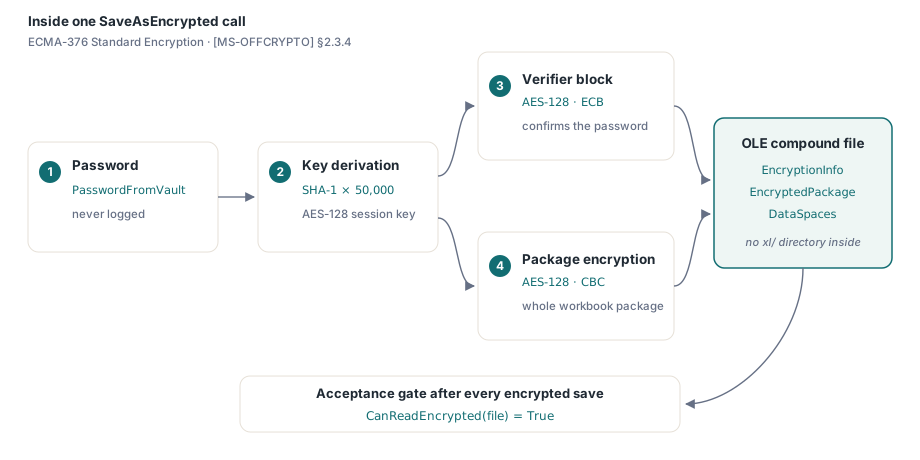
Die Implementierung folgt der ECMA-376 Standard Encryption, spezifiziert in [MS-OFFCRYPTO] Abschnitt 2.3.4. Das Passwort durchläuft 50.000 Iterationen von SHA-1, um einen AES-128-Schlüssel abzuleiten. Ein Verifier-Block, verschlüsselt mit AES-128 im ECB-Modus, lässt einen Konsumenten das Passwort bestätigen, bevor er irgendetwas entschlüsselt, und das gesamte Arbeitsmappenpaket wird dann mit AES-128 im CBC-Modus verschlüsselt. Was auf der Platte landet, ist überhaupt kein Zip. Es ist eine OLE-Verbunddatei mit den Streams EncryptionInfo, EncryptedPackage und DataSpaces, ohne ein xl/-Verzeichnis, das ein Archivwerkzeug auflisten könnte, weshalb der Umbenennungstest nun nichts Lesbares mehr zutage fördert. Excel 2007 und neuer öffnet sie allein mit dem Passwort, und aktuelles LibreOffice liest Standard Encryption ebenfalls
var
  Book: TXLSXWorkbook;
  Sheet: TXLSXWorksheet;
  rc: Integer;
begin
  Book := TXLSXWorkbook.Create;
  try
    Sheet := Book.Sheets.Add('Payroll');
    Sheet.Cells[1, 1].Value := 'Employee';
    Sheet.Cells[1, 2].Value := 'Net pay';
    Sheet.Cells[2, 1].Value := 'A. Garcia';
    Sheet.Cells[2, 2].Value := 4815.16;

    rc := Book.SaveAsEncrypted('payroll-2026-06.xlsx', PasswordFromVault);
    if rc <> 1 then
      raise Exception.CreateFmt('Encrypted save failed (rc=%d)', [rc]);
  finally
    Book.Free;
  end;
end;
Behandeln Sie die Passwortvariable mit derselben Sorgfalt wie einen Connection-String. Holen Sie sie im letzten Moment aus einem Vault oder einem Dienst für generierte Geheimnisse, protokollieren Sie sie nie, und schreiben Sie sie nie in die Arbeitsmappe selbst. Die Prüfung des Rückgabecodes ist keine optionale Zeremonie. Ein Verschlüsselungs-Speichervorgang, der auf halbem Weg fehlschlägt, muss die Auslieferung abbrechen, denn der einzige Fallback, den der aufrufende Code anbieten kann, ist eine unverschlüsselte Kopie, und diese Kopie ist genau der Vorfall, den diese Funktion verhindern soll
Es gibt außerdem einen maschinell prüfbaren Abnahmetest, der fast nichts kostet: Rufen Sie CanReadEncrypted auf der gerade geschriebenen Datei auf. Es liefert nur dann true, wenn die Ausgabe wirklich ein Verschlüsselungscontainer ist, sodass eine Assertion darauf nach jedem verschlüsselten Speichern die Regression fängt, die am meisten zählt, einen Codepfad, der stillschweigend auf ein einfaches SaveAs zurückgefallen ist, und zwar in dem Moment, in dem sie passiert, statt Wochen später im Posteingang eines Kunden. Das letzte Wort gehört weiterhin einem manuellen Öffnen in Excel mit dem echten Passwort während der Release-Tests
Nur-Schreiben per Design: Umgang mit EXlsxEncryptionNotImplemented
Hier ist die Asymmetrie, die Ihre Pipeline-Architektur prägen sollte: HotXLS verschlüsselt beim Speichern, entschlüsselt aber nicht beim Öffnen. OpenEncrypted löst EXlsxEncryptionNotImplemented aus, wenn es auf ein tatsächlich verschlüsseltes Paket zeigt; bei einer gewöhnlichen Arbeitsmappe fällt es einfach zu einem normalen Open durch. Die begleitende Sonde CanReadEncrypted erkennt den OLE-Verschlüsselungscontainer günstig, sodass Eingangscode solche Dateien weiterleiten kann, ohne die Exception auszulösen:
var
  Book: TXLSXWorkbook;
begin
  Book := TXLSXWorkbook.Create;
  try
    if Book.CanReadEncrypted(FileName) then
    begin
      // Verschlüsselter Container: HotXLS kann ihn nicht entschlüsseln.
      Writeln(FileName + ': needs manual decryption in Excel first');
      Exit;
    end;
    try
      Book.OpenEncrypted(FileName, '');   // unverschlüsselte Dateien fallen zu Open durch
      Writeln(FileName + ': opened, ' + IntToStr(Book.Sheets.Count) + ' sheet(s)');
    except
      on EXlsxEncryptionNotImplemented do
        Writeln(FileName + ': encrypted - routed to manual queue');
    end;
  finally
    Book.Free;
  end;
end;
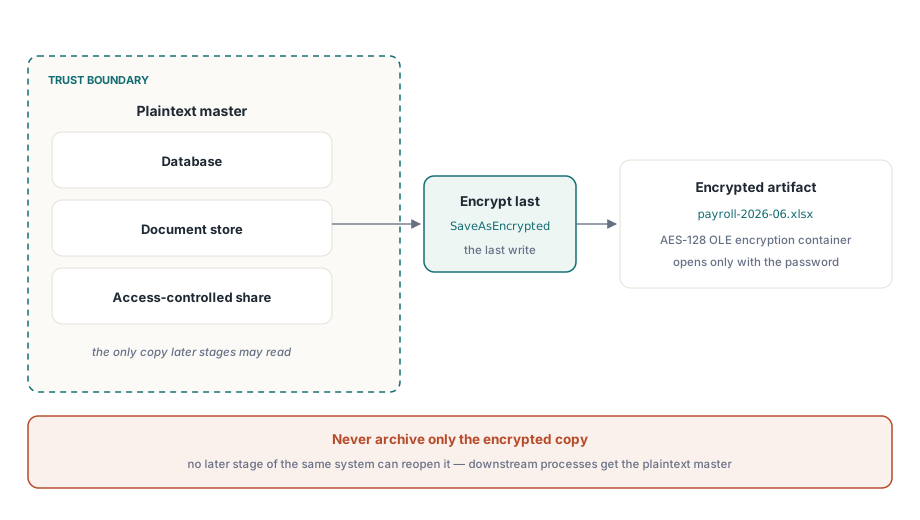
Diese Asymmetrie hat eine klare architektonische Lesart: Verschlüsseln Sie an der Auslieferungskante, zuletzt. Bewahren Sie das Klartext-Master innerhalb Ihrer Vertrauensgrenze auf, in einer Datenbank, einem Dokumentenspeicher oder einer zugriffskontrollierten Freigabe, und erzeugen Sie die verschlüsselte Kopie als letzten Schritt, bevor die Datei das System verlässt. Eine Pipeline, die nur die verschlüsselte Ausgabe archiviert, hat sich aus ihren eigenen Daten ausgesperrt, denn keine spätere Stufe desselben Systems kann diese Dateien wieder öffnen. Wenn ein nachgelagerter HotXLS-Prozess die Arbeitsmappe erneut braucht, geben Sie ihm das Klartext-Master, nie das Auslieferungsartefakt
AES-128 Standard Encryption und die AES-256-Compliance-Linie
Die Dateiverschlüsselung von Office gibt es in zwei Generationen. Standard Encryption, die HotXLS schreibt, verwendet AES-128 mit SHA-1-Schlüsselableitung. Agile Encryption kam später und wechselt zu AES-256 mit SHA-512 und einem anderen, per XML beschriebenen Schlüsselcontainer. Beide öffnen sich in Excel transparent, und AES-128 ist rechnerisch weiterhin solide, um eine Datei auf dem Weg zu einem Kunden zu schützen
Der Unterschied hört an dem Tag auf, akademisch zu sein, an dem ein Sicherheitsfragebogen nach „AES-256-Verschlüsselung von Dateien im Ruhezustand“ fragt. Standard Encryption erfüllt diese Linie nicht, ganz gleich wie stark das Passwort ist, und kein Parameter von SaveAsEncrypted ändert den Algorithmus, den es ausgibt. Benennen Sie das Profil in Ihrer Sicherheitsdokumentation daher präzise: AES-128, ECMA-376 Standard Encryption, SHA-1-Schlüsselableitung mit 50.000 Iterationen. Eine Aussage, die eine Prüfung übersteht, ist mehr wert als eine optimistische, die unter einem Audit zusammenbricht
Die Legacy-XLS-Route: RC4 hinaus, RC4 und XOR wieder hinein
Die BIFF-Fassade hat die entgegengesetzte Form. Ihre Verschlüsselung ist älter und schwächer, aber der Roundtrip ist vollständig: Was sie schreibt, kann sie auch zurücklesen. Wird EncryptionPassword vor SaveAs gesetzt, entsteht über den BIFF-FilePass-Mechanismus eine RC4-verschlüsselte .xls, und Open mit einem Passwortparameter liest alle drei Legacy-Schemata, RC4, RC4 CryptoAPI und die uralte XOR-Verschleierung:
var
  Writer, Reader: IXLSWorkbook;   // Interface-Referenzen: kein manuelles Free
begin
  Writer := TXLSWorkbook.Create;
  Writer.Sheets.Add.Cells.Item[1, 1].Value := 'Confidential';
  Writer.EncryptionPassword := 'S3cret!';
  Writer.SaveAs('confidential.xls');

  Reader := TXLSWorkbook.Create;
  if Reader.Open('confidential.xls', 'S3cret!') > 0 then
    Writeln(Reader.Sheets[1].Cells.Item[1, 1].Value);  // Einträge sind 1-basiert
end;
RC4 ist veraltete Kryptographie und sollte nie Daten schützen, die heute von Bedeutung sind; sein einziger verbleibender Wert ist die Interoperabilität mit Systemen, die noch .xls austauschen. Die Leseseite hingegen verdient sich ihren Platz in der Migrationsarbeit. Eine passwortgeschützte Legacy-Datei öffnet sich mit Open(FileName, Password), wechselt in das OOXML-Modell und sichert sich über den AES-Pfad neu ab, ein Einweg-Upgrade, das ohne Excel irgendwo in der Schleife läuft. Für verschlüsselte Auslieferungen in großen Mengen gelten die speicherseitigen Durchsatzhinweise in unserem Artikel über Streaming-Schreibvorgänge für Server-Batch-Jobs für die Phase des Inhaltsaufbaus, die vor der Verschlüsselung stattfindet
Verschlüsselung und Schutz sind keine Rivalen
Ein weiterer Punkt, den es zu klären lohnt, denn er kommt in dem Moment auf, in dem jemand die Warnung am Anfang dieser Seite als „Schutz ist wertlos“ liest. Das ist er nicht. Verschlüsselung und Schutz beantworten verschiedene Fragen, und sie lassen sich sauber stapeln. Die Verschlüsselung entscheidet, wer die Datei öffnen kann; der Schutz entscheidet, was ein Leser, der bereits drinnen ist, ändern darf. Eine Gehaltsabrechnungs-Auslieferung kann vernünftigerweise beides tun: das Paket verschlüsseln, damit nur der Inhaber des Passworts es sieht, und dann die Formelzellen sperren, damit der Empfänger filtern und sortieren, aber nicht stillschweigend die Berechnungen umschreiben kann. Der Fehler ist nie, Schutz hinzuzufügen. Der Fehler ist, sein Vorhandensein für Verschlüsselung einstehen zu lassen, wenn die Anforderung Vertraulichkeit war
Die Verwahrungsseite hat kein Sicherheitsnetz, und das ist beabsichtigt. Die Schlüsselableitung mit 50.000 Iterationen existiert, um das Raten teuer zu machen, und nichts in der Datei hinterlegt das Geheimnis. Ein verlorenes Passwort bedeutet verlorene Daten. Erzeugen, übermitteln und speichern Sie diese Passwörter mit derselben Disziplin, die Sie auf Datenbank-Zugangsdaten anwenden, und die Verschlüsselung erfüllt ihren Teil
Echte Dateiverschlüsselung ist in HotXLS ein Aufruf. Die Disziplin lebt in allem um den Aufruf herum: Passwortverwahrung, die Nur-Schreiben-Grenze, die HotXLS davon abhält, seine eigene Ausgabe wieder zu öffnen, und eine Algorithmus-Aussage, die Sie in einem Audit verteidigen können. SaveAsEncrypted und der Legacy-Roundtrip werden mit der HotXLS Delphi Component ausgeliefert und laufen nativ in Delphi- und C++Builder-Prozessen ohne Excel-Automatisierung irgendwo im Pfad