Text, Bilder und Schriften aus einem vorhandenen PDF zu ziehen, klingt nach einem gelösten Problem, bis Sie ein echtes Korpus hindurchschicken. Richten Sie einen Suchindexer auf vierzigtausend Kundendateien, und die Ausfälle sortieren sich in ein paar wiedererkennbare Haufen. Wörter kleben zusammen, weil niemand dem Extraktor gesagt hat, ab welcher Lücke ein Leerzeichen beginnt. Andere Seiten kommen als Kauderwelsch zurück, weil eine Subset-Schrift keinerlei Abbildung von ihren Glyphencodes auf echte Zeichen mitbringt. Und „das Firmenlogo“ entpuppt sich als neun getrennte Bildobjekte, gestapelt hinter einer Soft Mask. Nichts davon ist ein Fehler der Bibliothek. Es ist der Unterschied zwischen dem Aufruf einer Extraktionsfunktion und dem Verständnis dafür, was diese Funktion aus den Bytes auf der Platte wiederherstellen kann und was nicht
losLab PDF Library, die Pascal-Edition, gibt Delphi- und C++Builder-Code mehr als einen Weg, jeden dieser drei Ströme zu lesen, und die Stufen unterscheiden sich darin, was sie zusichern. Der Kniff besteht darin, die Stufe zur Aufgabe passend zu wählen: ein Suchindex, eine Redaktionsprüfung und ein PDF/A-Preflight wollen aus derselben Seite jeweils etwas anderes, und der falsche Aufruf verschwendet Aufwand oder liefert Ausgaben, denen Sie nicht trauen können
Textextraktionsstufen und was jede zusichert
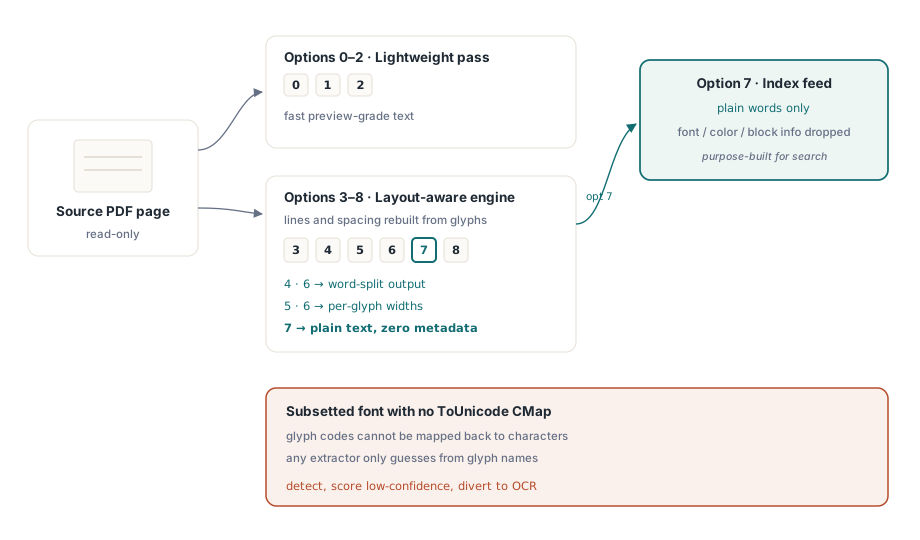
GetPageText nimmt einen Optionswert von 0 bis 8 entgegen, und diese Zahl wählt eine Engine, kein Format. Die Werte 0 bis 2 fahren einen leichtgewichtigen Durchlauf, der für eine schnelle Vorschau genügt. Die Werte 3 bis 8 laufen über die layoutbewusste Engine, die Zeilen und Abstände daraus rekonstruiert, wo die Glyphen tatsächlich auf der Seite sitzen. Innerhalb dieses Bereichs zählen die Unterschiede: 4 und 6 zerlegen die Ausgabe in Wörter, 5 und 6 geben Breiten pro Glyphe aus, und 7 liefert reinen Text, bei dem Schrift-, Farb- und Blockmetadaten bewusst wegfallen. Option 7 ist die, die Sie einem Suchindex vorsetzen, denn der Index will Wörter und sonst nichts
Keine Optionseinstellung rettet ein Dokument, das die Information nie mitgeführt hat. PDF bildet Zeichencodes auf Glyphenformen ab, und das Einzige, was diese Codes zurück auf lesbaren Text abbildet, ist die ToUnicode-CMap einer Schrift (ISO 32000-1 §9.10). Wenn eine Subset-Schrift ohne sie ausgeliefert wird, steht jeder Extraktor an. Diese Bibliothek, das Kopieren und Einfügen in einem Viewer, ein konkurrierendes Toolkit: alle sind darauf zurückgeworfen, aus Glyphennamen zu raten oder nichts zu liefern. Die praktische Antwort ist Erkennung, kein Heldenmut. Bewerten Sie die Seite als unsicher und schicken Sie sie an die OCR, denn den Müll stillschweigend zu indexieren ist schlimmer, als einzugestehen, dass Sie ihn nicht lesen können
Für die Fälle, die die pauschalen Optionen nicht abdecken, also eigene Tokenisierung, Forensik am Content-Stream, ein nach eigenen Regeln gebauter Texttrichter, steht der Decoder eine Schicht tiefer bereit. TPDFExtractor wird über dem Ressourcen-Dictionary und der Schriftsammlung einer Seite konstruiert. Seine Methode ExtractTextW schickt rohe Textoperationen aus dem Content-Stream erneut durch dieselbe Schriftmaschinerie, um Unicode zurückzugewinnen, und sein Ereignis OnFindObject reicht Ihnen jedes Objekt weiter, während es vorbeiströmt. Der meiste Code muss nie so tief greifen. Die Anwendungen, die es tun, sind froh, dass diese Schicht öffentlich und nicht vergraben ist
Positionierte Blöcke: die Einheit für Trefferanzeige und Redaktionsprüfung
Reiner Text sagt Ihnen, was die Seite sagt. Früher oder später muss ein Produkt auch wissen, wo sie es sagt, um einen Suchtreffer hervorzuheben, einen Redaktionskandidaten einzurahmen oder eine Anmerkung an der richtigen Stelle zu verankern. ExtractPageTextBlocks liefert ein Handle auf eine Liste von Textläufen zurück, und jeder Lauf trägt seinen Text, seine Bounding Box sowie Schriftname und Schriftgröße, in denen er gesetzt wurde:
var
  Pdf: TPDFlib;
  Blocks, I: Integer;
begin
  Pdf := TPDFlib.Create;
  try
    if Pdf.LoadFromFile('contract.pdf', '') <> 1 then
      raise Exception.Create('load failed');
    Pdf.SelectPage(1);
    Blocks := Pdf.ExtractPageTextBlocks(0);
    for I := 0 to Pdf.GetTextBlockCount(Blocks) - 1 do
      Writeln(Format('%s  [%s %.1f pt at %.0f,%.0f]',
        [Pdf.GetTextBlockText(Blocks, I),
         Pdf.GetTextBlockFontName(Blocks, I),
         Pdf.GetTextBlockFontSize(Blocks, I),
         Pdf.GetTextBlockBound(Blocks, I, 0),
         Pdf.GetTextBlockBound(Blocks, I, 1)]));
    Pdf.ReleaseTextBlocks(Blocks);
  finally
    Pdf.Free;
  end;
end;
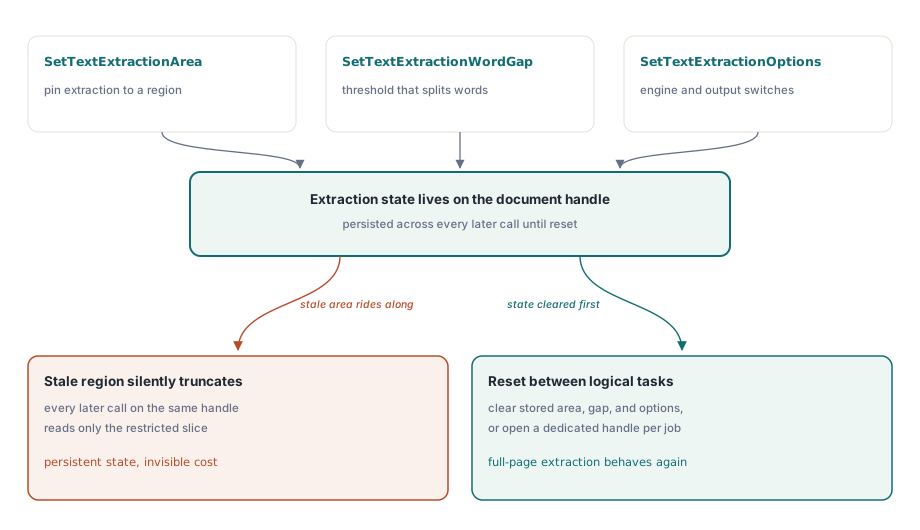
Ein Detail in diesem Bereich bringt Integrationen häufiger zu Fall als alles andere. SetTextExtractionArea, SetTextExtractionWordGap und SetTextExtractionOptions sind Zustand auf Dokumentebene, der bestehen bleibt, keine Argumente, die Sie pro Aufruf übergeben. Konfigurieren Sie eine Bereichseinschränkung für ein Feature, etwa nur das Kopfband zu lesen, um ein Dokument zu klassifizieren, und sie kürzt stillschweigend jede folgende Extraktion auf demselben Handle, einschließlich der layoutbewussten Stufen von GetPageText, zu denen Sie später greifen. Setzen Sie den Extraktionszustand zwischen logischen Aufgaben zurück oder geben Sie jeder Aufgabe ihr eigenes Dokument-Handle
Der Schwellwert für den Wortabstand ist der Hebel für den ersten Ausfallhaufen, die zusammenklebenden Wörter. SetTextExtractionWordGap sagt der Layout-Engine, wie viel horizontaler Raum, gemessen am Glyphenabstand der Seite selbst, ein Wort vom nächsten trennt. Eine dichte Tabelle braucht einen kleineren Abstand als eine locker gesetzte Marketingseite, also schlägt ein je Dokumentklasse abgestimmter Schwellwert eine globale Konstante. Er bleibt wie der übrige Extraktionszustand am Dokument bestehen, also planen Sie ein, ihn bewusst zu setzen, statt ihn einmal zu setzen und zu vergessen
Bilder: originale Streams, keine Bildschirmfotos
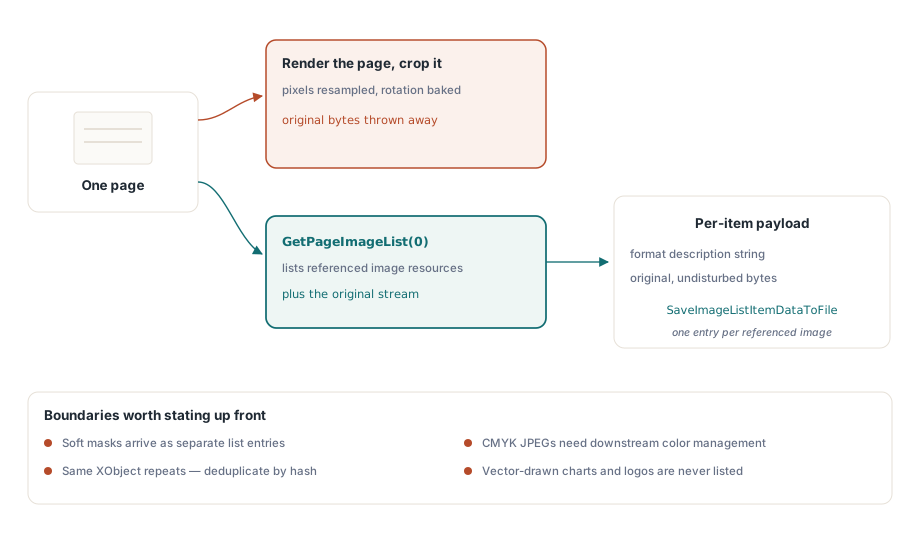
Der falsche Weg, Bilder aus einem PDF zu holen, ist, die Seite zu rendern und zuzuschneiden. Das rechnet die Pixel neu, brennt jede Drehung ein und wirft weg, was das Original war. GetPageImageList zählt stattdessen die tatsächlichen Bildressourcen auf, auf die die Seite verweist, und jeder Eintrag gibt seine Eigenschaften und seine originalen, unangetasteten Daten zurück:
var
  ImgList, I: Integer;
begin
  Pdf.SelectPage(1);
  ImgList := Pdf.GetPageImageList(0);
  for I := 0 to Pdf.GetImageListCount(ImgList) - 1 do
  begin
    Writeln(Pdf.GetImageListItemFormatDesc(ImgList, I, 0));
    Pdf.SaveImageListItemDataToFile(ImgList, I, 0,
      Format('page1-img%.2d.bin', [I]));
  end;
  Pdf.ReleaseImageList(ImgList);
end;
Prüfen Sie GetImageListItemFormatDesc, bevor Sie etwas über einen Eintrag annehmen, denn worauf eine Seite verweist, ist selten ein sauberes Bild je sichtbarer Abbildung. Eine Soft Mask taucht als eigener Eintrag auf. Dasselbe XObject wiederholt sich oft über viele Seiten, also entdoppeln Sie über einen Inhaltshash, bevor Sie einen Export „alle Bilder“ archivieren, sonst schreiben Sie dasselbe Logo hundertmal. CMYK-JPEGs brauchen nachgelagert Farbmanagement, sonst erscheinen sie in Viewern invertiert, die die Kanäle für bare Münze nehmen. Wenn Sie eine dokumentweite Inventur statt Seite für Seite wollen, durchsucht FindImages zusammen mit SetFindImagesMode die ganze Datei in einem Durchgang
Eine Grenze sollten Sie mit den Beteiligten klären, bevor jemand Abnahmekriterien schreibt: Die Bildextraktion liefert ausschließlich Rasterressourcen. Ein Logo oder Diagramm, das als Vektorpfade gezeichnet ist, ist im Ressourcensinn kein Bild und wird in keiner Bildliste je auftauchen, so eindeutig es auf dem Bildschirm auch als Abbildung wirkt. Wenn die Anforderung wirklich lautet, dieses Diagramm als Datei zu liefern, ist der ehrliche Weg, den Seitenbereich in eine Bitmap zu rendern, und das ist eine andere Operation mit anderer Wiedergabetreue. Beide Ausgabearten gehören ohne eine Kennzeichnung, welche welche ist, nicht in denselben Exportordner
Schriften: eine Prüffläche, keine Exportfunktion
Die Font-API beantwortet Fragen zu Schriften. Sie reicht Ihnen nicht die Schriftdateien selbst, und diese Unterscheidung prägt alles, was Sie darauf bauen können. Nachdem FindFonts das Dokument durchsucht hat, läuft die Aufzählung über die Schriften nach ID, und die Eigenschaftsaufrufe berichten über die jeweils ausgewählte Schrift:
var
  I: Integer;
begin
  Pdf.FindFonts;
  for I := 1 to Pdf.FontCount do        // Font-Indizes beginnen bei 1, nicht bei 0
    if Pdf.SelectFont(Pdf.GetFontID(I)) = 1 then
      Writeln(Format('%s  type=%d  embedded=%d  subset=%d',
        [Pdf.FontName, Pdf.FontType,
         Pdf.GetFontIsEmbedded, Pdf.GetFontIsSubsetted]));
end;
Achten Sie auf die Schleifengrenzen. Font-Indizes laufen von 1 bis FontCount, während die Indizes für Textblöcke und Bildlisten ein paar Absätze weiter oben bei null beginnen. Tragen Sie die eine Konvention in die andere, bekommen Sie einen Off-by-one, der entweder die erste Schrift überspringt oder über das Ende hinausläuft, und er übersteht beiläufiges Testen, weil die meisten Dokumente mehrere Schriften haben und die falsche immer noch plausibel aussieht. Seien Sie auch beim Umfang klar. Diese API kennt keinen Font-Export auf Byte-Ebene. Kein Aufruf gibt das eingebettete Schriftprogramm als TTF- oder OTF-Datei zurück, und Aufzählung samt Metadatenprüfung ist das gesamte vorgesehene Modell. Dieses Modell deckt dennoch ab, was der Produktionsalltag von Schriften wirklich verlangt: Subset-Erkennung über Namensmuster, Einbettungsprüfungen vor einer Archivkonvertierung (eine nicht eingebettete Schrift ist ein harter Blocker für PDF/A, wie PDF/A- und PDF/UA-Preflight in Delphi ausführt) und Kodierungsdiagnose für den Fall, dass die Extraktionsgüte fällt. Es gibt auch einen lizenzrechtlichen Grund, warum die Grenze hier verläuft. Ein Subset-Schriftprogramm ist lizenziertes Material und ohnehin, weil ihm die meisten Glyphen fehlen, als installierbare Schrift nutzlos. Es als Prüfmetadaten und nicht als extrahierbares Gut zu behandeln, ist die Position, die Sie verteidigen können
Der letzte Aufruf trägt seinen Teil zur Triage bei. Führen Sie GetFontEncoding auf jeder Schrift aus, lesen Sie das Ergebnis zusammen mit dem Subset-Flag, und Sie können die Extraktionsgüte vorhersagen, bevor Sie ein einziges Zeichen ziehen. Eine Seite, deren Schriften alle als Subset mit nicht standardisierten Kodierungen vorliegen, ist allein nach Inspektion ein OCR-Kandidat, sodass eine Batch-Pipeline sie richtig leiten kann, ohne zuvor einen fehlgeschlagenen Extraktionsdurchlauf zu verschwenden
Extraktion im großen Maßstab, ohne Dokumente zu laden
In einer Batch-Pipeline ist es verschwendete E/A, ein ganzes Dokument zu laden, nur um eine Seite zu lesen, und über ein Korpus hinweg summiert sich das schnell. Die Einzelaufruf-Varianten ExtractFilePageText und ExtractFilePageTextBlocks nehmen Dateinamen, Passwort und Seitennummer direkt entgegen und überspringen das vollständige Laden. Für Dateien im Gigabyte-Bereich gibt es noch einen niedrigeren Gang. Der Direktzugriffspfad öffnet eine Datei über streamende xref-Lesevorgänge, sodass DAOpenFileReadOnly gefolgt von DAExtractPageText nur die Objekte anfasst, die diese eine Seite wirklich braucht. Damit kommt ein Konventionswechsel, den Sie sich merken sollten: Die DA-Funktionen adressieren Seiten über PageRef, ein Objektreferenz-Handle aus DAFindPage, niemals über die rohe Seitennummer. Übergeben Sie die Nummer, wo das Handle hingehört, arbeitet der Aufruf am falschen Objekt, ohne einen Fehler zu melden, und das ist die übelste Sorte Fehler beim Debuggen. Der Rest des Direktzugriff-Werkzeugkastens ist in große PDFs zusammenführen, teilen und direkt zugreifen ausgebreitet
Wenn es eine einzelne Gewohnheit gibt, die Extraktionscode, der ein echtes Korpus übersteht, von humpelndem Code trennt, dann die, die Seite als nicht vertrauenswürdige Eingabe zu behandeln und nicht als saubere Datenquelle. Text, der dem widerspricht, was der Viewer zeigt, ist fast immer ein Kodierungsproblem, eine Ligatur, die zu einer Glyphe zusammenfällt, oder eine Subset-Schrift ohne ToUnicode-Einträge, und die Abhilfe ist, Vertrauen zu messen und die schlechten Seiten an die OCR umzuleiten, nicht gegen die Bytes zu kämpfen. Die Font-API wird per Entwurf nie eine TTF oder OTF erzeugen, also bauen Sie Schrift-Workflows um Prüffragen herum. Und der persistente Extraktionszustand, allen voran das Bereichsrechteck, ist eine Einstellung, die Ihnen für die Lebensdauer eines Dokument-Handles gehört, kein Parameter, den Sie nach einem Aufruf vergessen. Bringen Sie diese drei Reflexe zusammen, und der Rest der API verhält sich
Evaluierungs-Builds, Demoprojekte und die vollständige Referenz der Extraktions-API finden Sie auf der Produktseite von losLab PDF Library for Delphi