Du har en PDF på disken, en kunde har scannet den fra en stak fakturaer, og din opgave er at trække sidebillederne ud igen som bitmaps til et OCR-pas. Du indlæser filen, finder image XObjects og opdager så det stykke ingen advarer dig om: bytes i de streams er ikke pixels. De er en JPEG-strøm, eller en JPEG 2000-blok komprimeret med wavelets, eller en Group 4-faxstrøm, eller et indekseret raster bag en palet bag et Flate-filter. Image-objektet kender sin bredde og højde, men de egentlige samples er lukket inde bag det filter producenten valgte. At få et brugbart TBitmapbitmap betyder, at du skal ophæve det filter, og PDF giver dig omtrent otte forskellige måder at forsegle bytes på
Det er det hul, som ExtractLoadedImage udfylder i HotPDF, den native VCL PDF-komponent til Delphi og C++Builder. Den gennemgår image XObjects i et indlæst dokument, fortæller hvad hver enkelt er, og afkoder dem den kan tilbage til et 24-bit bitmap. Det interessante er ikke API-fladen, som kun består af tre metoder. Det er, hvorfor en separat afkodningsvej overhovedet er nødvendig, og hvad den kan og ikke kan omsætte tilbage til pixels
Hvorfor indlæste billeder ikke allerede er afkodet
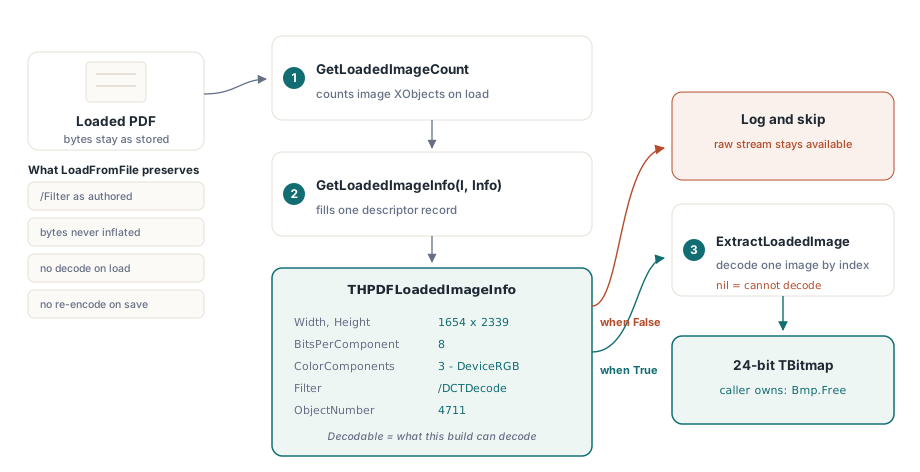
HotPDFs loader er bygget omkring pass-through-troskab. Når du kalder LoadFromFile, bevares billedstreams præcis, som de fremstår i kildefilen: det oprindelige filter, de oprindelige komprimerede bytes, det oprindelige dictionary. Det er bevidst. Hele pointen med at indlæse et dokument er som regel at kopiere sider, sammenflette filer, stemple dem, ompermissionere dem og skrive dem ud igen, og for alt det er det billigste og sikreste at lade hver billedstream være urørt. At afkode hvert billede til et raster ved indlæsning ville brænde hukommelse og CPU på arbejde, de fleste kaldere aldrig har brug for, og genkodning ved lagring ville forringe billeder, der burde være kopieret ordret
Konsekvensen er, at den indlæste objektgraf ingen pixels bærer. Et image XObject, hvis /Filter er /DCTDecode, holder JPEG-bytes; HotPDF kørte aldrig en JPEG-afkoder mod det, fordi intet i kopiér-og-omskriv-stien havde brug for det. Så når du rent faktisk vil have pixels, må ekstraktions-API'en selv gøre afkodningen, fra bunden, for hvilket filter det pågældende billede nu bruger. Det er den samme grund til, at kodesidens codecs er uafhængige af loaderen: artiklen om at tilføje JPEG 2000-billeder til PDF'er i Delphi beskriver, hvordan JPX-motoren kobles ind på oprettelsessiden, og den motor var ganske enkelt ikke koblet ind i læsestien, før ekstraktions-API'en fik brug for det
Det tre metode-API
Overfladen er lille. GetLoadedImageCount returnerer, hvor mange image XObjects det indlæste dokument indeholder. GetLoadedImageInfo udfylder en deskriptor-record for ét af dem ud fra indeks. ExtractLoadedImage returnerer det afkodede bitmap, eller nil, når den ikke kan afkode det billede. Enumerering er indeksbaseret og stabil for en given indlæsning: internt gennemgår den den indirekte objekttabel og indsamler hver stream, hvis /Subtype opløses til /Image, så det indeks, du giver til GetLoadedImageInfo, er det samme indeks, du giver til ExtractLoadedImage
var
  Pdf: THotPDF;
  Info: THPDFLoadedImageInfo;
  Bmp: TBitmap;
  I, Count: Integer;
begin
  Pdf := THotPDF.Create(nil);
  try
    if Pdf.LoadFromFile('scanned-invoices.pdf', '') <= 0 then
      Exit;
    Count := Pdf.GetLoadedImageCount;
    for I := 0 to Count - 1 do
    begin
      if not Pdf.GetLoadedImageInfo(I, Info) then
        Continue;
      if not Info.Decodable then
        Continue;                       // filter eller farverum ikke understøttet
      Bmp := Pdf.ExtractLoadedImage(I);
      if Bmp <> nil then
      try
        Bmp.SaveToFile(Format('img_%d.bmp', [I]));
      finally
        Bmp.Free;                       // den kaldende kode ejer bitmappet
      end;
    end;
  finally
    Pdf.Free;
  end;
end;
To kontraktdetaljer betyder noget her. For det første er det returnerede TBitmap dit at frigøre; dokumentet cacher eller ejer det ikke. For det andet skal du tjekke Decodable, før du kalder, og tjekke resultatet mod nil bagefter. Metoden rejser ikke ved et ikke-understøttet filter, den returnerer nil, og en tavs nil i en batch-løkke er præcis den slags, der sluger en side af et tusind-siders job, uden nogen bemærker det
Læs beskrivelsen, før du afkoder
THPDFLoadedImageInfo fortæller dig, hvad et billede er, uden at forpligte sig til en fuld afkodning. Dens felter kommer direkte fra billed-dictionaryet: Width og Height i samples, BitsPerComponent, ColorComponents og ColorSpace, der beskriver fortolkningen efter afkodning (1 for grå, 3 for RGB, 4 for CMYK), Filter som den navngivne komprimering, IsImageMask for stencil-masker, ObjectNumber for det underliggende indirekte objekt, og Decodable
Det sidste flag er det ærlige. Decodable er True kun, når det kørende build rent faktisk kan omsætte netop denne kombination af filter og farverum til et bitmap. Det koder den reelle understøttelsesmatrix, ikke et ønske: et billede, hvis Filter det aktuelle build ikke forstår, rapporterer Decodable = False, og du kan forgrene på det for at logge, springe over eller falde tilbage på selv at udtrække den rå stream. Behandl det som en forudsætning, ikke et fingerpeg
// Triagér hvert billede, før du forpligter dig til en afkodning.
var
  Pdf: THotPDF;
  Info: THPDFLoadedImageInfo;
  I: Integer;
begin
  // ... Pdf loaded ...
  for I := 0 to Pdf.GetLoadedImageCount - 1 do
  begin
    if not Pdf.GetLoadedImageInfo(I, Info) then
      Continue;
    if Info.Decodable then
      // ExtractLoadedImage(I) vil returnere et TBitmap
    else
      // ikke-understøttet filter/farverum: log objektet og spring over
      Writeln(Format('Image %d obj %d: %dx%d %s/%s not decodable',
        [I, Info.ObjectNumber, Info.Width, Info.Height,
         String(Info.Filter), String(Info.ColorSpace)]));
  end;
end;
Én implementeringsdetalje bider folk, der bygger deskriptor-records i hånden. THPDFLoadedImageInfo holder to AnsiString-felter, Filter og ColorSpace. De er managed types med reference counting, så refleksen med at nulstille en record med FillChar(Info, SizeOf(Info), 0) er forkert her: den overskriver strengreferencen uden at dekrementere den, hvilket lækker eller korrumperer. HotPDF initialiserer recorden felt for felt af præcis den grund, og kopierer du nogensinde det mønster i din egen kode, skal du gøre det samme
Én dispatcher, otte filterstier
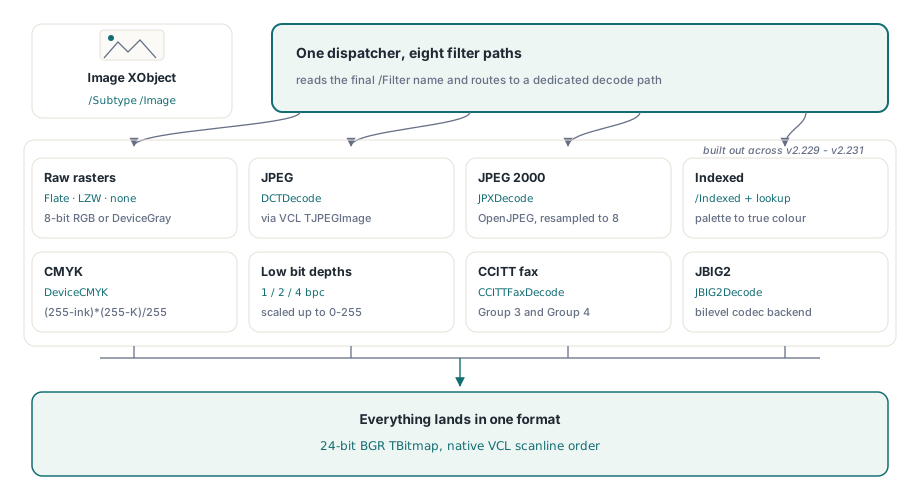
Grunden til, at denne funktion tog en række udgivelser frem for én, er, at PDF ikke har et billedformat. Det har filtre, og §8.9.5 i ISO 32000-1 lader et image XObject navngive et hvilket som helst af dem i /Filter, med sample-fortolkningen styret separat af /ColorSpace, /BitsPerComponent og et valgfrit /Decode-array. ExtractLoadedImage læser filternavnet og ruter til en dedikeret afkoder for hvert tilfælde. Det understøttede sæt, bygget op på tværs af v2.229 til v2.231, dækker nu otte forskellige stier
- Rå rastre (FlateDecode, LZWDecode eller intet filter) i 8-bit DeviceRGB eller DeviceGray. Bytesene inflaterer til et pakket raster, og den eneste transformation er en kanalombytning, dækket nedenfor
- DCTDecode (JPEG). Codestreamen gives videre til VCL'ens
TJPEGImage, som opløser geometri og farve, og resultatet tildeles til et 24-bit bitmap - JPXDecode (JPEG 2000). Afkodet gennem OpenJPEG-backenden, den samme motor beskrevet i JPEG 2000-artiklen, med høj-bitdybde-komponenter genresamplet ned til 8 bit
- Indekseret farve. Paletten læses fra arrayet
[/Indexed base hival lookup], og hvert sample udvides gennem opslagstabellen til true colour - DeviceCMYK. Fire-kanals samples konverteres til RGB med standardformlen blæk-på-hvidt
- Sub-8-bit DeviceGray og Indexed ved 1, 2 eller 4 bit pr. komponent, udpakket sample for sample og skaleret til intervallet 0–255
- CCITTFaxDecode, Group 3- og Group 4-faxfiltrene, afkodet af en dedikeret T.4/T.6-backend
- JBIG2Decode, det høj-ratio bilevel-filter, afkodet gennem den registrerede JBIG2-backend, som artiklen om native JBIG2-komprimering dækker fra kodesiden
Alt lander samme sted: et 24-bit BGR-bitmap, fordi det er, hvad et VCL TBitmap gemmer nativt, og hvad enhver nedstrøms-forbruger forventer
De transformationer, der stille ændrer pixels
To af disse stier involverer en transformation, det er let at få subtilt galt, og det er værd at forstå, selv hvis du aldrig selv rører afkoderen. Den første er farverækkefølge-ombytningen. Et PDF DeviceRGB-raster gemmer samples i rød-grøn-blå-rækkefølge, øverste række først. En VCL 24-bit scanline gemmer dem i blå-grøn-rød-rækkefølge. Så at afkode et almindeligt RGB-billede er ikke en memcpy; hver pixels første og tredje byte ombyttes på vej ind i scanlinen. Får du det omvendt, bytter dine røde og blå farve plads, hvilket ser fint ud på et gråtone-testbillede og katastrofalt forkert ud på et farvebillede. Rækkefølgen af rækker, for hvad det er værd, mapper lige igennem: PDF's top-down-rastre stemmer overens med VCL's ScanLine[0] som den øverste visuelle række, så der er ikke brug for et lodret flip
Den anden er CMYK. PDF DeviceCMYK-billeder bærer fire blæktyper, og konverteringen til RGB er en pr.-kanal-beregning, ikke et opslag: hver outputkanal er (255 - ink) * (255 - K) / 255. Det er en enhedsapproksimation, ikke en farvestyret konvertering gennem en ICC-profil, så resultatet er godt nok til visning og genrasterisering, men er ikke den rigtige vej, hvis du har brug for printnøjagtig farve. Kræver dit workflow troskab, skal du behandle det udtrukne bitmap som en forhåndsvisning og beholde den originale CMYK-stream til den farvestyrede pipeline
Indexed-stien skjuler sin egen parsing-fælde. Paletten i et /Indexed-farverum kan gemmes som en literal streng eller som en hexadecimal streng, og HotPDF gemmer en hex-strengs værdi som selve hex-teksten, ikke de afkodede bytes. Så når paletten er en hex-streng, skal opslagstabellen først køres gennem en hex-til-bytes-afkodning; en literal streng er allerede rå bytes. Springer du den gren over, kommer et fire-farvers indekseret billede ud som volapyk, fordi hver paletpost læses fra den forkerte bytegrænse
Filterkæder: det sidste filter er billedets eget
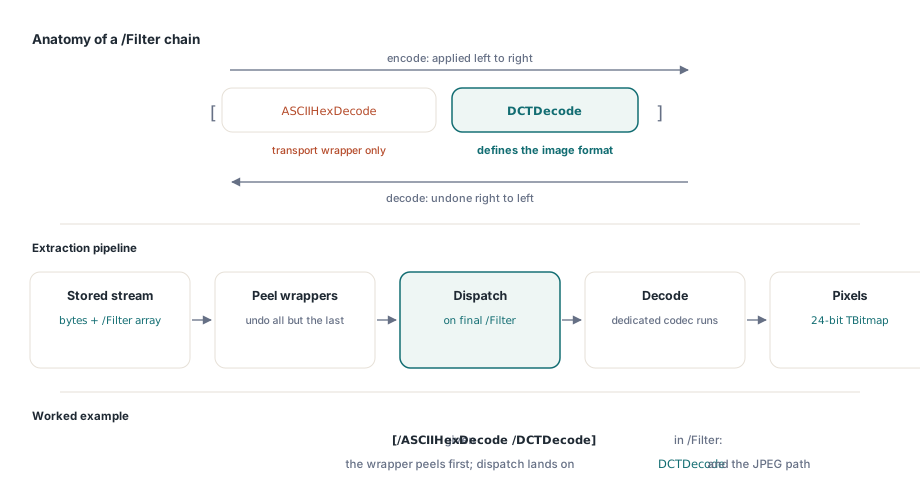
Et enkelt /Filter-navn er det lette tilfælde. PDF tillader også en kæde af filtre, hvor streamen er sendt gennem flere i rækkefølge, listet i orden i et /Filter-array som [/ASCII85Decode /FlateDecode] eller [/ASCIIHexDecode /DCTDecode] (ISO 32000-1 §7.4). Semantikken er præcis: filtrene anvendes venstre mod højre ved kodning, så du ophæver dem højre mod venstre ved afkodning, og det sidste filter i arrayet er det, der reelt definerer billedformatet. De indledende filtre er bare transportkodninger viklet omkring det
Ekstraktoren håndterer det ved at skrælle. Før nogen billedafkoder kører, anvendes hvert filter i kæden undtagen det sidste for at producere det input, det endelige filter forventer, og først derefter sker dispatchen på det sidste filter. Så [/ASCII85Decode /DCTDecode] fjerner først ASCII85 fra streamen, ruter så resultatet til JPEG-stien; [/FlateDecode] viklet om et råt raster inflaterer og kører så rasterstien. Det er, hvad der lader de otte afkodere forblive simple. Ingen af dem behøver kende til ASCII85- eller hex-transportindpakninger, fordi tiden en afkoder ser bytesene, er indpakningerne allerede væk. Det betyder også, at en kæde, hvis sidste filter er ikke-understøttet, stadig fejler rent ved dispatch-trinnet frem for halvvejs igennem
Hvor udtrækningen stopper, og hvad du gør derefter
Vær ærlig med dig selv om grænserne. Et billede, hvis sidste filter ligger uden for det understøttede sæt, returnerer nil, og det gør et, hvis farverum build'et ikke kan fortolke, også. Bløde masker og alpha rekonstrueres ikke ind i bitmappet; du får basisbilledet, ikke et sammensat resultat. Bitdybder over 8 fra JPEG 2000 resamples ned, hvilket er tabsgivende med vilje og det forkerte træk, hvis du genarkiverer frem for at vise. Og en billedmaske, en et-bit stencil uden egen farve, beskrives af deskriptoren, men er noget andet end et billedligt billede; afkod den i forventning om et foto, og du bliver overrasket
Når udtrækning ikke er nok, er den rå stream stadig lige der i den indlæste objektgraf, filter og det hele, og du kan trække den ud byte for byte og give den til en specialiseret codec, du selv har. Det er det fallback, pass-through-designet bevarer med vilje: de originale bytes smides aldrig væk, så værste fald er, at du selv afkoder dem, frem for at dataene er væk. For de fleste rigtige jobs dækker de understøttede otte filtre dog, hvad scannere, kontorpakker og rapportmotorer rent faktisk udsender, og en løkke over GetLoadedImageCount med en Decodable-vagt gør et indlæst PDF-dokument tilbage til en mappe af bitmaps på nogle få linjer
Ekstraktions-API'en til indlæste billeder, sammen med det fulde sæt afkodningsfiltre beskrevet her, følger med i HotPDF-Delphi-komponenten til Delphi og C++Builder