Máte šablonu faktury od třetí strany nebo archivovanou smlouvu, kterou kdysi vygeneroval dnes už nedohledatelný software, a zadání zní udělat ji interaktivní: přidat do rohu podpisové pole, doplnit několik textových polí a proměnit plochý checklist v opravdové checkboxy. Háček je v tom, že tento PDF nevytváříte od nuly. Už existuje, už má stránky, streamy obsahu i fonty, které nemáte pod kontrolou, a vy na ten graf objektů potřebujete přilepit widgety AcroForm, aniž byste ho přestavěli. To je jiný problém než tvorba formuláře v novém dokumentu a záludnost se neukáže, dokud výsledek neotevřete v prohlížeči a pole, která jste právě zapsali, na stránce prostě nejsou
HotPDF je nativní VCL PDF komponenta pro Delphi a C++Builder a od verze v2.247.0 vystavuje vyhrazenou sadu metod právě pro toto, tedy pro vytvoření všech šesti standardních typů polí přímo v dokumentu načteném pomocí LoadFromFile. Tento článek vysvětluje, co tyto metody dělají, jaký slovník ISO 32000-1 vytvářejí a proč je jeden příznak nezbytný k tomu, aby z celé operace nevypadl soubor, který vypadá prázdně
Proč je tvorba polí v načteném dokumentu vlastní cestou
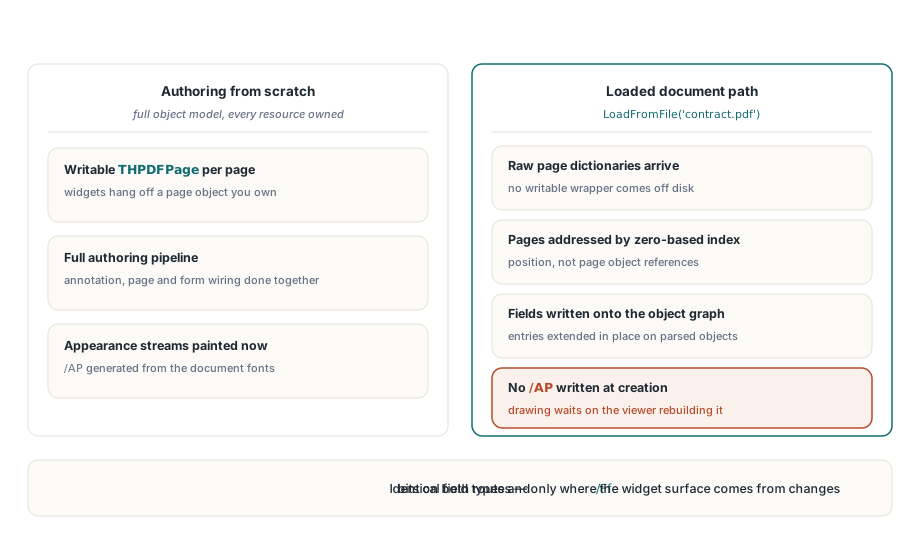
Když vytváříte PDF od nuly, HotPDF vlastní celý objektový model. Každá stránka je zapisovatelný obal THPDFPage a přidání textového pole přes AddTextField napojí nový widget do anotace stránky, objektu stránky i do kolekce polí formuláře a pak vygeneruje appearance stream z fontových zdrojů dokumentu. Appearance stream je viditelný povrch widgetu, rámeček, okraj a případný výchozí text, vykreslený jako PDF kreslicí operátory, které prohlížeč přečte doslova
Načtený dokument vám nic z téhle podpory nedá. Stránky přišly jako syrové slovníky, není tu zapisovatelný obal THPDFPage, na který by bylo možné widget zavěsit, a hlavně tu není připravený fontový pipeline pro malování appearance streamů. Načtená cesta proto volí jiný postup. Zapíše slovníky polí přímo do parsovaného grafu objektů a oslovuje stránky podle indexu od nuly, ne podle objektu stránky. Typy polí i bity příznaků přesně odpovídají cestě pro tvorbu od nuly, takže Text field je Text field v obou případech, mění se ale podkladová infrastruktura a hlavně to, jak se povrch widgetu vykreslí
Příznak /NeedAppearances zde není volitelný
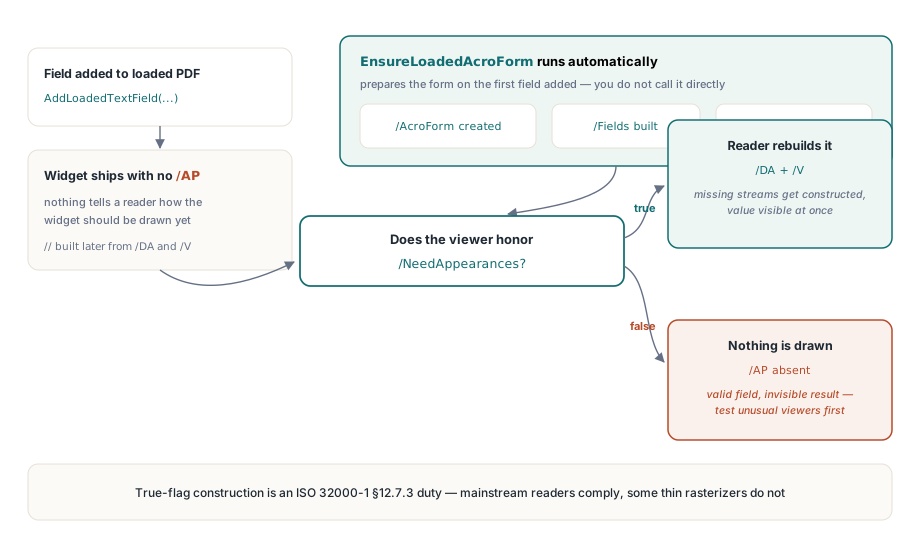
Tohle je ten jediný fakt, který rozhoduje o tom, jestli se vaše práce vůbec zobrazí. Protože načtená cesta negeneruje appearance streamy, čerstvě přidaný widget dorazí do prohlížeče bez záznamu /AP: pole bez popsaného povrchu. Řada prohlížečů, když má vykreslit widget bez appearance a bez instrukce, jak si ji sám vytvořit, nenakreslí vůbec nic. Pole je v souboru, strukturálně platné, adresovatelné nástrojem pro vyplňování formulářů, a přitom pro člověka zcela neviditelné
Únikový poklop je definovaný v ISO 32000-1 §12.7.3: slovník AcroForm nese booleovský příznak /NeedAppearances, a pokud je true, konformní čtečka je povinna si chybějící appearance streamy sama sestavit z řetězce /DA (default appearance) a hodnoty každého pole. HotPDF to za vás nastaví. Při prvním přidání jakéhokoli pole do načteného dokumentu se spustí EnsureLoadedAcroForm: pokud katalog nemá /AcroForm, vytvoří ho, pokud chybí pole /Fields, vytvoří i to, a vynutí /NeedAppearances true. Sami tuto metodu nevoláte, ale znalost její existence vysvětluje chování. Vysvětluje také jedno nasazovací úskalí, které stojí za to říct rovnou: hrstka minimalistických nebo nekonformních prohlížečů /NeedAppearances ignoruje a stále nic nevykreslí. U běžných čteček příznak svou práci odvede, ale pokud vaše publikum používá neobvyklý vestavěný renderer, otestujte to tam, než cokoli slíbíte
Přidání šesti typů polí
Každá metoda má stejný tvar. Předáte index stránky od nuly, čtyři rohy obdélníku widgetu v souřadnicích PDF user-space, název pole a jakékoli další argumenty, které daný typ potřebuje. Obdélník je X1, Y1, X2, Y2 s počátkem PDF v levém dolním rohu stránky, takže vyšší hodnoty Y leží výš; to je souřadnicová konvence formátu souboru, ne konvence obrazovky s počátkem vlevo nahoře, a spletení této konvence je druhá nejčastější chyba hned po zapomenutí příznaku. Každé volání vrátí index nového pole od nuly, nebo -1, pokud byl index stránky mimo rozsah nebo se objekt stránky nepodařilo přeložit
var
  Pdf: THotPDF;
  Idx: Integer;
begin
  Pdf := THotPDF.Create(nil);
  try
    if Pdf.LoadFromFile('contract.pdf') <= 0 then Exit;

    // Textové pole: název, počáteční hodnota, max. délka (0 = neomezeno)
    Idx := Pdf.AddLoadedTextField(0, 72, 680, 320, 700, 'FullName', '', 0);

    // CheckBox: exportní hodnota, počáteční stav zaškrtnutí
    Pdf.AddLoadedCheckBox(0, 72, 640, 90, 658, 'AgreeTerms', 'Yes', False);

    // Podpisové pole: pouze název a obdélník
    Pdf.AddLoadedSignatureField(0, 360, 72, 540, 132, 'ApproverSig');

    if Idx >= 0 then
      Pdf.SaveLoadedDocument('contract-interactive.pdf');
  finally
    Pdf.Free;
  end;
end;
Třetí a čtvrtý řetězcový argument textového pole jsou název pole a jeho počáteční hodnota /V; celé číslo je /MaxLen, zapisované jen tehdy, je-li větší než nula. HotPDF dává každému editovatelnému poli výchozí appearance řetězec /Helv 12 Tf 0 0 0 rg, což je to, co prohlížeč respektující /NeedAppearances přečte, aby rozhodl, jakým fontem a barvou hodnotu vykreslit. Checkbox přijímá exportní hodnotu, tedy řetězec, který formulář odešle při zaškrtnutí, plus booleovský počáteční stav; interně zapíše odpovídající záznamy jmen /V, /AS a /DV, takže stav zapnuto/vypnuto je konzistentní hned při otevření souboru. Prázdná exportní hodnota se defaultně nastaví na Yes, konvenční název „zapnuto“ u checkboxu
Výběrová pole a bitové příznaky /Ff
ComboBox a ListBox jsou obě výběrová pole, typ pole /Ch podle ISO 32000-1 §12.7.4. Rozdíl mezi rozbalovacím seznamem a posuvným seznamem je jediný bit v celočíselném poli příznaků /Ff: bit 18, příznak Combo, hodnota $40000. HotPDF tento bit nastaví pro AddLoadedComboBox a ponechá ho vypnutý pro AddLoadedListBox; jinak jsou obě metody identické a obě přijímají své volby jako otevřené pole řetězců, zapisované do záznamu /Opt
// Rozbalovací seznam (příznak Combo se nastaví interně) s počátečním výběrem
Pdf.AddLoadedComboBox(0, 72, 600, 300, 620, 'Country', 'Canada',
  ['United States', 'Canada', 'Mexico']);

// Posuvný seznam, bez počáteční hodnoty
Pdf.AddLoadedListBox(0, 72, 520, 300, 590, 'Priority', '',
  ['Low', 'Normal', 'High']);

// Tlačítko s popiskem vykresleným přes /MK
Pdf.AddLoadedPushButton(0, 360, 600, 480, 626, 'SubmitBtn', 'Submit');
Dvě poznámky k seznamu voleb. HotPDF zapisuje každý záznam /Opt jako prostý řetězec, kde exportní hodnota a zobrazený popisek jsou stejný text. ISO 32000-1 §12.7.4.4 také umožňuje dvouprvkovou formu [export display], pokud potřebujete, aby se odeslaná hodnota lišila od toho, co čte uživatel; metody pro tvorbu v načteném dokumentu používají jednodušší formu s jedním řetězcem, takže pokud potřebujete odlišné exportní a zobrazované hodnoty, museli byste je nastavit na výsledném slovníku sami. A hodnota, kterou předáte jako aktuální výběr pole, by měla být jednou z voleb, které jste dodali, protože prohlížeč ji proti seznamu porovnává
Tlačítko je druhý případ řízený příznakem: typ pole /Btn s bitem 17, příznakem PushButton, hodnota $10000. Tento bit odděluje klikatelné tlačítko od checkboxu, který je také polem /Btn, ale bez tohoto bitu. Popisek, který předáte, se zapíše do slovníku charakteristik vzhledu /MK jako normální popisek /CA. Zde stojí za to být upřímný ohledně rozsahu: tlačítko vznikne se svým popiskem a obdélníkem, ale metoda pro tvorbu v načteném dokumentu k němu nepřipojí žádnou akci, takže samo o sobě je to tlačítko, které vypadá správně a po kliknutí nic neudělá. Napojení akcí submit, reset nebo JavaScript je samostatná záležitost; pro stranu tvorby od nuly je pracovní postup pole plus akce popsán v tvorbě polí AcroForm a akcí v Delphi, což je správný srovnávací bod pro to, co načtená cesta záměrně vynechává
Slovník společný pro všechna pole
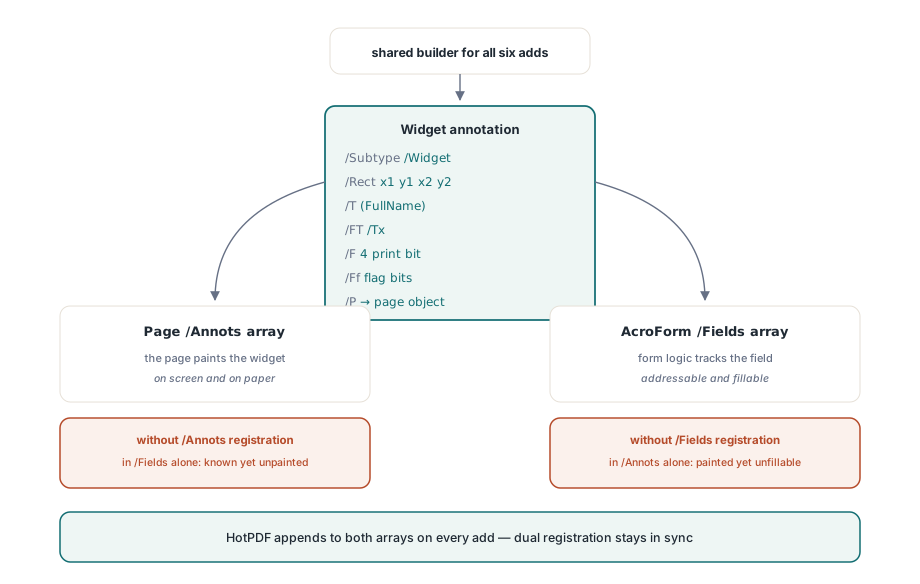
Pod všemi šesti metodami je jeden sdílený builder, který vytvoří anotaci widgetu a zaregistruje ji na dvou místech. Zapíše /Type /Annot a /Subtype /Widget, pole /Rect ze čtyř vámi zadaných souřadnic, příznaky anotace /F 4, které nastaví bit Print, takže se pole objeví jak na papíře, tak na obrazovce, název pole /T, typ pole /FT, příznaky /Ff a zpětný odkaz /P na objekt stránky. Poté připojí nové pole do pole /Fields AcroFormu i do pole /Annots dané stránky, přičemž po cestě rozřeší nepřímé reference, takže rozšiřuje skutečná pole místo toho, aby widget osiřel
Na tomto dvojím zápisu záleží, protože widget, který žije jen v jednom ze dvou seznamů, je rozbitý jemným způsobem. Pole přítomné v /Fields, ale chybějící v /Annots stránky, formulář zná, ale nikdy se nevykreslí; opačný případ se vykreslí, ale logika formuláře o něm neví. HotPDF udržuje obě strany synchronizované při každém přidání, což je přesně ten typ účetnictví, který byste jinak museli ručně přesně dodržet podle specifikace
Několik přímých omezení
Nastavte si očekávání dřív, než na tomto postavíte pracovní postup. Chování typu zploštit-a-znovu-vygenerovat závisí na tom, že prohlížeč respektuje /NeedAppearances, což pokrývá Acrobat, moderní PDF enginy v prohlížečích a běžné desktopové čtečky, ale není to tvrdá záruka napříč každým rendererem, který kdy potkáte. Pokud potřebujete vytvořit soubor, jehož pole se vykreslí identicky všude, včetně prohlížečů, které příznak ignorují, jste v teritoriu appearance streamů a lepší volbou je cesta tvorby od nuly, která za vás /AP vymaluje. Podpisové pole se stejně tak vytváří jako prázdný podpisový widget připravený k podepsání; umístění pole není totéž jako aplikace kryptografického podpisu
Pro změnu toho, co už existuje, místo přidávání nového, je související operací zploštění formuláře (flattening), kdy interaktivní pole zapečete zpět do statického obsahu stránky, takže hodnoty se stanou trvalými a needitovatelnými; tento oběh, včetně toho, jak se zachází s formuláři obsahujícími XFA, je probrán v zplošťování polí XFA a AcroForm v Delphi. Přidávání polí a zplošťování polí jsou dva konce téhož životního cyklu: tento článek je o tom, jak na dokument, který interaktivitu postrádal, interaktivitu dostat, a zploštění je o tom, jak ji zase sundat, jakmile formulář splnil svůj účel
API pro práci s formuláři v načteném dokumentu, popsané zde, je součástí standardní komponenty HotPDF Delphi Component pro Delphi a C++Builder, spolu s plnou referencí pro příznaky polí, zacházení s appearance a zbytek modelu AcroForm