Получавате задача: вземете пач вече визуализирани извлечения, замажете номерата на сметките и подайте по две страници на лист, за да спестите хартия. И двете половини на тази задача са хирургия върху content-stream в PDF, който не сте създали, така че няма удобен page canvas, върху който да рисувате, и няма font manager, на който да разчитате. Редактирате директно обектния граф на зареден документ, като добавяте сурови drawing оператори към страница, която е била подредена от друг инструмент. HotPDF предлага точно две входни точки за това и по-опасната от двете е тази, която изглежда безобидна
HotPDF е нативен VCL PDF компонент за Delphi и C++Builder. В неговия API за зареден документ в round nine бяха добавени първите методи, които създават изцяло ново съдържание върху страница, която сте отворили от диск, а не върху такава, която сте изградили от нулата. Два от тях са темата тук: RedactLoadedRect, който рисува плътен правоъгълник върху област, и StitchLoadedPage, който мащабира една страница и я рисува върху друга. И двата работят, като записват ISO 32000-1 §8.5 content-stream оператори в /Contents stream-а на страницата. Разбирането на това какво правят тези оператори и, също толкова важно, какво не правят, е разликата между работещ инструмент и изтичане на данни
Добавяне на оператори към заредена страница
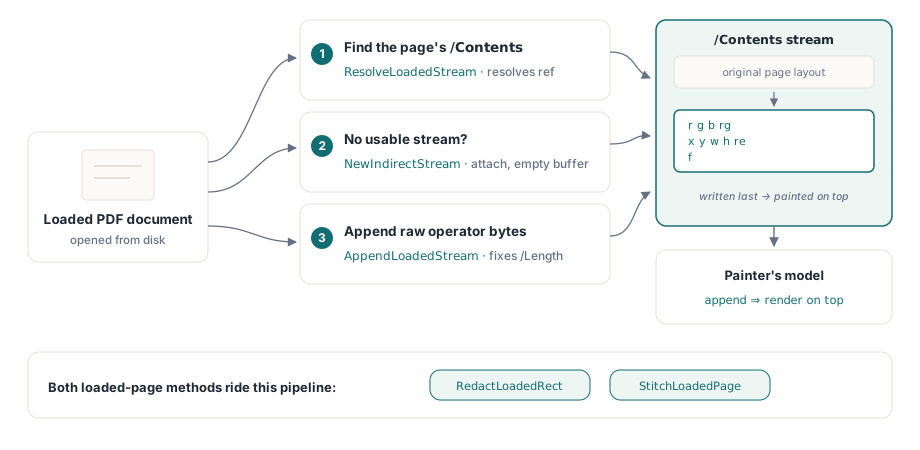
Когато изграждате страница с обичайния HotPDF API, компонентът притежава content stream-а и сериализира вашите TextOut и vector извиквания вместо вас. Заредената страница е различна: нейният /Contents е съществуващ stream object, възможно споделен, възможно част от content array, и трябва да се вмъкнете в него, без да повредите това, което вече е там. Round nine въведе три малки помощника, които правят това безопасно. NewIndirectStream заделя нов indirect THPDFStreamObject с празен буфер и /Length 0 запис; ResolveLoadedStream следва indirect reference надолу до подлежащия stream; и AppendLoadedStream записва сурови байтове в края на stream-а и пренаписва /Length така че записаният обект да остане добре оформен
И двата публични метода следват един и същ модел. Намерете /Contents на страницата, разрешете го до stream и ако няма използваем stream, създайте нов и го прикачете. После добавете операторите. Понеже новите байтове отиват в края на stream-а, моделът на пейнтера гарантира, че те се рисуват върху всичко, което оригиналното оформление е начертало. Този ред е целият механизъм зад redaction правоъгълника, а също и причината този правоъгълник да не е това, което повечето хора предполагат
RedactLoadedRect: плътен капак, не изтриване
RedactLoadedRect приема нулево базиран индекс на страница, четири координати в user space и три цветови компонента в диапазона 0-1:
var
  Pdf: THotPDF;
begin
  Pdf := THotPDF.Create(nil);
  try
    if Pdf.LoadFromFile('statement.pdf') > 0 then
    begin
      // Покрива лентата с номера на сметка на страница 1 с плътно черно.
      // Координатите са в PDF user space: начало долу вляво, в points.
      Pdf.RedactLoadedRect(0, 56, 690, 320, 706, 0, 0, 0);
      Pdf.SaveLoadedDocument('statement-covered.pdf');
    end;
  finally
    Pdf.Free;
  end;
end;
Под капака методът изписва три оператора в content stream-а: задаване на fill color в DeviceRGB (r g b rg), path за правоъгълник (x y w h re), и fill (f). Ширината и височината се извеждат като X2 - X1 и Y2 - Y1, така че подавате две срещуположни ъгълни точки и оставяте метода да изчисли обхвата. Подайте 0, 0, 0 за цвят и получавате черна лента; подайте 1, 1, 1 за бяла, която съвпада с бяла страница. Координатите са собственото user space на заредената страница, което означава, че началото е долният ляв ъгъл и мерните единици са points, и също означава, че трябва да знаете /MediaBox на страницата, за да поставите нещо точно; GetLoadedPageBox с pbMediaBox ви дава това
Прочетете това два пъти: запълненият правоъгълник покрива съдържание визуално, но не го премахва. Текстът, изображението или vector art-ът под правоъгълника все още присъства в PDF-а, все още е в обектния граф, все още е извличаем от всеки, който копира страницата, пусне text extractor или просто изтрие вашия правоъгълник от content stream-а. Това е визуално маскиране, не redaction в правен или сигурностен смисъл. Ако скривате наистина чувствителни данни - номера на сметки, медицински досиета, самоличности, каквото и да е регулирано - да ги покриете с черна кутия и да изпратите файла е изтичане на данни, което чака да бъде открито. Истинското redaction изисква изтриване на подлежащите content objects, не рисуване отгоре върху тях
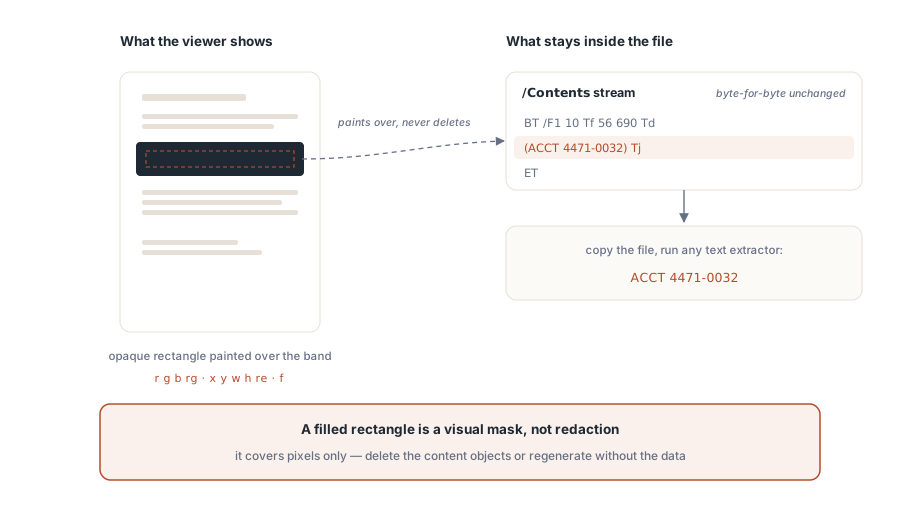
Името на метода казва „Redact“ и това е полезно предупреждение как резултатът ще бъде погрешно разчетен, а не обещание за това какво изтрива. Имплементацията е честна за това в собствения си коментар: нарича себе си „visual redaction primitive“ и отбелязва, че redaction, което премахва съдържание, изисква content-stream интерпретатор, който обхожда и пренаписва съществуващите оператори. Пътят на HotPDF за зареден документ не прави това тук. Затова безопасното правило е тясно: използвайте RedactLoadedRect за нечувствително козметично маскиране — скриване на чернова водна марка, замазване на област преди screenshot, покриване на остарял лого на вътрешен коректор. В момента, в който съдържанието под кутията би имало значение, ако изтече, този метод е грешният инструмент, и правилният отговор е да регенерирате документа без данните или да използвате истински pipeline за премахване на съдържание
StitchLoadedPage: мащабиране, преместване, рисуване
N-up подредбата е по-дружелюбният проблем, защото нищо не е скрито, а само преподредено. StitchLoadedPage приема индекс на целева страница, индекс на изходна страница, X/Y отместване и коефициент на мащабиране, и рисува изходната страница върху целевата на тази позиция и размер:
// Наслагва страница 2 (индекс 1) върху страница 1 (индекс 0),
// мащабирана на 70% и леко изместена нагоре-надясно.
Pdf.StitchLoadedPage(0, 1, 40, 380, 0.7);

// Удобен вариант 2-up: изходната страница в дясната половина на целевата.
Pdf.StitchLoadedPageSideBySide(0, 1);
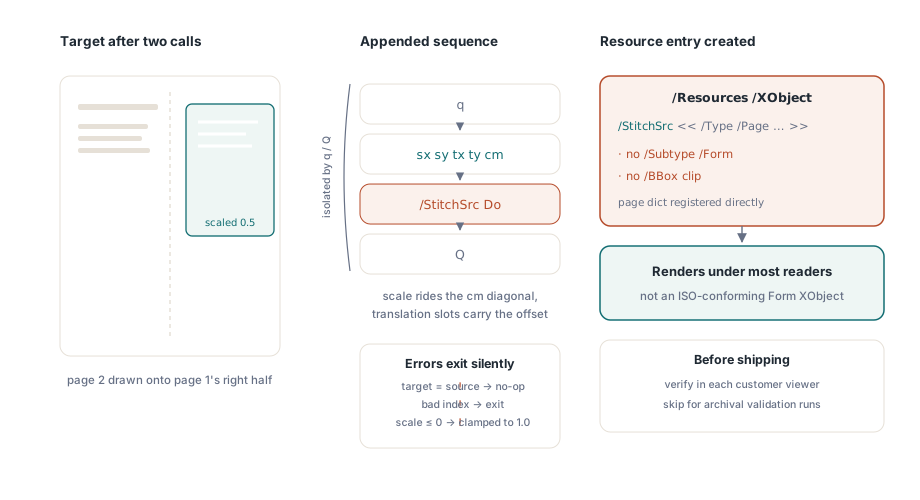
Низът от оператори, който методът добавя, е стандартна последователност от трансформация и рисуване: q за запазване на graphics state, матрица cm, носеща мащаба по диагонала и отместването в клетките за транслация, /StitchSrc Do за извикване на външен обект, и Q за възстановяване на състоянието. Двойката q/Q има значение: тя изолира трансформацията, така че подредената страница да не прелее координатната си система в нищо, добавено след нея. Методът също така се предпазва от очевидните грешки — индекси извън диапазона, цел, равна на източника, немного положителен мащаб (който се ограничава до 1.0) — и излиза тихо вместо да вдига изключение, затова проверявайте входните си данни, защото тих no-op изглежда идентично на успех
StitchLoadedPageSideBySide е тънко удобство над общия метод. Той чете ширината на media box-а на целта, разполовява я и извиква StitchLoadedPage с тази половин ширина като X отместване и фиксиран мащаб 0.5, поставяйки източника в дясната половина. Това вкоренено 0.5 предполага, че източникът и целта споделят една и съща ширина; ако не е така, източникът няма да запълни чисто своята половина и ще ви трябва общият StitchLoadedPage с мащаб, който изчислявате сами от двата media box-а
Опростената XObject стратегия и нейният ISO компромис
Ето тук имплементацията прави съзнателна кратка пътека, за която трябва да знаете, преди да се доверите на резултата в различни четци. Правилната N-up подредба обвива съдържанието на изходната страница във Form XObject — самостоятелен рисуем обект, за който ISO 32000-1 §8.10.1 казва, че трябва да носи /Type /XObject, /Subtype /Form и собствена клипираща кутия /BBox. Stitch методът от round nine на HotPDF не изгражда тази обвивка. Вместо това той регистрира самия речник на изходната страница директно под /Resources /XObject на целта с името StitchSrc, след което го рисува с Do. Речник на страница и Form XObject споделят достатъчно от своя content model — и двата реферират content stream и resource dictionary — така че много четци ще визуализират резултата
Но това не е конформен Form XObject. Липсва му маркерът /Subtype /Form и собствен /BBox, което означава, че строг consumer е в правото си да игнорира Do или да го изреже по различен начин от очаквания. TechnicalNotes за този round казват това направо: подходът „се визуализира в повечето четци“, но „не е строго ISO-съвместим Form XObject“, и пълната съвместимост изисква синтезиране на истински Form XObject stream като отделна стъпка. Затова третирайте stitch резултата така, както бихте третирали всяка неконформна конструкция: проверете го в конкретните четци, които използват вашите клиенти, не само в този на вашата машина, и ако ви трябват архивни или строго валидируеми PDF файлове, не разчитайте на този път. Същата дисциплина важи за всичко, което изграждате върху заредения обектен граф, затова preflight проверка на PDF в Delphi си заслужава мястото в release pipeline-а, когато мутирате документи програмно
Къде се вписват и къде не
И двата метода са content-stream инструменти, така че менталният модел е същият, който използвате за директно рисуване. Ако сте изграждали страници от нулата с компонента, vector и цветовите оператори зад тези извиквания ще ви изглеждат познати от рисуване върху canvas в HotPDF за Delphi; разликата е само, че тук добавяте към stream, създаден от друг, а не такъв, който притежавате. Дръжте в ума си три граници:
- Redaction е козметичен.
RedactLoadedRectрисува върху съдържанието и никога не го изтрива. За всичко чувствително регенерирайте източника или използвайте истинско премахване на съдържание — черна кутия не е сигурност - Stitch е неконформен по замисъл. Изходната страница се реферира като псевдо-XObject без
/Subtype /Formи/BBoxот §8.10.1, затова потвърдете визуализацията в целевите си четци и го избягвайте там, където се изисква строга валидация - Координатите са в user space на страницата. Начало долу вляво, в points, определени от собствения media box на страницата. Прочетете box-а с
GetLoadedPageBox, преди да поставите каквото и да е, защото заредената от вас страница може да не е с размера, който сте предполагали
Използвана в тези граници, двойката покрива реален работен процес: преподреждане на страници за печат, маскиране на неповерителни области и записване на резултата обратно с SaveLoadedDocument — всичко без пълно повторно рендиране. API-то за зареден документ, което включва тези stitch и mask примитиви, се доставя с HotPDF Delphi Component за Delphi и C++Builder, заедно с методите за form field, annotation и FDF от същия round