Hello World من مكون HotPDF لـ Delphi.
مرحبًا بكم في الدليل الشامل لـ مكون HotPDF لـ Delphi. برنامج عرض HelloWorld.
حول مكون HotPDF.
مكون HotPDF هو مكتبة معالجة PDF قوية ومتعددة الاستخدامات مصممة خصيصًا لمطوري Delphi و C++Builder. يوفر هذا المكون الشامل واجهة برمجة تطبيقات (API) واسعة النطاق تمكن المطورين من إنشاء وتعديل وتغيير مستندات PDF بسهولة ودقة.
الميزات الرئيسية لمكون HotPDF:
- إنشاء وإنشاء ملفات PDF: قم بإنشاء مستندات PDF من البداية مع تحكم كامل في التخطيط والتنسيق والمحتوى.
- دعم النصوص والرسومات: أضف نصوصًا وصورًا وأشكالًا ورسومات معقدة إلى صفحات PDF.
- دعم متعدد اللغات: دعم كامل لـ Unicode لعرض النصوص الدولية.
- إدارة الخطوط: قم بتضمين الخطوط للحصول على مظهر متسق للمستند عبر أنظمة مختلفة.
- خيارات الضغط: استخدم خوارزميات الضغط لتحسين حجم الملف.
- ميزات الأمان: تشفير المستندات، وحماية بكلمة مرور، والتحكم في الأذونات.
- معالجة المستندات: دمج وتقسيم وتعديل مستندات PDF الحالية.
- دعم الجداول والنماذج: إنشاء جداول معقدة ونماذج تفاعلية.
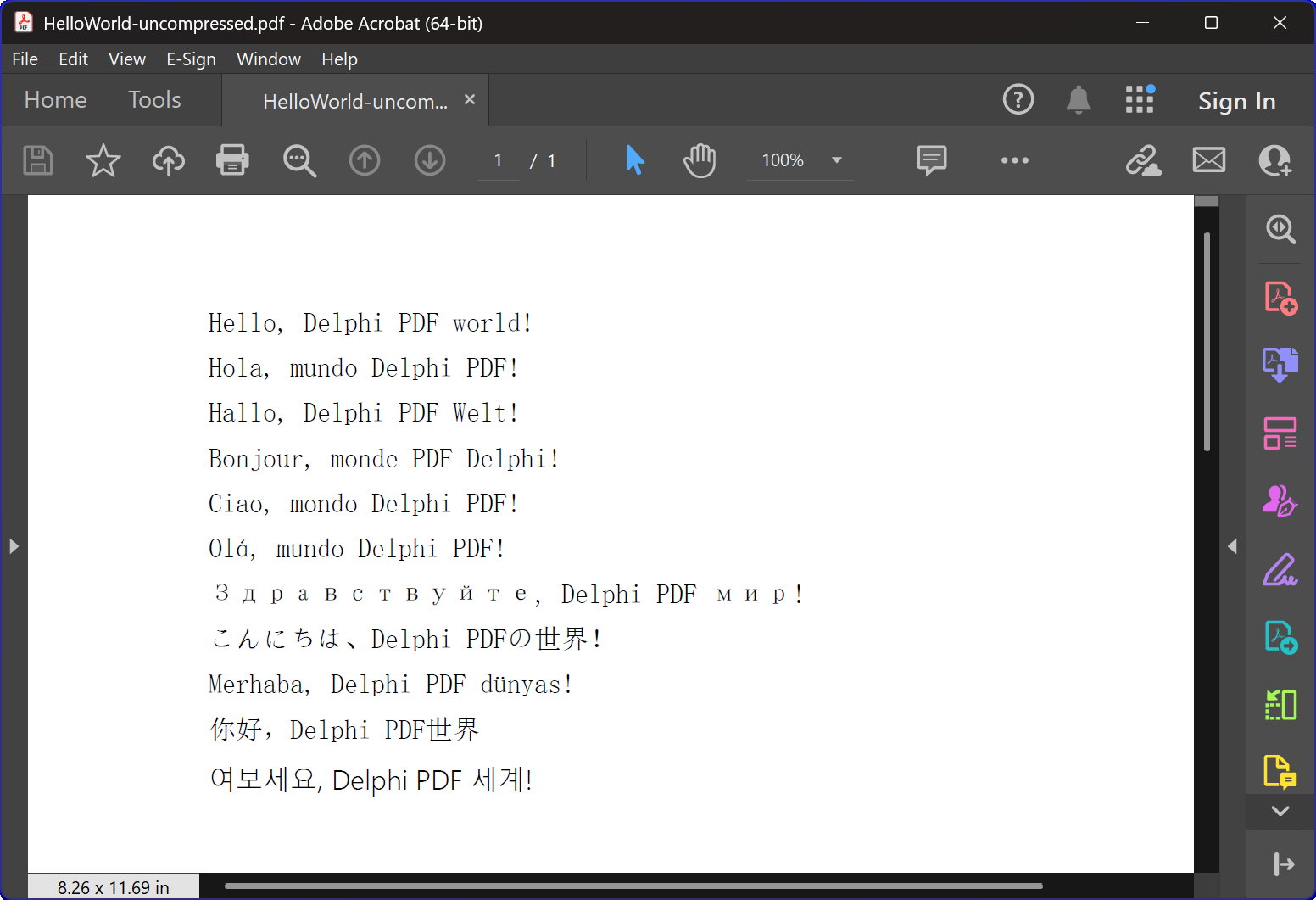
نظرة عامة على برنامج HelloWorld.dpr
الـ HelloWorld.dpr البرنامج التجريبي هو مقدمة ممتازة لمكون HotPDF.
الميزة الأساسية والأكثر أهمية: دالة TexOut. تعرض هذه البرامج التوضيحية أيضًا وظائف إنشاء ملفات PDF الأساسية.
الوظائف الأساسية:
1. إنشاء مستندات PDF
الوظيفة الأساسية للبرنامج هي إنشاء مستندات PDF تحتوي على نص متعدد اللغات "Hello World". CreatePDF توضح الإجراء التالي:
- تهيئة المكون: الإعداد والتكوين الصحيحين لمكون THotPDF.
- خصائص المستند: تعيين البيانات الوصفية مثل خيارات الضغط وتضمين الخطوط.
- عرض النصوص بلغات متعددة: عرض النصوص بلغات مختلفة، بما في ذلك الإنجليزية والإسبانية والألمانية والفرنسية والإيطالية والبرتغالية والروسية واليابانية والتركية والصينية والكورية.
- إدارة الخطوط: استخدام خط Arial Unicode MS لدعم عرض النصوص بلغات متعددة.
- الضغط: إنشاء مستند PDF مضغوط.
2. إدارة النوافذ والتكامل مع النظام.
يتضمن البرنامج وظائف متطورة لعدّ النوافذ والتي توضح:
- تعداد النوافذ في النظام: استخدام واجهة برمجة تطبيقات Windows (Windows API)
EnumWindowsللدوران عبر جميع النوافذ الرئيسية. - مطابقة عناوين النوافذ: تطبيق مطابقة السلاسل الفرعية لتحديد التطبيقات المستهدفة.
- إغلاق النوافذ تلقائيًا: إرسال
WM_CLOSEرسائل لإغلاق برامج عرض ملفات PDF التي قد تحتوي على ملفات مفتوحة. - منع التعارض: ضمان عدم حدوث تعارضات في الوصول إلى الملفات عند إنشاء ملفات PDF جديدة.
3. معالجة الأخطاء وإدارة الموارد.
يوضح البرنامج أفضل الممارسات لـ:
- إدارة الذاكرة: إنشاء وتخلص مناسب من مثيلات المكونات.
- الأمان في حالة حدوث استثناءات: استخدام كتل try-finally لضمان تنظيف الموارد.
- ملاحظات المستخدم: توفير مخرجات وحدة التحكم لإعلام المستخدمين بتقدم البرنامج.
تفاصيل التنفيذ التقني:
تقنية الضغط.
يقوم البرنامج بإنشاء مستند PDF باستخدام ضغط FlateDecode.
استراتيجية معالجة الخطوط.
يستخدم البرنامج استراتيجية متطورة لاختيار الخطوط:
- Arial Unicode MS: تستخدم لمعظم اللغات نظرًا لدعمها الواسع لمجموعة الأحرف.
- تضمين الخط: تضمن مظهرًا متسقًا عبر الأنظمة المختلفة.
توافق الإصدارات.
يتضمن الكود توجيهات تجميع شرطي لدعم كل من إصدارات Delphi الحديثة والقديمة.
- دعم XE2+: يستخدم وحدات ذات نطاقات أسماء (WinApi.Windows, System.SysUtils، إلخ).
- دعم الإصدارات القديمة: يعود إلى أسماء الوحدات التقليدية لإصدارات Delphi الأقدم.
القيمة التعليمية.
هذا المثال البسيط لـ "Hello World" يخدم أغراضًا تعليمية متعددة:
- مقدمة عن المكونات: يوفر مقدمة سهلة لاستخدام مكون HotPDF.
- أفضل الممارسات: يوضح إدارة الموارد المناسبة والتعامل مع الأخطاء.
- التكامل مع النظام. يوضح كيفية دمج توليد ملفات PDF مع عمليات نظام Windows.
- التدويل: يوضح كيفية التعامل مع النصوص متعددة اللغات في مستندات PDF.
البدء.
لتشغيل هذا البرنامج التجريبي:
- تأكد من تثبيت مكون HotPDF بشكل صحيح في بيئة تطوير Delphi الخاصة بك.
- افتح ملف مشروع HelloWorld.dpr.
- قم بتجميع وتشغيل البرنامج.
- سيقوم البرنامج بإنشاء ملف PDF تلقائيًا مع ضغط.
- قم بفحص الملفات التي تم إنشاؤها لمعرفة كيفية عرض النص متعدد اللغات.
الكود المصدري.
فيما يلي الكود المصدري الكامل والموثق لبرنامج عرض HelloWorld التوضيحي:
|
1 2 3 4 5 6 7 8 9 10 11 12 13 14 15 16 17 18 19 20 21 22 23 24 25 26 27 28 29 30 31 32 33 34 35 36 37 38 39 40 41 42 43 44 45 46 47 48 49 50 51 52 53 54 55 56 57 58 59 60 61 62 63 64 65 66 67 68 69 70 71 72 73 74 75 76 77 78 79 80 81 82 83 84 85 86 87 88 89 90 91 92 93 94 95 96 97 98 99 100 101 102 103 104 105 106 107 108 109 110 111 112 113 114 115 116 117 118 119 120 121 122 123 124 125 126 127 128 129 130 131 132 133 134 135 136 137 138 139 140 141 142 143 144 145 146 147 148 149 150 151 152 153 154 155 156 157 158 159 160 161 162 163 164 165 166 167 |
{************************************************************} // HotPDF PDF Component // Copyright(c)2007-2025, https://www.loslab.com {************************************************************} // HelloWorld Demo Program for HotPDF Component // This program demonstrates basic PDF creation capabilities // including multilingual text support and compression options {************************************************************} program HelloWorld; {$APPTYPE CONSOLE} // Console application type {$I ..\..\..\Lib\HotPDF.inc} // Include HotPDF configuration file uses // EurekaLog units for memory leak detection and debugging (optional) {$IFDEF EurekaLog} EMemLeaks, // Memory leak detection EResLeaks, // Resource leak detection EDebugJCL, // JCL debugging support EDebugExports, // Export debugging information EFixSafeCallException, // SafeCall exception handling EMapWin32, // Win32 mapping support EAppConsole, // Console application support EDialogConsole, // Console dialog support ExceptionLog7, // Exception logging {$ENDIF EurekaLog} // System units - different namespaces for XE2+ vs older versions {$IFDEF XE2+} WinApi.Windows, // Windows API functions WinApi.Messages, // Windows message constants System.SysUtils, // System utilities System.Classes, // Base classes (TStringList, etc.) Vcl.Graphics, // Graphics support {$ELSE} Windows, // Windows API functions (older Delphi) Messages, // Windows message constants (older Delphi) SysUtils, // System utilities (older Delphi) Classes, // Base classes (older Delphi) Graphics, // Graphics support (older Delphi) {$ENDIF} HPDFDoc; // HotPDF main component unit // Creates a compressed PDF file with multilingual "Hello World" text // Parameters: // FileName: Output PDF file name procedure CreatePDF(const FileName: string); var HotPDF: THotPDF; // Main HotPDF component instance begin // Create HotPDF component instance HotPDF := THotPDF.Create(nil); try // Configure PDF properties HotPDF.AutoLaunch := true; // Automatically open PDF after creation HotPDF.FileName := FileName; // Set output file name // Enable FlateDecode compression HotPDF.Compression := cmFlateDecode; // Enable FlateDecode compression WriteLn('Creating compressed PDF: ', FileName); HotPDF.FontEmbedding := true; // Embed fonts for better compatibility HotPDF.BeginDoc; // Start PDF document creation // Set Unicode font for multilingual text support // Arial Unicode MS supports most languages except Korean // procedure SetFont ( FontName: AnsiString; FontStyle: TFontStyles; ASize: Single; FontCharset: TFontCharset = DEFAULT_CHARSET; IsVertical: boolean = false); // DEFAULT_CHARSET: 1 - Font is chosen based on Name. If the described font is not available on the system, Windows will substitute another font HotPDF.CurrentPage.SetFont('Arial Unicode MS', [], 12, 1, False); // Display "Hello World" in multiple languages // TextOut parameters: (X, Y, Angle, Text) HotPDF.CurrentPage.TextOut(80, 50, 0, 'Hello, Delphi PDF world!'); // English HotPDF.CurrentPage.TextOut(80, 70, 0, 'Hola, mundo Delphi PDF!'); // Spanish HotPDF.CurrentPage.TextOut(80, 90, 0, 'Hallo, Delphi PDF Welt!'); // German HotPDF.CurrentPage.TextOut(80, 110, 0, 'Bonjour, monde PDF Delphi!'); // French HotPDF.CurrentPage.TextOut(80, 130, 0, 'Ciao, mondo Delphi PDF!'); // Italian HotPDF.CurrentPage.TextOut(80, 150, 0, 'Olá, mundo Delphi PDF!'); // Portuguese HotPDF.CurrentPage.TextOut(80, 170, 0, 'Здравствуйте, Delphi PDF мир!'); // Russian HotPDF.CurrentPage.TextOut(80, 190, 0, 'こんにちは、Delphi PDFの世界!'); // Japanese HotPDF.CurrentPage.TextOut(80, 210, 0, 'Merhaba, Delphi PDF dünyası!'); // Turkish HotPDF.CurrentPage.TextOut(80, 230, 0, '你好,Delphi PDF世界'); // Chinese HotPDF.CurrentPage.TextOut(80, 250, 0, '여보세요, Delphi PDF 세계!'); // Korean HotPDF.EndDoc; // Finalize and save the PDF document WriteLn('PDF created successfully: ', FileName); finally HotPDF.Free; // Clean up HotPDF component end; end; // Global variables for window enumeration and PDF creation var Title: String; // Individual title string (unused in current implementation) Titles: TStrings; // List of window titles to search for Window: HWND; // Window handle (unused in current implementation) WindowText: array [0 .. 255] of Char; // Buffer for window text (unused in current implementation) WindowTitle: String; // Window title string (unused in current implementation) I: Integer; // Loop counter (unused in current implementation) // Callback function for EnumWindows API // This function is called for each top-level window in the system // Parameters: // hWnd: Handle to the current window being enumerated // lParam: User-defined data (in our case, pointer to TStrings with target titles) // Returns: True to continue enumeration, False to stop function EnumWindowsProc(HWND: HWND; lParam: lParam): BOOL; stdcall; var Titles: TStrings; // List of target window titles I: Integer; // Loop counter WindowText: array [0 .. 255] of Char; // Buffer to store window text WindowTitle: String; // Current window's title as string begin Result := true; // Continue enumeration by default Titles := TStrings(lParam); // Cast lParam back to TStrings // Get the window title text if GetWindowText(HWND, WindowText, SizeOf(WindowText)) > 0 then begin WindowTitle := String(WindowText); // Convert char array to string // Check if window title contains any of our target strings for I := 0 to Titles.Count - 1 do begin // Use Pos function to check if target string is contained in window title if Pos(Titles[I], WindowTitle) > 0 then begin // Send WM_CLOSE message to close the window PostMessage(HWND, WM_CLOSE, 0, 0); Break; // Exit loop after finding first match end; end; end; end; // Main program execution begins here begin // Close any existing PDF files that might be open in PDF viewers // This prevents file access conflicts when creating new PDFs with same names Titles := TStringList.Create; try // Define list of window title substrings to search for // Any window containing these strings will be closed // This will close Adobe and Foxit PDF reader & editor and many other PDF apps Titles.CommaText := '"HelloWorld.pdf", "Foxit"'; // Enumerate all top-level windows and close matching ones // EnumWindows calls our callback function for each window EnumWindows(@EnumWindowsProc, lParam(Titles)); finally Titles.Free; // Clean up string list end; // Display program header WriteLn('=== HotPDF HelloWorld Demo ==='); WriteLn('This demo creates a compressed PDF file with multilingual text.'); WriteLn(''); // Create compressed PDF CreatePDF('HelloWorld.pdf'); // Display completion message WriteLn(''); WriteLn('PDF file created successfully!'); WriteLn('The PDF file uses FlateDecode compression for optimal file size.'); WriteLn(''); WriteLn('Press Enter to exit...'); ReadLn; // Wait for user input before closing console end. |