لديك ملف PDF على القرص، مسحه عميل ضوئيًا من كومة فواتير، ومهمتك استخراج صور الصفحات مجددًا كصور نقطية (bitmaps) لتمريرها على محرك OCR. تحمّل الملف، وتجد كائنات XObject الخاصة بالصور، ثم تكتشف الجزء الذي لا يحذّرك منه أحد: البايتات داخل تلك التدفقات ليست بكسلات. إنها تدفق JPEG مرمّز، أو كتلة JPEG 2000 مضغوطة بالمويجات، أو تشغيلة فاكس Group 4، أو صورة نقطية مفهرسة خلف لوحة ألوان خلف مرشح Flate. كائن الصورة يعرف عرضها وارتفاعها، لكن العينات الفعلية مختومة داخل أيًا كان المرشح الذي اختاره المُنتِج. الحصول على TBitmap قابل للاستخدام يعني فك ذلك المرشح، وPDF يمنحك نحو ثماني طرق مختلفة يمكن أن تُختم بها البايتات
هذه هي الفجوة التي تسدّها ExtractLoadedImage في HotPDF، مكوّن PDF الأصلي لـ VCL الخاص بـ Delphi وC++Builder. فهي تعدّد كائنات XObject الخاصة بالصور في المستند الذي حمّلته، وتُبلغ عن ماهية كل واحدة منها، وتفك ترميز ما تستطيع منها إلى صورة نقطية بعمق 24-bit. الجزء المثير للاهتمام ليس سطح API، الذي يتكون من ثلاث طرق فقط. بل هو سبب وجود مسار فك ترميز منفصل من الأساس، وما الذي يمكنه، وما لا يمكنه، إعادته إلى بكسلات
لماذا لا تُفك الصور المحمّلة بالفعل
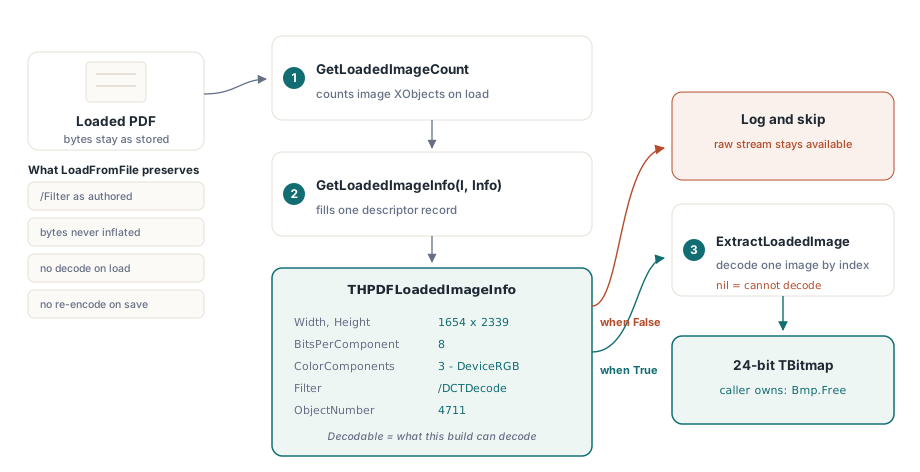
محمّل HotPDF مبني حول مبدأ الدقة بالتمرير المباشر (pass-through fidelity). عندما تستدعي LoadFromFile، تُبقى تدفقات الصور كما تظهر تمامًا في الملف المصدر: المرشح الأصلي، والبايتات المضغوطة الأصلية، والقاموس الأصلي. هذا أمر متعمّد. الغرض الكامل من تحميل مستند هو عادة نسخ الصفحات، ودمج الملفات، وختمها، وإعادة ضبط أذوناتها، وكتابتها من جديد، ولكل ذلك فإن أرخص وأأمن ما يمكن فعله هو ترك كل تدفق صورة دون مساس. فك ترميز كل صورة إلى صورة نقطية عند التحميل سيستهلك ذاكرة ومعالجًا على عمل لا يحتاجه معظم المستدعين أبدًا، وإعادة الترميز عند الحفظ ستُتلف صورًا كان ينبغي نسخها حرفيًا
النتيجة هي أن الرسم البياني للكائنات المحمّلة لا يحمل أي بكسلات. كائن XObject لصورة يكون /Filter الخاص بها /DCTDecode يحمل بايتات JPEG؛ ولم يشغّل HotPDF قط مفكك JPEG عليها، لأن لا شيء في مسار النسخ وإعادة الكتابة يحتاج إلى ذلك. لذلك عندما تريد البكسلات فعليًا، يجب على API الاستخراج أن يقوم بفك الترميز بنفسه، من الصفر، أيًا كان المرشح الذي تستخدمه تلك الصورة بالذات. هذا هو نفس السبب في أن ترميزات جهة الإنشاء مستقلة عن المحمّل: المقالة عن إضافة صور JPEG 2000 إلى ملفات PDF في Delphi تصف كيف يتصل محرك JPX بجهة الإنشاء، وأن ذلك المحرك لم يكن ببساطة موصولًا بمسار القراءة إلى أن احتاجه API الاستخراج
واجهة API ذات الطرق الثلاث
السطح صغير. GetLoadedImageCount تعيد عدد كائنات XObject الخاصة بالصور التي يحتويها المستند المحمّل. GetLoadedImageInfo تملأ سجل واصف لواحدة منها حسب الفهرس. ExtractLoadedImage تعيد الصورة النقطية المفكوكة، أو nil عندما لا تستطيع فك تلك الصورة. العدّ يعتمد على الفهرس وثابت لعملية تحميل معيّنة: فهو داخليًا يجتاز جدول الكائنات غير المباشرة، ويجمع كل تدفق يُحلّ /Subtype الخاص به إلى /Image، لذا فإن الفهرس الذي تمرره إلى GetLoadedImageInfo هو نفس الفهرس الذي تمرره إلى ExtractLoadedImage
var
  Pdf: THotPDF;
  Info: THPDFLoadedImageInfo;
  Bmp: TBitmap;
  I, Count: Integer;
begin
  Pdf := THotPDF.Create(nil);
  try
    if Pdf.LoadFromFile('scanned-invoices.pdf', '') <= 0 then
      Exit;
    Count := Pdf.GetLoadedImageCount;
    for I := 0 to Count - 1 do
    begin
      if not Pdf.GetLoadedImageInfo(I, Info) then
        Continue;
      if not Info.Decodable then
        Continue;                       // المرشح أو مساحة الألوان غير مدعومة
      Bmp := Pdf.ExtractLoadedImage(I);
      if Bmp <> nil then
      try
        Bmp.SaveToFile(Format('img_%d.bmp', [I]));
      finally
        Bmp.Free;                       // المستدعي يملك الصورة النقطية
      end;
    end;
  finally
    Pdf.Free;
  end;
end;
هناك تفصيلان تعاقديان مهمّان هنا. أولًا، TBitmap المُعادة ملك لك لتحريرها؛ فالمستند لا يخزّنها مؤقتًا ولا يملكها. ثانيًا، تحقّق من Decodable قبل الاستدعاء، وتحقّق من النتيجة مقابل nil بعده. الطريقة لا تثير استثناءً عند وجود مرشح غير مدعوم، بل تعيد nil، وقيمة nil صامتة داخل حلقة دفعية هي بالضبط النوع من الأشياء الذي يبتلع صفحة من مهمة تضم ألف صفحة دون أن ينتبه أحد
قراءة الوصف قبل فك الترميز
THPDFLoadedImageInfo تخبرك بماهية الصورة من دون الالتزام بفك ترميز كامل. حقولها مأخوذة مباشرة من قاموس الصورة: Width وHeight بالعينات، وBitsPerComponent، وColorComponents وColorSpace اللذان يصفان التفسير بعد فك الترميز (1 للرمادي، 3 لـ RGB، 4 لـ CMYK)، وFilter باسم الضغط، وIsImageMask لأقنعة الاستنسل، وObjectNumber للكائن غير المباشر الأساسي، وDecodable
تلك العلامة الأخيرة هي الصادقة. Decodable تكون True فقط عندما يستطيع الإصدار الحالي فعليًا تحويل هذا المزيج المحدد من المرشح ومساحة الألوان إلى صورة نقطية. إنها تعبّر عن مصفوفة الدعم الحقيقية، لا عن أمنية: الصورة التي لا يفهم الإصدار الحالي Filter الخاص بها تُبلّغ Decodable = False، ويمكنك التفرّع بناءً على ذلك لتسجيل الأمر، أو التخطي، أو الرجوع إلى استخراج التدفق الخام بنفسك. عاملها كشرط مسبق، لا كتلميح
// فرز كل صورة قبل الالتزام بفك الترميز
var
  Pdf: THotPDF;
  Info: THPDFLoadedImageInfo;
  I: Integer;
begin
  // ... تم تحميل Pdf ...
  for I := 0 to Pdf.GetLoadedImageCount - 1 do
  begin
    if not Pdf.GetLoadedImageInfo(I, Info) then
      Continue;
    if Info.Decodable then
      // ستُعيد ExtractLoadedImage(I) كائن TBitmap
    else
      // مرشح/مساحة ألوان غير مدعومة: سجّل الكائن وتخطّه
      Writeln(Format('Image %d obj %d: %dx%d %s/%s not decodable',
        [I, Info.ObjectNumber, Info.Width, Info.Height,
         String(Info.Filter), String(Info.ColorSpace)]));
  end;
end;
هناك تفصيل تنفيذي واحد يوقع من يبني سجلات الواصف يدويًا. THPDFLoadedImageInfo تحمل حقلين من نوع AnsiString، هما Filter وColorSpace. هذان نوعان مُدارَان بعدّ مرجعي، لذا فإن ردّ الفعل المعتاد بتصفير سجل باستخدام FillChar(Info, SizeOf(Info), 0) خاطئ هنا: فهو يكتب فوق مرجع السلسلة دون إنقاص عدّاده، وهذا يسبّب تسربًا أو تلفًا. يُهيّئ HotPDF السجل حقلًا حقلًا لهذا السبب بالذات، وإذا نسخت هذا النمط في كودك الخاص يومًا، فافعل الشيء نفسه
موزّع واحد، وثمانية مسارات للمرشحات
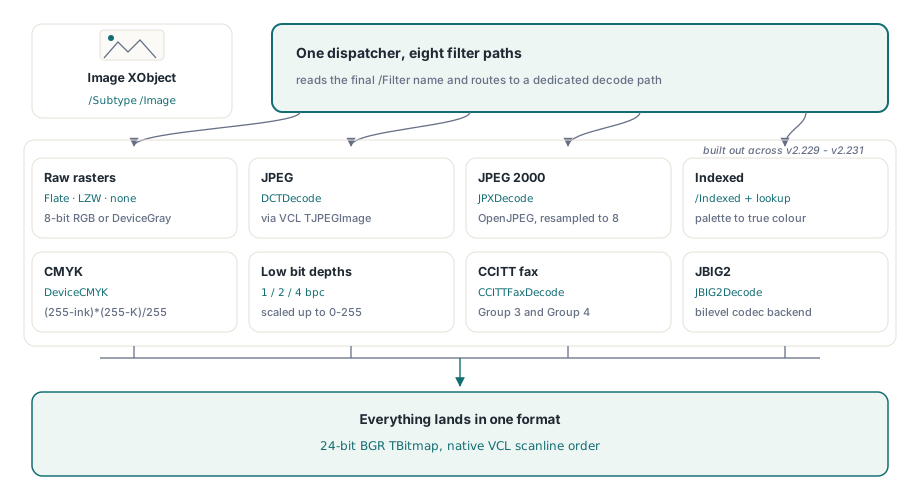
سبب استغراق هذه الميزة سلسلة من الإصدارات بدلًا من إصدار واحد هو أن PDF لا تملك صيغة صورة واحدة. بل تملك مرشحات، والفقرة §8.9.5 من ISO 32000-1 تتيح لكائن XObject الخاص بالصورة تسمية أي منها في /Filter، مع تفسير العينات محكومًا بشكل منفصل عبر /ColorSpace و/BitsPerComponent ومصفوفة /Decode اختيارية. ExtractLoadedImage تقرأ اسم المرشح وتوجّه إلى مفكك مخصص لكل حالة. المجموعة المدعومة، التي بُنيت عبر الإصدارات من v2.229 إلى v2.231، تغطي الآن ثمانية مسارات متمايزة
- الصور النقطية الخام (FlateDecode أو LZWDecode أو بلا مرشح) بصيغة DeviceRGB أو DeviceGray بعمق 8-bit. تُفكّ البايتات إلى صورة نقطية مرصوصة، والتحويل الوحيد هو تبديل القنوات، ويُغطّى ذلك أدناه
- DCTDecode (JPEG). يُسلَّم التدفق المرمّز إلى
TJPEGImageالخاص بـ VCL، الذي يحل الهندسة واللون، وتُسنَد النتيجة إلى صورة نقطية بعمق 24-bit - JPXDecode (JPEG 2000). تُفكّ عبر محرك OpenJPEG الخلفي، وهو نفس المحرك الموصوف في مقالة JPEG 2000، مع إعادة أخذ عيّنات المكوّنات ذات العمق العالي نزولًا إلى 8 بتات
- الألوان المفهرسة (Indexed). تُقرأ لوحة الألوان من مصفوفة
[/Indexed base hival lookup]وتُوسَّع كل عينة عبر جدول البحث إلى لون حقيقي - DeviceCMYK. تُحوَّل عينات القنوات الأربع إلى RGB بالصيغة القياسية لحبر على أبيض
- DeviceGray وIndexed دون 8-bit بعمق 1 أو 2 أو 4 بتات لكل مكوّن، تُفكّ حزمتها عينة بعينة وتُقاس إلى نطاق 0–255
- CCITTFaxDecode، مرشحا الفاكس Group 3 وGroup 4، تُفكّ عبر محرك خلفي مخصص T.4/T.6
- JBIG2Decode، مرشح الثنائية المستوى عالي النسبة، يُفكّ عبر محرك JBIG2 المسجَّل الذي تغطيه مقالة ضغط JBIG2 الأصلي من جهة الترميز
كل شيء ينتهي في المكان نفسه: bitmap BGR 24-bit، لأن هذا هو ما يخزّنه VCL TBitmap طبيعيًا وما يتوقعه كل مستهلك لاحق
التحويلات التي تغيّر البكسلات من دون أن تلاحظ
هناك مساران من هذه المسارات يتضمنان تحويلًا يسهل أن يخطئ المرء فيه بخفة، ويستحق الفهم حتى لو لم تلمس المفكك بنفسك قط. الأول هو تبديل ترتيب الألوان. صورة PDF DeviceRGB تخزن العينات بترتيب أحمر-أخضر-أزرق، وصفّها العلوي أولًا. أما scanline 24-bit في VCL فيخزنها بترتيب أزرق-أخضر-أحمر. لذلك فإن فك صورة RGB عادية ليس memcpy؛ بل يُبادَل البايتان الأول والثالث لكل بكسل في الطريق إلى الـ scanline. أعكس ذلك وستتبادل الأحمرات والزرق، وهو ما يبدو مقبولًا على صورة اختبار رمادية لكنه يخرج كارثيًا على صورة ملوّنة. أما ترتيب الصفوف، فهو يطابق مباشرة، لأن rasters PDF من الأعلى إلى الأسفل تصطف مع ScanLine[0] بصفتها الصف البصري العلوي، فلا حاجة إلى قلب عمودي
الثاني هو CMYK. صور PDF DeviceCMYK تحمل أربعة أحبار، والتحويل إلى RGB حساب لكل قناة، لا بحثًا في جدول: كل قناة خرج هي (255 - ink) * (255 - K) / 255. هذا تقريب على مستوى الجهاز، لا تحويلًا مُدار الألوان عبر ICC profile، لذا فالنتيجة دقيقة بما يكفي للعرض وإعادة rasterize، لكنها ليست المسار المناسب إذا كنت تحتاج لونًا مطابقًا للطباعة. وإذا كان سير عملك يطلب الدقة، فتعامل مع الـ bitmap المستخرج كمعاينة، واحتفظ بتدفق CMYK الأصلي للمسار المُدار الألوان
مسار Indexed يخبئ فخًا تحليليًا خاصًا به. اللوحة في مساحة ألوان /Indexed يمكن أن تُخزَّن كسلسلة حرفية أو كسلسلة سداسية، وHotPDF يخزن قيمة السلسلة السداسية على أنها النص السداسي نص، لا البايتات المفكوكة. لذلك عندما تكون اللوحة سلسلة سداسية، يجب تمرير جدول البحث عبر فك من hex إلى bytes أولًا؛ أما السلسلة الحرفية فهي بايتات خام أصلًا. إذا فاتك هذا الفرع، ستخرج الصورة المفهرسة ذات الألوان الأربعة خرابًا، لأن كل إدخال في اللوحة يُقرأ من حد بايت خاطئ
سلاسل المرشحات: آخر فلتر هو فلتر الصورة نفسه
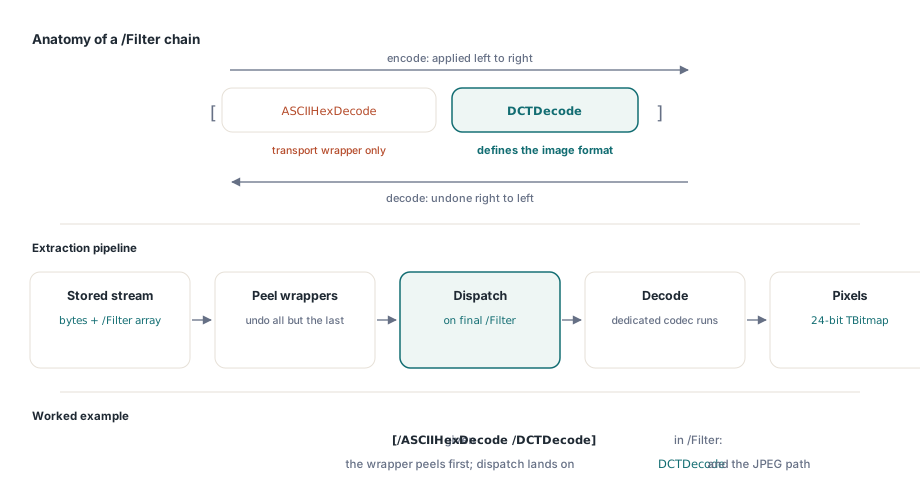
اسم واحد لـ /Filter هو الحالة الأسهل. لكن PDF يتيح أيضًا سلسلة من المرشحات، حيث يمر التدفق عبر عدة مرشحات على التوالي، وتُذكر بالترتيب في مصفوفة /Filter مثل [/ASCII85Decode /FlateDecode] أو [/ASCIIHexDecode /DCTDecode] (ISO 32000-1 §7.4). الدلالة دقيقة: المرشحات تُطبَّق من اليسار إلى اليمين عند الترميز، لذلك عند فك الترميز تعكسها من اليمين إلى اليسار، والأخير هو المرشح الذي يعرّف صيغة الصورة فعلًا. أما المرشحات الأولى فليست سوى ترميزات نقل ملفوفة حوله
يعالج المفكك هذا الأمر بالتقشير. قبل تشغيل أي مفكك صورة، يُطبَّق كل فلتر في السلسلة باستثناء الأخير لإنتاج المدخل الذي يتوقعه الفلتر النهائي، وعندها فقط يحدث التوجيه إلى ذلك الفلتر الأخير. لذلك [/ASCII85Decode /DCTDecode] يزيل ASCII85 من التدفق أولًا، ثم يوجّه الناتج إلى مسار JPEG؛ [/FlateDecode] الملفوف حول raster خام يفك ثم يشغّل مسار raster. هذا ما يجعل المفككات الثمانية تبقى بسيطة. لا يحتاج أي منها إلى معرفة ASCII85 أو أغلفة النقل السداسية، لأن الأغلفة تكون قد اختفت بحلول الوقت الذي يرى فيه المفكك البايتات. وهذا يعني أيضًا أن سلسلة ينتهي آخر فلاترها بفلتر غير مدعوم تفشل نظيفًا عند خطوة التوجيه بدل أن تتعطل في المنتصف
أين يتوقف الاستخراج، وماذا تفعل بعد ذلك
كن صريحًا مع نفسك بشأن الحدود. الصورة التي يكون فلترها النهائي خارج المجموعة المدعومة تعيد nil، وكذلك الصورة التي لا تستطيع مساحة ألوانها أن تُفسَّر بواسطة البناء الحالي. الأقنعة الناعمة والشفافية لا يُعاد بناؤها داخل bitmap؛ ستحصل على الصورة الأساسية، لا على نتيجة مركّبة. الأعماق الأعلى من 8 في JPEG 2000 يُعاد تحجيمها نزوليًا، وهذا lossy مقصود وخيار خاطئ إذا كنت تعيد أرشفة لا عرضًا. وقناع الصورة، وهو stencil أحادي البت لا لون له، موصوف في الوصف لكنه شيء مختلف عن صورة تصويرية؛ إذا فُكّ على أنه صورة فوتوغرافية فسيفاجئك
عندما لا يكفي الاستخراج، يبقى التدفق الخام هناك في الرسم البياني للكائنات المحمّل، مع الفلتر وكل شيء، ويمكنك سحبه بايتًا بايتًا وتسليمه إلى codec متخصص خاص بك. هذا هو البديل الاحتياطي الذي يحافظ عليه تصميم التمرير المباشر عمدًا: البايتات الأصلية لا تُرمى أبدًا، لذا فإن أسوأ الحالات هي أن تفكها بنفسك بدل أن تكون البيانات قد اختفت. لكن في معظم الأعمال الحقيقية، تغطي المرشحات الثمانية المدعومة ما يصدره فعليًا الماسحات الضوئية ومجموعات المكتب ومحركات التقارير، وحلقة عبر GetLoadedImageCount مع حارس Decodable تعيد PDF محمّل إلى مجلد من bitmaps في بضع سطور
واجهة API لاستخراج الصور المحمّلة، مع المجموعة الكاملة من مرشحات الفك الموصوفة هنا، متاحة في HotPDF Delphi Component لـ Delphi وC++Builder