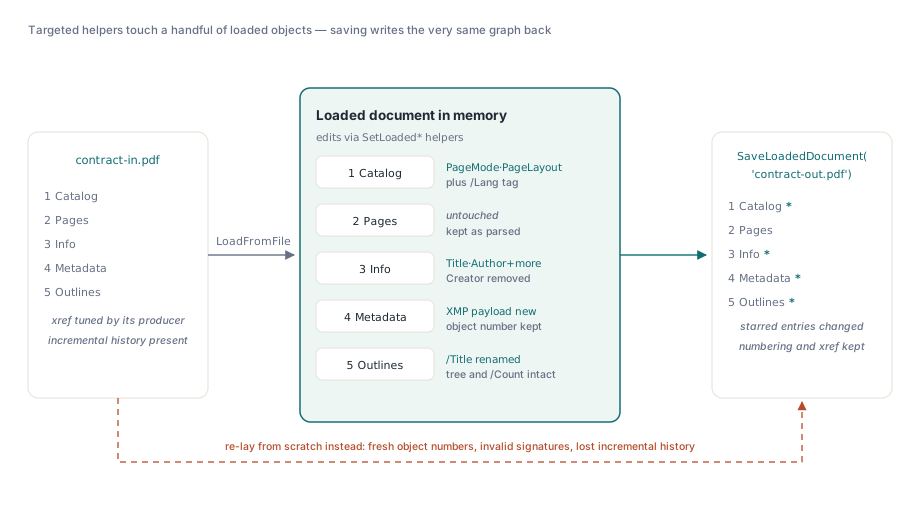
لديك عشرة آلاف ملف PDF لعقود صادرة من اثني عشر مولدًا مختلفًا، ويريد قسم الشؤون القانونية أن يحمل كل واحد منها Author، وProducer مصححًا، ووضع قراءة يفتح لوحة الإشارات المرجعية عند التشغيل. الحل الساذج هو تحميل كل ملف، وإعادة تنضيد الصفحات، ثم كتابة مستند جديد. إذا فعلت ذلك، فأنت قد تخلّيت عن كل أرقام الكائنات الموجودة، وتاريخ التحديث التزايدي، وأي توقيع رقمي، وxref المضبوط بعناية الذي أخرجه البرنامج الأصلي. ستبدو الصفحات متطابقة، لكن الملف من الناحية البنيوية سيكون غريبًا. ولتعديل بيانات تعريف، هذا هو الخيار الخاطئ تمامًا
النهج الصحيح هو أن تتعامل مع المستند المحمّل بوصفه مخطط كائنات تعدله في مكانه: ادخل إلى قاموس Info، و/Metadata stream، وCatalog، وغيّر الإدخالات القليلة التي تهمك، ثم اكتب النتيجة مرة أخرى. HotPDF، مكوّن PDF الأصلي لـ Delphi وC++Builder، يوفّر هذه الواجهة بالضبط عبر واجهة كتابة المستند المحمّل. وهذه المقالة عن استخدامه بالطريقة الصحيحة، وعن الخطأ الوحيد الذي يرتكبه تقريبًا الجميع: تعديل قاموس Info ونسيان أن نسخة ثانية من البيانات الوصفية نفسها تعيش في XMP
مكانان يخزّنان البيانات الوصفية نفسها، وهما يختلفان
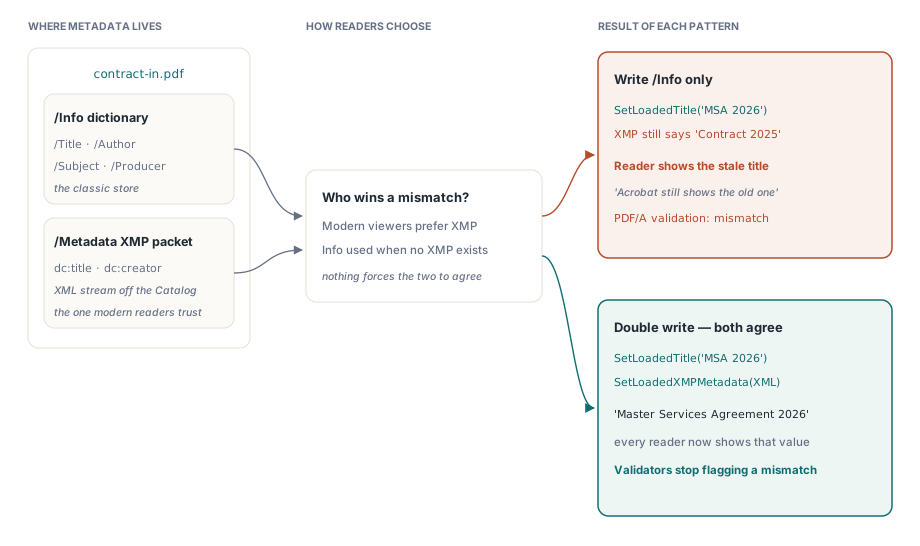
يحمل PDF معلومات المستند في موقعين متوازيين، وهذا هو أصل معظم تذاكر "غيّرت العنوان لكن Acrobat ما زال يعرض القديم". الأول هو قاموس معلومات المستند، الكائن الكلاسيكي /Info مع /Title, /Author, /Subject, /Keywords, /Creator، و/Producer مفاتيح، المعرّفة في ISO 32000-1 §14.3.3. والثاني حزمة XMP، وهي مستند XML مخزن كتدفق معلّق بـCatalog تحت /Metadata، المعرّفة في §14.3.2 والمبنية على نموذج بيانات Adobe XMP
يمكن لكليهما حمل عنوان. ولا شيء في المواصفة يجبرهما على التطابق. عارِضات العرض الحديثة ومعظم أدوات التحقق من PDF/A تفضّل حزمة XMP عندما تكون موجودة، وتعود إلى قاموس Info عندما لا تكون موجودة. لذلك إذا حدّثت /Info فقط، وهو ما يفعله الغالبية الساحقة من كود "ضبط بيانات تعريف PDF"، فسيواصل القارئ الذي يثق بـXMP عرض القيمة القديمة، وستبلّغ أداة فحص PDF/A عن عدم التطابق. العملية الصحيحة على أي ملف يحتوي بالفعل على حزمة XMP هي كتابة مزدوجة: غيّر الإدخال و أعد توليد XMP، حتى تبقى الحزمتان متسقتين. يمنحك HotPDF كلا الجانبين؛ أما الانضباط في استخدامهما معًا فعليك أنت
تحرير قاموس Info
مساعدو جانب Info رفيعو المستوى ويمكن التنبؤ بهم. SetLoadedTitle, SetLoadedAuthor, SetLoadedSubject, SetLoadedKeywords, SetLoadedCreator, وSetLoadedProducer كل منها يأخذ AnsiStringًا واحدًا ويكتب المفتاح المقابل في قاموس Info المحمّل، مع استبدال القيمة إذا كان المفتاح موجودًا وإضافتها إذا لم يكن موجودًا. ولإزالة مفتاح بالكامل، مثل /Creator يتسرّب ويذكر أدواتك الداخلية، استدعِ RemoveLoadedInfoKey باسم المفتاح الخام. لا يلمس أي من هذه الحقول XMP؛ فهي تعمل فقط على كائن /Info الذي حدده LoadFromFile عندما حلّل الملف
var
  Pdf: THotPDF;
begin
  Pdf := THotPDF.Create(nil);
  try
    if Pdf.LoadFromFile('contract-in.pdf', '') > 0 then
    begin
      Pdf.SetLoadedTitle('Master Services Agreement 2026');
      Pdf.SetLoadedAuthor('Legal Department');
      Pdf.SetLoadedSubject('Executed contract, retention 7 years');
      Pdf.SetLoadedKeywords('contract; MSA; 2026; executed');
      Pdf.SetLoadedProducer('Acme Document Pipeline');
      Pdf.RemoveLoadedInfoKey('Creator');  // أزل اسم الأداة المصدر
      Pdf.SaveLoadedDocument('contract-out.pdf');
    end;
  finally
    Pdf.Free;
  end;
end;
تفصيل واحد يجب ضبطه بدقة: هذه الدوال تأخذ AnsiString. بالنسبة للعناوين ASCII، لا مشكلة في ذلك، لكن سلاسل نص PDF التي تحتاج إلى أحرف غير لاتينية يجب ترميزها كما تقتضي المواصفة، سواء UTF-16BE مع علامة ترتيب البايت أو PDFDocEncoding، قبل تسليمها. المكتبة تكتب البايتات التي تمنحها إياها داخل كائن سلسلة نصية، ولا تخمّن الترميز بدلًا منك. إذا كانت عناوينك إنجليزية عادية، فتجاهل هذا. أما إذا كانت تتضمن أحرفًا مُشكّلة أو أحرف CJK، فقم بالترميز عمدًا واختبر في عارض حقيقي
إعادة كتابة حزمة XMP
SetLoadedXMPMetadata هي النصف الآخر من الكتابة المزدوجة. مرّر إليها حزمة XMP كاملة على أنها AnsiString، وستفعل أحد أمرين: إذا كان Catalog يشير بالفعل إلى /Metadata stream، فستستبدل محتوى هذا التيار في مكانه مع الحفاظ على رقم الكائن نفسه؛ وإذا لم يكن هناك تيار metadata، فستنشئ واحدًا، وتعلّمه على أنه /Type /Metadata و/Subtype /XML، وتخصص له رقم كائن، ثم تربطه من Catalog. في كلتا الحالتين تنتهي مع كائن بيانات وصفية صالح يقرؤه العارض
أنت توفّر XML، وهذا يعني أنك تتحكم في المخطط، dc:title، dc:creator، xmp:CreatorTool، وهكذا. هذا يمنحك قوة ومسؤولية معًا: فالمكتبة لا تحلل حزمتك ولا تتحقق منها، وتكتب البايتات غير مضغوطة من دون تطبيق أي مرشح على التيار. الحزمة التالفة ستمر عبر الاستدعاء ثم تظهر لاحقًا على شكل شكوى من البيانات الوصفية المكسورة. ابنِ XML بعناية، وطابق بدقة القيم التي كتبتها في قاموس Info حتى لا يتعارض المنظوران أبدًا
const
  XMP_TEMPLATE =
    '<?xpacket begin="" id="W5M0MpCehiHzreSzNTczkc9d"?>' +
    '<x:xmpmeta xmlns:x="adobe:ns:meta/">' +
    '<rdf:RDF xmlns:rdf="http://www.w3.org/1999/02/22-rdf-syntax-ns#">' +
    '<rdf:Description rdf:about="" xmlns:dc="http://purl.org/dc/elements/1.1/">' +
    '<dc:title><rdf:Alt><rdf:li xml:lang="x-default">%s</rdf:li></rdf:Alt></dc:title>' +
    '<dc:creator><rdf:Seq><rdf:li>%s</rdf:li></rdf:Seq></dc:creator>' +
    '</rdf:Description></rdf:RDF></x:xmpmeta><?xpacket end="w"?>';
begin
  // بعد ضبط قاموس Info، اعكس القيم نفسها في XMP:
  Pdf.SetLoadedTitle('Master Services Agreement 2026');
  Pdf.SetLoadedAuthor('Legal Department');
  Pdf.SetLoadedXMPMetadata(
    AnsiString(Format(XMP_TEMPLATE,
      ['Master Services Agreement 2026', 'Legal Department'])));
  Pdf.SaveLoadedDocument('contract-out.pdf');
end;
ذلك الترتيب، Info أولًا، ثم XMP، ثم الحفظ، هو النمط الذي ينبغي ترسيخه. الاستدعاءان مستقلان؛ والاتساق لا يوجد إلا لأنك زوّدتَهما بالسلاسل النصية نفسها. إذا تجاهلت استدعاء XMP على ملف يحتوي على حزمة XMP، فأنت تعود إلى خطأ الجمود الصامت الذي صُمم هذا القسم كله لمنعه
التحكم في طريقة فتح العارض للملف
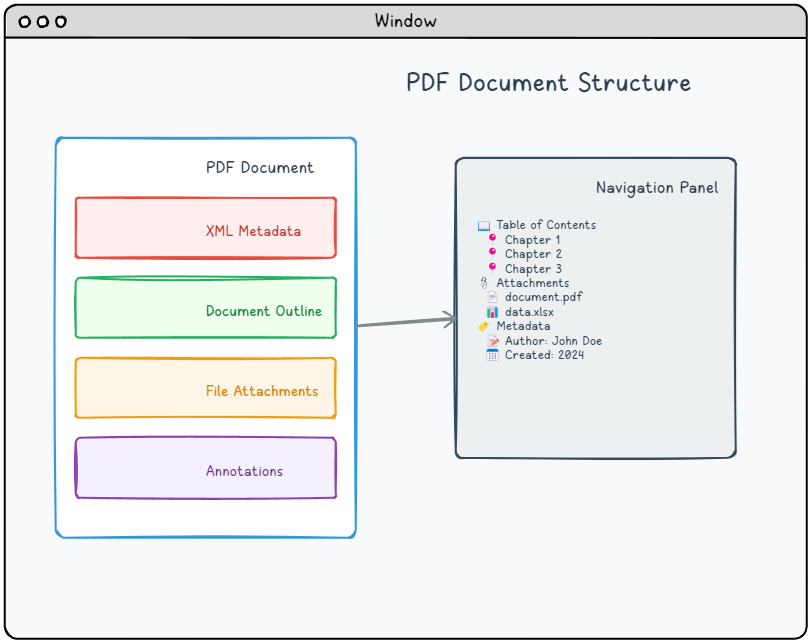
تحدد ثلاثة إدخالات في Catalog ما يراه القارئ في اللحظة التي يُفتح فيها المستند، وكلها تعديلات سطر واحد على المخطط المحمّل. SetLoadedPageMode يكتب /PageMode ككائن name: مرّر 'UseOutlines' لفتح لوحة الإشارات المرجعية، و'UseThumbs' لشريط الصور المصغرة، و'FullScreen' لوضع العرض التقديمي، أو 'UseAttachments' لإظهار جزء المرفقات (ISO 32000-1 §7.7.3.1، الجدول 28). SetLoadedPageLayout يكتب /PageLayout بالطريقة نفسها، 'SinglePage', 'OneColumn', 'TwoColumnLeft'، والبقية. كلاهما يأخذ الاسم من دون شرطة مائلة بادئة؛ وتضيفها المكتبة عند الإخراج
SetLoadedLanguage يكتب إدخال /Lang في Catalog، أي الوسم اللغوي الطبيعي للمستند ككل، 'en-US', 'de-DE'، وBCP 47 tag. لاحظ فرق النوع الذي يوقع الناس في الحيرة: /PageMode و/PageLayout هما كائنان من نوع PDF name، بينما /Lang هو string. HotPDF يصيب هذا داخليًا، لكن إذا تفحّصتَ المخرجات فسوف ترى /PageMode /UseOutlines مقابل /Lang (en-US)، والآن تعرف السبب. إدخال /Lang يهم أكثر مما يبدو: فهو ما تقرؤه التقنيات المساعدة لاختيار النطق، وهو متطلب صارم للامتثال لإتاحة PDF/UA
if Pdf.LoadFromFile('handbook.pdf', '') > 0 then
begin
  Pdf.SetLoadedPageMode('UseOutlines');     // /PageMode, a name
  Pdf.SetLoadedPageLayout('TwoColumnLeft'); // /PageLayout, a name
  Pdf.SetLoadedLanguage('en-US');           // /Lang, a string
  Pdf.SaveLoadedDocument('handbook-tagged.pdf');
end;
إعادة تسمية الإشارات المرجعية من دون إزعاج الشجرة
عناوين الإشارات المرجعية هي تنظيف روتيني، مثل خطأ مطبعي في عنوان أو إعادة ترقيم فصل بعد بناء المخطط. SetLoadedOutlineTitle يأخذ فهرسًا يبدأ من الصفر داخل عناصر المخطط على المستوى الأعلى ويتبع سلسلة Catalog → /Outlines → /First → /Next حتى تلك الموضع، ثم يستبدل /Title الخاص بالإدخال. وهو يغيّر العنوان فقط؛ أما الوجهة، وحالة الفتح أو الإغلاق، وبنية الأبناء فتبقى كما هي
if Pdf.LoadFromFile('report.pdf', '') > 0 then
begin
  Pdf.SetLoadedOutlineTitle(0, 'Executive Summary');
  Pdf.SetLoadedOutlineTitle(1, 'Financial Results');
  Pdf.SaveLoadedDocument('report-renamed.pdf');
end;
إعادة التسمية آمنة تحديدًا لأنها لا تلمس العدادات البنيوية أبدًا. حذف إدخال في المخطط هو الحالة التي تسبب المتاعب، ومن المفيد فهمها حتى عندما تكون بصدد إعادة تسمية فقط، لأنها توضح لك ما الذي ينبغي لا أن تعدّله يدويًا. كل عقدة في المخطط تحمل /Count، ووفقًا لـ ISO 32000-1 §12.3.3، فهذا العدد ليس عدد الأبناء المباشرين. بل هو العدد الإجمالي لـالورثة المرئيين: قيمة موجبة مقدارها N تعني أن N من الورثة معروضون حاليًا، بينما تعني القيمة السالبة أن للعقدة ورثة لكنّها مطوية. عندما يُزال إدخال على المستوى الأعلى، لا يمكن أن يُنقص /Count الجذر ببساطة بمقدار واحد؛ بل يجب إعادة حسابه بجمع، عبر كل عقدة عليا باقية، "واحدًا للعقدة نفسها زائد /Outlines الإيجابية الخاصة بها"، مع تجاهل ورثة أي عقدة مطوية (ذات عدد سالب). إذا أخطأت في ذلك، فإن إجمالي الإشارات المرجعية الذي يعرضه القارئ ينحرف، ويقفز بأكثر من واحد لكل عملية حذف. إعادة التسمية تتجنب كل هذا، وهذا سبب آخر لتفضيل المساعد الموجّه على العبث بالقاموس بنفسك/Countكيفية بقاء الحفظ في مكانه
كل تعديل أعلاه يغير الكائنات في الذاكرة، ولا يصل شيء إلى القرص حتى
يعمل. سبب كون هذا النهج رخيصًا هو أن الحفظ لا يعيد توليد المستند، بل يحافظ على أرقام الكائنات الموجودة والبنية التي حلّلها HotPDF عند التحميل، ويكتب المخطط نفسه مرة أخرى مع عدد قليل من الكائنات المعدلة والجديدة التي أضفتها. هذا ما يمنع تمريرة بيانات التعريف من إعادة كتابة الملف بالكامل، وهو الآلية نفسها الخاصة بالتحديث في المكان التي تجعل SaveLoadedDocument تدفقات الكائنات والتحديثات التزايدية تعمل. إذا كانت ملفاتك المصدرية صادرة عن Word أو عن مجموعة مكتبية أخرى، فلبنية الكائنات فيها خصوصياتها التي تستحق المعرفة قبل تعديلها؛ والمقالة عن مخططات التوافق الهجينة في ملفات PDF الخاصة بـOffice تشرح كيف تُبنى تلك الملفات وما الذي ينجو من عملية الذهاب والإيابهناك حدان يجب احترامهما. أولًا، هذا نموذج تعديل في المكان، وليس أداة لإزالة البيانات أو تطهيرها: إزالة مفتاح من Info تزيل ذلك المفتاح، لكنها لا تمحو القيم الأقدم التي قد تبقى في جيل تحديث تزايدي سابق من الملف نفسه. إذا كان المطلوب هو الإزالة الحقيقية للبيانات الوصفية الحساسة، فهذه عملية مختلفة وأثقل. ثانيًا، كتابة XMP حرفية، فالمكتبة تثق بـXML الذي تمنحه إياه ولا تتحقق منه، لذلك أي شيء متجه إلى PDF/A أو أداة تحقق صارمة يجب أن تولد له الحزمة من قالب معروف جيدًا وأن تتحقق من المخرجات. عندما يُستخدم ضمن هذه الحدود، يكون تحرير البيانات الوصفية في المكان أداة بالحجم المناسب: يصلح البايتات القليلة الخاطئة ويترك التسعة والتسعين بالمئة من الملف التي كانت صحيحة أصلًا كما كتبها المنتج الأصلي
واجهة كتابة المستند المحمّل المعروضة هنا تأتي مع
HotPDF Delphi Component لـ Delphi وC++Builder، إلى جانب المجموعة الكاملة من طرق تحرير البيانات الوصفية، والمخطط، وCatalog