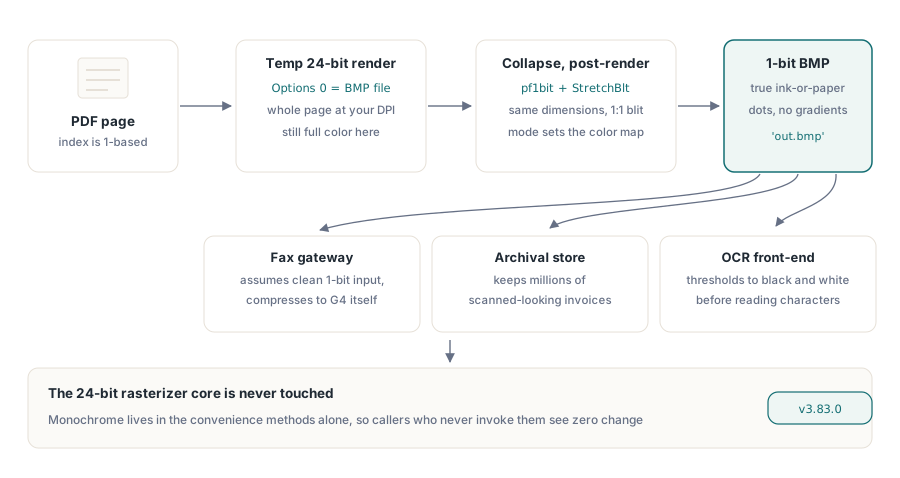
بوابة الفاكس لا تريد صفحتك المُصيَّرة بعمق لون 24 بت لا يريدها أيضا خط أنابيب الأرشفة الذي يخزّن مليون فاتورة تبدو ممسوحة ضوئيا، ولا واجهة التعرف الضوئي على الحروف التي تحوّل كل شيء إلى حد أبيض وأسود قبل أن تبحث عن حرف واحد الثلاثة جميعا تريد الشيء نفسه: صورة نقطية نظيفة بعمق 1 بت، بت واحد لكل بكسل، حيث كل نقطة إما حبر أو ورق سلّمهم BMP كامل الألوان وسيتخلصون من 23 بت لكل بكسل على أي حال، عادة بتمرير تشتيت أسوأ مما كنت ستفعله بنفسك السؤال المثير للاهتمام هو أين ينبغي أن يحدث هذا التحويل النازل، والجواب في PDF Library for Delphi يتضح أنه يقول شيئا مفيدا عن كيفية توسيع مُصيِّر تفضّل عدم إعادة كتابته
PDF Library for Delphi مكتبة PDF أصلية بلغة Object Pascal لـDelphi وC++Builder نواة التصيير فيها تحوّل صفحة إلى صورة نقطية بالمسح الشعاعي وتستطيع إصدار BMP وPNG وJPEG وWMF وحفنة من الصيغ الأخرى ما لم تكن تفعله حتى وقت قريب هو تسليم صورة نقطية أحادية اللون حقيقية، أو تصيير جزء فقط من صفحة كلاهما وصل في الإصدار v3.83.0، وكلاهما بُني كطبقتي راحة رقيقتين فوق المُصيِّر الموجود بدل أن يكونا تغييرات في المُصيِّر الشعاعي نفسه ذلك القيد هو القصة كاملة
لماذا التحويل النازل بعد التصيير، لا داخل المُصيِّر
الطريقة الواضحة لإنتاج صورة بعمق 1 بت هي إخبار المُصيِّر الشعاعي بالرسم بعمق 1 بت وهذه أيضا الطريقة التي تكسر كل شيء آخر الصورة النقطية الداخلية للمُصيِّر تُنشأ بـPixelFormat := pf24bit مرمّز مباشرة في مُنشئ PDFlibRenderer، وذلك السطح بعمق 24 بت يتشاركه كل مسار تصيير: تصدير PNG، ومعاينة سياق الجهاز، وخرج JPEG، كل ذلك اقلبه إلى pf1bit عند المصدر ولن تكون قد أضفت ميزة أحادية اللون، بل ستكون قد أضعفت أمانة الألوان لكل مستدعٍ في المكتبة واشتركت في تصحيح دزينة من الانحدارات اللاحقة
لذا تسلك RenderPageToMonochromeFile المسار المعاكس تصيّر الصفحة عادة، إلى BMP مؤقت بعمق 24 بت، وعندئذ فقط تطويها إلى 1 بت كخطوة معالجة لاحقة المُصيِّر لا يُمس السلوك أحادي اللون يعيش بالكامل داخل طريقة الراحة، ما يعني أنه لا يمكن أن يؤثر على من لا يستدعيها هذا نوع المقايضة الذي يستحق التسمية صراحة: المعالجة اللاحقة تدفع ثمن تخصيص صورة نقطية إضافي واحد وملف مؤقت، وفي المقابل تبقي نواة تحمل عبئا تشغيليا خارج النطاق كليا بالنسبة إلى ميزة موجودة لخدمة حالات حدية للفاكس والأرشفة، هذا هو الجانب الصحيح من الميزان
var
  Pdf: TPDFlib;
begin
  Pdf := TPDFlib.Create;
  try
    Pdf.LoadFromFile('invoice.pdf');
    // 200 DPI هي دقة فاكس Group 4 الكلاسيكية؛ فهرس الصفحة يبدأ من واحد
    Pdf.RenderPageToMonochromeFile(200, 1, 'invoice-page1.bmp');
  finally
    Pdf.Free;
  end;
end;
كيف يحدث الطي إلى 1 بت فعليا
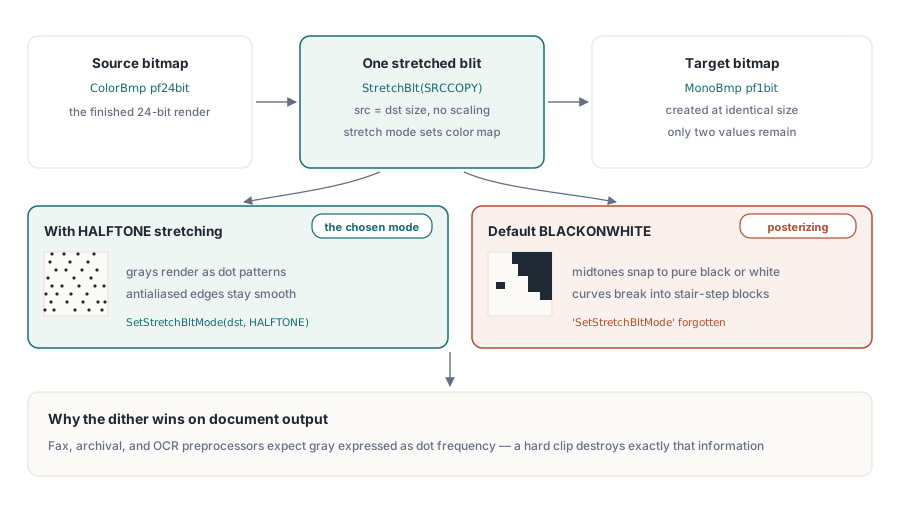
التحويل النازل يعتمد على GDI بدل حلقة عتبة مكتوبة يدويا، والاختيار مهم لجودة الخرج داخل الطريقة، تُحمَّل الصورة النقطية المؤقتة بعمق 24 بت إلى TBitmap، وتُنشأ TBitmap ثانية بـPixelFormat := pf1bit بنفس الأبعاد، وتنتقل البكسلات عبر نسخ واحد
// داخل RenderPageToMonochromeFile، بعد تحميل ColorBmp بعمق 24 بت
MonoBmp.PixelFormat := pf1bit;
MonoBmp.Width  := ColorBmp.Width;
MonoBmp.Height := ColorBmp.Height;
// HALFTONE يخبر GDI بتشتيت المصدر بعمق 24 بت نزولا إلى 1 بت
SetStretchBltMode(MonoBmp.Canvas.Handle, HALFTONE);
StretchBlt(MonoBmp.Canvas.Handle, 0, 0, MonoBmp.Width, MonoBmp.Height,
  ColorBmp.Canvas.Handle, 0, 0, ColorBmp.Width, ColorBmp.Height, SRCCOPY);
MonoBmp.SaveToFile('out.bmp');
الحيلة هي SetStretchBltMode مع HALFTONE رغم أن المصدر والوجهة بنفس الحجم، فلا يحدث تحجيم، لا يزال وضع التمديد يحكم كيف يخطط GDI الألوان إلى لوحة 1 بت HALFTONE يجعله يطبّق تشتيت نصف تدرج، محوّلا المناطق الرمادية وحواف النص المسواة إلى أنماط من نقاط سوداء وبيضاء بدل قطع صلب إلى أقرب لونين أسقط استدعاء الوضع، أو استخدم الافتراضي BLACKONWHITE، وسيتحول المحتوى الرمادي المتدرج إلى أشكال مكتلة ذات عتبة بالنسبة إلى خرج المستندات الممسوحة ومعالجة ما قبل التعرف الضوئي، النتيجة المشتتة هي غالبا ما تريده تماما
تفصيل واحد غير قابل للتفاوض ومن السهل أن يُخطأ فيه: التصيير المؤقت يجب أن يكون BMP RenderPageToMonochromeFile تستدعي المُصيِّر العام برمز خيارات 0، وهو BMP وسيط الخيارات في RenderPageToFile تعداد صحيح صغير، والقيم غير قابلة للتبادل لهذا الغرض: 0 هو BMP، و1 JPEG، و2 WMF، و3 EMF، و5 PNG، وهكذا يقوم المحوّل النازل بعدها بـTBitmap.LoadFromStream على الملف المؤقت غذّه بـWMF، بتمرير 2، وسيُطلق ذلك التحميل "Bitmap image is not valid"، لأن ملف Windows Metafile دفق سجلات متجهية، لا DIB التحويل النازل أحادي اللون عملية نقطية من طرف إلى طرف، لذا يجب أن يكون الوسيط صيغة نقطية
تصيير منطقة فرعية فقط من صفحة
الطريقة الثانية، RenderPageRegionToFile، تصيّر مستطيلا واحدا فقط من الصفحة بدل الصفحة كاملة حالات الاستخدام مألوفة بمجرد أن تكون قد بنيت أي عارض مستندات: قص كتلة توقيع من عقد، أو توليد بلاطة لخريطة مكبَّرة من رسم كبير، أو سحب منطقة مختومة واحدة لصورة مصغرة دون دفع ثمن مسح الصفحة كاملة عند دقة عالية التوقيع واضح
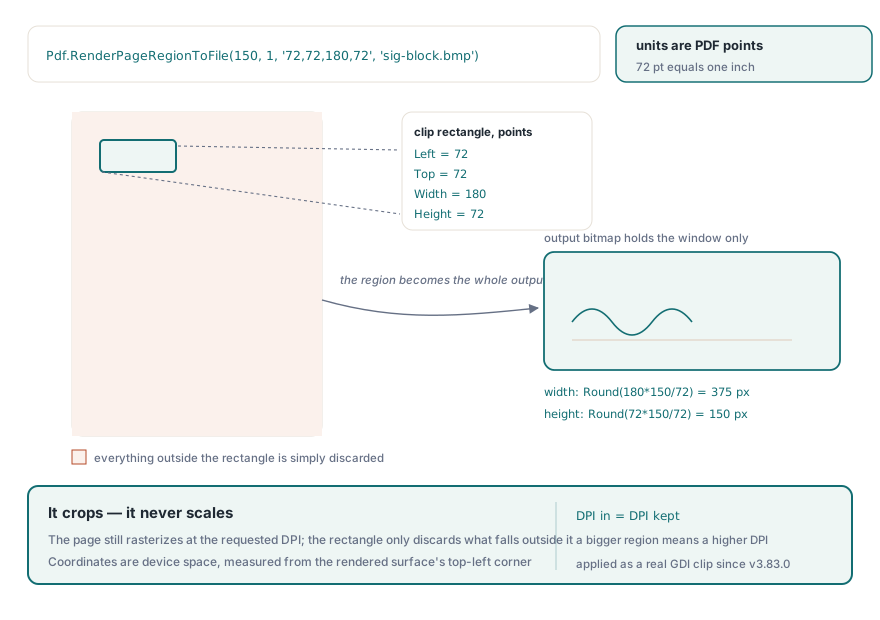
// Clip هو "Left,Top,Width,Height" بنقاط PDF (72 نقطة = 1 إنش)
// هنا: صندوق 2.5 إنش × 1 إنش، إنش واحد من أعلى يسار الصفحة
Pdf.RenderPageRegionToFile(150, 1, '72,72,180,72', 'sig-block.bmp');
سلسلة القص أربعة أعداد مضاعفة الدقة مفصولة بفواصل بنقاط PDF، تُحلَّل يدويا داخل الطريقة لتفادي خصوصيات الإقليم وDelimitedText من العرض والارتفاع، تحسب الطريقة حجم الصورة النقطية الناتجة كـRound(Width * DPI / 72) في Round(Height * DPI / 72)، وتخصص صورة نقطية pf24bit في الذاكرة بذلك الحجم بالضبط، وتصيّر إلى سياق جهازها عبر RenderPageToDCClip ملف النتيجة يحتوي فقط على المستطيل المقصوص، بحجم المنطقة لا الصفحة كاملة
معامل القص الذي لم يفعل شيئا
هنا حيث كان العمل أدق مما يبدو RenderPageToDCClip كانت تحمل معامل Clip لفترة طويلة، وكان كذبة الاستدعاء كان يقبل الوسيط، ويمرره نزولا إلى TPDFPageTree.RenderPageToDC، وذلك التنفيذ كان يتجاهله كليا، ولا يسلّمه أبدا إلى المُصيِّر كنت تستطيع تمرير أي مستطيل تريده وتستعيد الصفحة كاملة أي شخص وصّل RenderPageToDCClip متوقعا قصا كان يحصل على تصيير صفحة كاملة وقد لا يكون قد لاحظ ذلك، حسب تخطيطه
وصل الإصدار v3.83.0 السلك RenderPageToDC الآن تحلل نفس مستطيل النقاط "Left,Top,Width,Height" وتطبقه كمنطقة قص GDI حقيقية على سياق جهاز الهدف قبل أن يرسم المُصيِّر التحويل من النقاط إلى بكسلات الجهاز هو عامل القياس المعتاد DPI / 72، مطبّقا على الحواف الأربع كلها التسلسل حول التصيير هو رقصة الحفظ/القص/الاستعادة القياسية
// داخل TPDFPageTree.RenderPageToDC، حين يكون Clip غير فارغ
ScaleFactor := DPI / 72;
SaveDC(TargetDC);
IntersectClipRect(TargetDC,
  Round(ClipLeft * ScaleFactor),
  Round(ClipTop * ScaleFactor),
  Round((ClipLeft + ClipWidth) * ScaleFactor),
  Round((ClipTop + ClipHeight) * ScaleFactor));
// ... المُصيِّر يرسم الصفحة هنا ...
// في كتلة finally:
RestoreDC(TargetDC, -1);
زوج SaveDC / RestoreDC(-1) هو ما يجعل هذا آمنا للاستدعاء المتكرر: تُدفع منطقة القص إلى مكدس حالة سياق الجهاز، وتُرسم الصفحة، ويُسحَب القص الأصلي مرة أخرى بغض النظر عن كيفية خروج التصيير RestoreDC(TargetDC, -1) يستعيد أحدث حالة محفوظة، وهو المصطلح القياسي لحفظ/استعادة متوازنين تخطَّ الاستعادة وسيجد مستدعٍ يعيد استخدام سياق الجهاز نفسه لتصيير صفحة كاملة لاحق نفسه مقصوصا بغموض إلى آخر منطقة إصلاح المعامل الميت أصلح أيضا RenderPageRegionToFile مجانا، لأن تلك الطريقة الجديدة تمر عبر هذا المسار بالضبط
نقطة سلوكية واحدة تستحق الاستيعاب: القص يقتص، لا يحجّم لا تزال الصفحة تُمسح شعاعيا عند الدقة التي طلبتها، في موضعها الطبيعي، ومنطقة القص ببساطة تُسقط كل ما هو خارج المستطيل أنت لا تكبّر المنطقة لملء الخرج؛ أنت تقطع نافذة من التصيير كامل الدقة إذا أردت منطقة مكبَّرة، ارفع الدقة إحداثيات المستطيل تُفسَّر في فضاء الجهاز بعد قياس النقاط إلى بكسلات، مقيسة من الزاوية العلوية اليسرى للسطح المُصيَّر، لذا خطط لـLeft وTop من أعلى الصفحة نزولا للحصول على جولة أعمق في كيفية تشغيل PDF Library for Delphi لسياق جهاز لخرج على الشاشة، المقالة المرافقة عن معاينة الطباعة وخرج سياق الجهاز تجتاز نفس سباكة سياق الجهاز من جانب العرض
الحد الصادق: BMP بعمق 1 بت، لا G4 TIFF
سيكون من السهل تسويق هذا مبالغة كـ"خرج جاهز للفاكس"، لذا إليك الحد موضحا بصراحة RenderPageToMonochromeFile تنتج BMP بعمق pf1bit لا تنتج CCITT Group 4 TIFF، وهي الصيغة التي يتوقعها عادة سير عمل فاكس حقيقي أو أرشيف TIFF السبب ملموس لا سهو وحدة CCITT في PDF Library for Delphi تفك حاليا دفقات G4 لكن ليس لديها مُرمِّز G4 دون مُرمِّز لا يوجد مكان لكتابة تشغيلات أحادية اللون مضغوطة، لذا يتوقف المسار أحادي اللون عند DIB غير مضغوط بعمق 1 بت
عمليا هذا لا يزال مفيدا BMP بعمق 1 بت هو تنسيق البكسل الصحيح، مشتّت وجاهز، ومعظم سلاسل أدوات الفاكس أو الأرشفة أو التعرف الضوئي ستستوعبه بسعادة أو تحوّله إلى G4 بنفسها بخطوة لاحقة واحدة لكن إذا كان متطلبك حرفيا هو G4 TIFF مباشرة من المكتبة، فهذا ليس ذلك بعد، وينبغي أن تخطط لمرحلة ضغط خاصة بك معرفة أين تتوقف ميزة تستحق بقدر معرفة ما تفعله
كلتا الطريقتين صغيرتان عمدا، وذلك درس التصميم الذي يستحق أخذه من هذه الصفحة: واجهة برمجية للراحة تجلس فوق مُصيِّر يمكنها إضافة قدرة حقيقية، خرج أحادي اللون، قص منطقة، دون الوصول إلى داخل المُصيِّر الشعاعي وزعزعة استقرار كل مستدعٍ آخر حين تحتاج فعلا إلى الاختيار بين محركات التصيير للمسح الشعاعي الأساسي، تغطي نظرة تصيير PDF متعدد المحركات في Delphi المقايضات بعمق لرؤية سطح التصيير الكامل وبقية الواجهة البرمجية، صفحة منتج PDF Library for Delphi Delphi PDF Library تحمل الصورة الكاملة